

Product Periodically Becomes Impossible to Buy - Buy button opens to "empty cart"
UPDATE: Solved! It was a caching problem with the host/server and the tools they had couldn't fix the issue. I moved my site to a better host and haven't had this problem (it also fixed a few others!) since.
TLDR; Every 20 minutes to 2 hours one of my products becomes impossible to purchase. Clicking on the 'Buy Now' button instantly goes to an empty cart. I have to jump through hoops to get it working again each time.
The Details:
I'm in the final day of my site launch which I emailed to about 70,000 people.
I see 2 or 3 or 5 sales come in, and then they stop.
Soon after, emails like this start coming in:
"I've spent the past half hour trying to buy but nothing works"
For every email I get, another 3 to 10 people probably had the same problem.
So I go to try it myself...
On clicking the "buy now" button, an empty cart loads and nothing can be done. Going back and clicking again just leads to the empty cart page again. Instantly.
See it in 30 second screen recording video here
I don't know what is causing it but this is what I do to get it working again:
- Clear cache
- Turn off caching
- Open product page, change something. Save it
- Open sales page, change something, save it.
- Turn cache back on.
- Open my browser, "empty cache and hard reload" try to purchase.
Works 80% of the time
This all seems like a cache problem
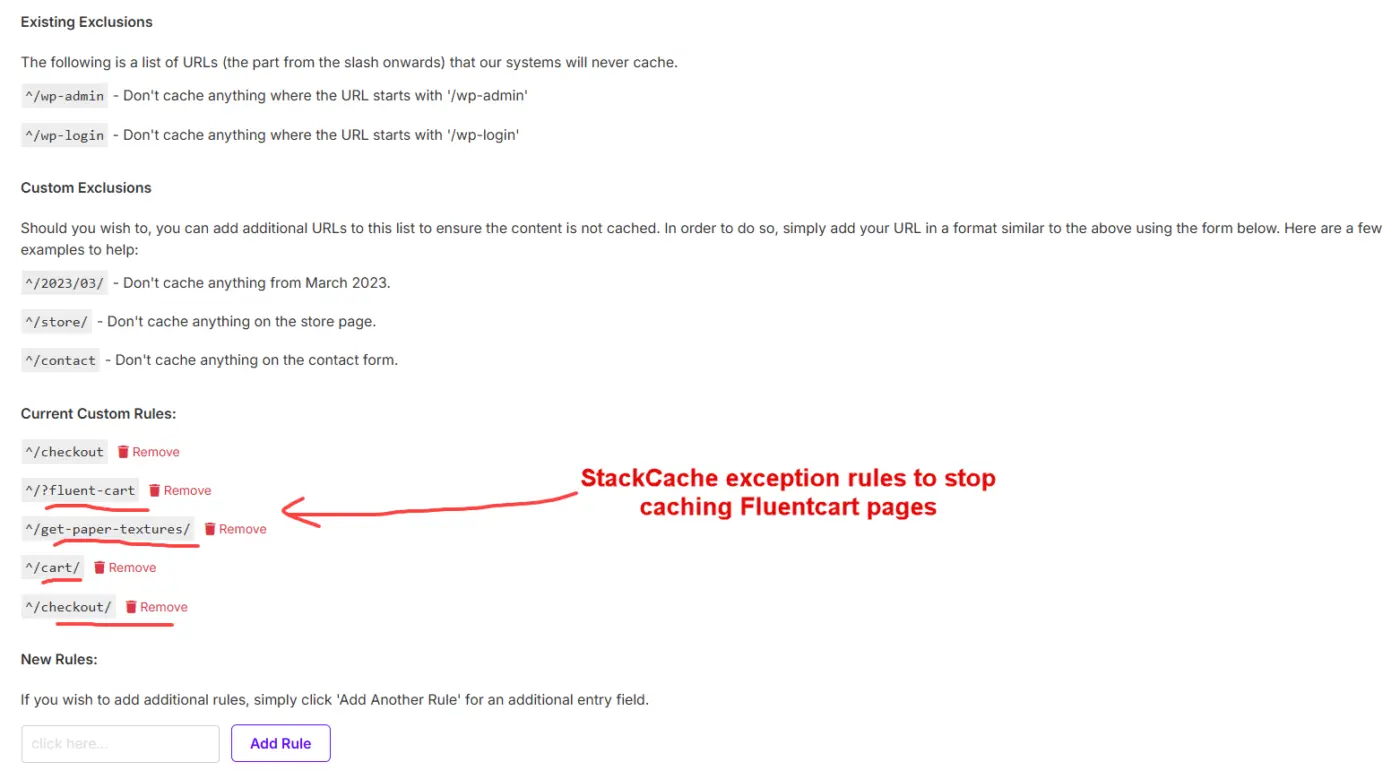
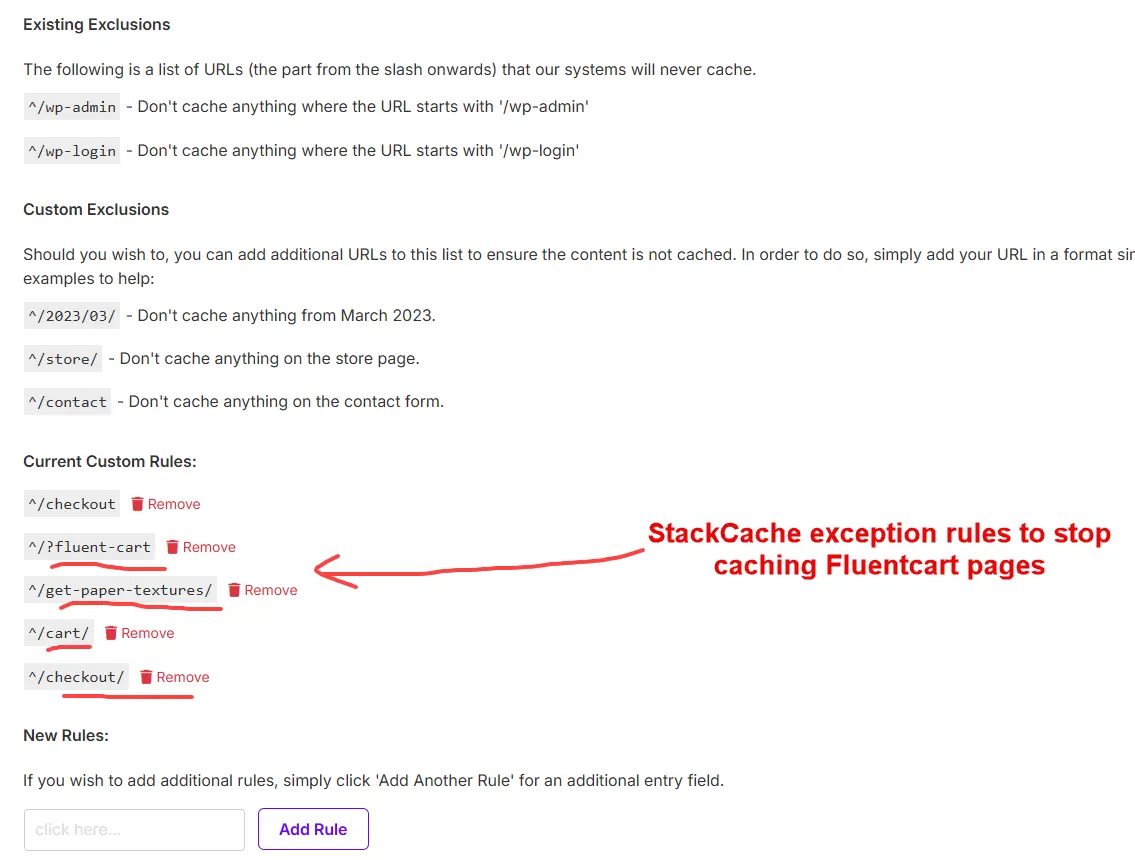
I have exception rules that should disable the cache on all the Fluentcart pages anyway see screenshot below.
Even disabling cache completely doesn't always solve the problem.
In any browser that has had a problem purchasing, I need to clear all browser cache as well. That means that the people who email me and say they got stuck, still can't purchase, even when the cart is working again for new people.
Once I 'fix' it, sales start coming in again from new people until it happens again, but I don't know when that is until I get a new complaint email.
I checked the analytics and I'm getting a 6% completion rate from clicking the buy button which is another strong indicator that there are definitely problem(s)
For comparison, my conversion rate from clicking "buy now" on another cart is around 60%
I can't cause it to happen if its not happening, but it keeps re-occurring consistently over time when caching is on. I can't disable caching permanently on this site, the host turns it back on periodically, and I don't want it off anyway.
Any ideas on how I can fix this?
Thanks very much in advance,
Nicolai
Interesting note: the cart fails on the most popular product first: Pro Access for $59, and then the others later.
I know this because once I see the other ones begin to sell I know that is a sign that the main one is no longer purchasable and people have become desperate and moved on to buy whatever checkout will work.
Then they email me and ask how they can exchange it for the one they really wanted.

Can you disable caching from checkout uri. Looks like it’s a caching issue.

Shahjahan Jewel Thank you for the reply.
- I can, and I have, and that fixes it for most people IF I also resave the product and purchase page as well (pausing and clearing cache alone doesn't fix it)
- But it doesn't seem to fix it for people who have tried to purchase already.
- my host will automatically turn it back on every few hours.
- and lastly, I can manually turn it off every 2 hours during this launch, but even if I could turn it off permanently, I do want my site to be nice and fast.
*I say turning caching off works for most people, but it doesn't work for me on my test iPad or my wife's computer unless she clears the browser cache as well. What I mean is it seems to start the sales coming in again from new people.
Nicolai which hosting are you using? The checkout page is a dynamic page and it should never be cached? Are you using siteground by the way? They do caching extensively to reduce their server cost.
If you are using a plugin, you will have option to add the exception.
Shahjahan Jewel I have added custom caching exclusions to all the Fluentcart pages. See screenshot:
I don't use Siteground. I can't remember the host name right now
From everything you say though, it sounds like I will have to move to a new host.

Shahjahan Jewel can you create a tutorial/ blogpost with best settings for fluent plugins? I'm using litespeed, en it would really be helpfull to know how I can best configure it so it does not give issues anywhere