

How To Send Cart Links exactly "as is"?
I need to send emails with the exact link as they are but something is changing them.
I just sent out another promotion to 60,000 people and I'm getting tech support questions like this:
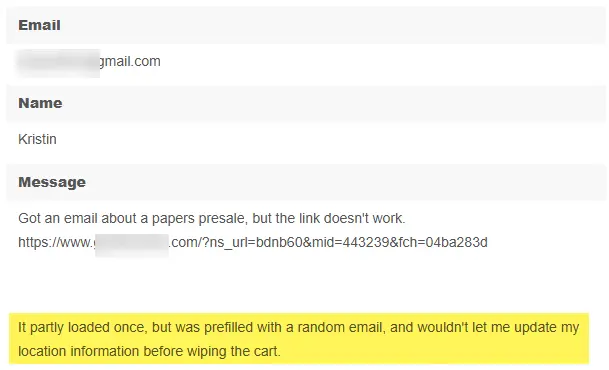
For many people, the link to purchase is auto-filling the checkout in FluentCart with random emails and won't let them change it, so they can't purchase.
It's a secret promotion, so they can't even get to it any other way.
I was expecting a conversion rate of about 1 to 2% but I'm getting about .08%
Any idea what is changing the url (looks fine in tests) and how can I make sure the url appears exactly as I write it?
My correct link looks something like this:
[https://MYWESITEADDRESS.com/?fluent-cart=instant_checkout&item_id=16&quantity=1&coupons=Pilot-Presale]()

That “mid”= is the FCRM system for open and click tracking. It may be breaking the FC direct URL.
It used to happen to us with some other tools like PDFs and so.
Just an idea.
If it works on test (those emails do not have the tracking), disabling tracking may work.

Thanks Jorge de los Reyes I didn't know it was possible to turn off tracking (or necessary) I will look that up and I may try that next time. It's too late for this one.
Yes, it works perfectly on the tests. I guess I just don't add utms? Is that how I turn off tracking?
I've never seen such bad results. I'm getting tons of emails like these too:
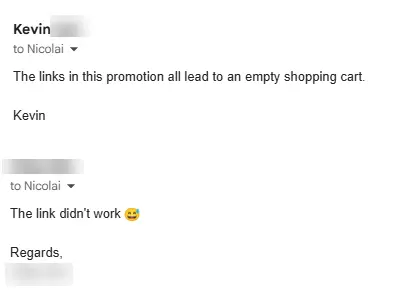
Which means most other people just give up. I am getting sales, but a tiny fraction of what I'd normally get.
After getting lots of those reports I sent out a batch without an active link, and asked people to copy and paste it, but it's so long that it spans two lines so people only copy the first half and of course that doesn't work either. Or they can't be bothered to paste it.
I also tried making a redirect, but it also doesn't apply the product or coupon and it also ends up on an empty cart.
This is the second or third major disaster similar to this. I don't think I can afford another one. I may have to rethink this and use a different cart for email promotions.
My unsubscribe is also through the roof, probably due to the bad links. Rough stuff.
Nicolai That sounds really frustrating, especially after sending to such a large audience. But, take it as a learning: the price of taking action! 🙂
No: removing UTMs won’t turn off FluentCRM’s click tracking. UTMs are analytics parameters; click tracking is the separate process that rewrites links through a tracking redirect.
FluentCRM documents a way to disable link-click tracking using this WordPress filter:
add_filter('fluent_crm/track_click', '__return_false');
Here’s the official snippet. It’s a site-wide filter, so it would affect click reporting for emails processed while it’s active. I’d use it for a controlled test with your developer or support, rather than assume it will fix the campaign already sent.
You can also check the FCRM compliance settings tab and disable tracking there too.
Also, my earlier suggestion was a hypothesis, not a confirmed diagnosis. So, you will have to test anyway.
A successful test email is useful evidence (because those emails do not use the tracking), but it doesn’t prove that tracking is the cause. I’d compare the original URL, the actual link in a delivered campaign email, and the final destination after all redirects, checking that the product and coupon parameters survive. A small real campaign to your own test contacts (real campaign not a test email one) would be more representative than the “Send test” button.
The wrong email addresses at checkout need separate investigation too. Shared caching or cart/session identification could be involved, but I wouldn’t assume either without evidence. FluentCart has an official cache-exclusion guide covering cart/checkout pages and cart identifiers.
I’d send support the exact reproduction steps and links privately, including the redirect that failed, and ask them to investigate both the empty cart and the unexpected email addresses. You shouldn’t have to ask customers to copy and paste a long URL to complete a purchase 😅
That being said, it wouldn't be the first time tracking parameters interfere with URLs, so my guess is, you will be able to send the proper URL if you disable tracking.
Let us know! :)
Thank you so much Jorge de los Reyes I will investigate all this and go through support. I wish it was a learning lesson but this happened last time too. 😑
The thinking then was it was Amazon SES related, and I did a aton of troubleshooting and configuring on SES, and small batches seemed fine, but now its all gone haywire.
Also, if they are seeing other emails: that may be a cache issue.
So, be careful with that too: for conversion, sure. But also for privacy as it may be exfiltrating private checkout info from other users due to cache misconfiguration.
Jorge de los Reyes This is a more serious issue than I thought. I will have to get support to investigate. People are sending me their receipts and some of them have other people's emails and names on them! It's mixing up customers. Seriously bad. Most people are very kind but a few people are pretty angry.
Those orders also don't show up in the correct accounts either!
Nicolai yep. Seems like a really serious cache issue. Keep us updated!
Have you opened a ticket in the end?
yes Jorge de los Reyes I think everyone agrees it's caching now. I will work with support and server support to try to get it right.
It's an interesting and elusive problem. It would be possible to have it and never know.
If I never send out more than 3 or 4 thousand emails I simply dont know its a problem and nobody experiences it. (that's been the case for the past 8 months or so)
Send out 12,000 and a few customers experience it.
30,000 emails and its a big problem.
60,000 and all hell breaks loose, most purchases fail and people's accounts, invoices and orders get mixed up!
Nicolai that’s insane 🫣. The thing is, if it’s cache related, it should happen to everyone. From the very start.
I really hope you can get a proper solution, first of all, for your launch. And of course, afterwards, to the whole cache issue.
I’ll definitely audit the whole install prior to conducting any new action.
Checkout cache related issues are among the worst. So, exclude all FluentCart pages from any cache or performance setting. And double check the cache at a server level too.
I guess I dont understand how caching works @jorgedelosreyes. In my mind, I was imagining a scenario where certain urls were getting hit over and over and at a certain volume of visits the server would start to serve a static page instead of the dynamic "live" cart, so that is why the more visits, the more they failed. But if it doesnt work that way then my scenario makes no sense 😅.
Turns out it's irrelevant, because I asked my host to investigate and help turn off caching on all the FluentCart pages (they dont give me control) and they looked into it and sent me a report back showing that there is no caching active on the FluentCart pages. They are already excluded. So its back to square zero. Who knows what the issue is.
The mystery continues.
What I am doing now is sending people to the shop page and telling them to add the product and the coupon manually.
It's a bit of a conversion killer, but at least it cant fail.
Nicolai Thanks for the update. I should correct something I said earlier: a caching issue wouldn’t necessarily affect everyone from the start. Depending on the configuration and which requests get reused, it can be intermittent or become more noticeable with increased traffic. So your reasoning wasn’t unreasonable.
That said, the host’s findings are useful, and I wouldn’t keep assuming caching is the cause. The next step should be for FluentCart support to trace an affected purchase from the email link through to the cart, order, customer account and receipt.
One important distinction: are customers only seeing someone else’s details, or are the orders actually saved against the wrong customer? The receipts and missing orders you described make that especially important to establish. Support should check both what the checkout displays and what gets recorded in the database.
I’d also ask them to check the original instant-checkout URL and the tracking redirects, not just the final checkout page. FluentCart’s cache-exclusion guide covers cart cookies, query parameters and checkout requests as well as page URLs.
Sending people through the shop sounds like a reasonable temporary workaround, but I’d still verify that those purchases end up under the correct customer, with the correct receipt. Until that’s confirmed, I wouldn’t assume the identity mix-up is resolved.
You’ve already done a lot of troubleshooting. At this point, I’d want the team to identify the cause and demonstrate the fix with separate customer sessions and a test that reflects the traffic conditions where it fails, before another large promotion. Please keep us updated. I hope they can get this properly resolved for you.
Also, consider switching the hosting provider in the future to one in which you can check this kind of things by yourself. Having to ask for permission sounds like an unnecessary burden for this cases 😅
Thanks again Jorge de los Reyes
It looks like it may have been caching after all. I had Dreamhost implement ALL the rules in the docs here.
They were great and went ahead and did it right away. I am sticking with them. I have 3 sites on there now and one of them never performed well anywhere but runs like a dream on there.
Looking at those docs I would not have been able to implement those changes myself. Some of the sime exclusions yes, but a lot of that is over my head (excluding caching when certain cookies are active and things like that) Their tech support people are incredibly knowledgeable, responsive and fast.
Anyway...the result is I haven't been able to break the cart, I suppose I won't know if its truly fixed until I send another 60k emails out, but I did see a small cluster of sales come through shortly after they made the changes. Those would be stragglers from the email of 3 days ago.
Now I still have to sort out the swapped invoices. That's hard to troubleshoot since each involves multiple accounts, email addresses and multiple payment processors, one failed Stripe payment came out as a successful PayPal invoice. I don't know how many there are but it may only be a couple
Hopefully this is the end of it. Thanks for all your advice Jorge and hopefuly this is a lesson to all to make sure all the server caching exception rules are properly implemented before you launch a big campaign!
Ok. I think it is caching related. I cleared cache on the site and some links are working again, including one that was resolving to an empty cart from one of my test emails.
I think I remember how this went last time now on my last product launch.
It's fine for the first few thousand sends, that's also why my small tests always work, even if they are to a segment of the list, but then it stops working for more and more people and then eventually everyone.
That sounds like a caching issue to me.
I just looked at my notes from last time and to resolve it I ended up moving my site to a new host but now its happening on Dreamhost as well! 😵
Nicolai ups 😬 in any case, if it’s hosting related, it should be a settings related question.
So, don’t be afraid of having to switch again 😅: you probably can fix that with a couple of tweaks on the settings .