

Coupon Code in URL issues
1.If you restrict a coupon to 1 per user, they have to register and log in before they can use it. This makes it impossible to add it automatically via URL.
I think the way some other ecommerce platforms handle this is they disable the coupon and show a popup once the person enters their email address and it's found.
When I tried it, you are sent to the checkout correctly, but the coupon is not applied and no error pops up.
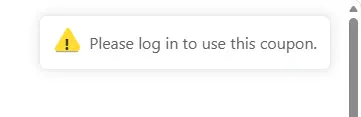
If you enter the coupon code manually after that, this error pops up: "please log in to use this coupon"
also
2.Even without restrictions, adding a coupon using a url parameter is only working for me on Chrome. I tried Firefox and Edge but it was not applied.
Thanks for all the great work.

Yes, I think it should be based on email, not customer account! So thank-you coupons sent by FluentCRM etc can work. Atm it forces them to create an account for this..

I understand this message didn’t appear for the coupon applied in the URL, but it did appear when applied generally at checkout. We have improved the error message, and it will be shipped in the next release.

Great! Thanks for keeping on top of this stuff Sarkar Ripon