


Would love to be able to offer a biweekly payment plan. Weekly is too frequent and monthly doesn't make sense for a 4-week program. Every 2 weeks is the sweet spot!

FluentCart crossed 5,000+ active installations this week.
I've been staring at this number for a few days now. It's not just a metric. It's 5,000+ people who trusted something we built. 5,000+ stores selling real products to real customers. That hits different when you sit with it.
But this post isn't about a number. It's about why we built this in the first place.
⚡️ Why We Built This:
I've been in the WordPress space for over a decade. And I've watched how selling products on WordPress became unnecessarily complicated.
You want to sell a product? Great. Install this plugin. Oh, you want subscriptions? That's a separate add-on. Digital downloads? Another add-on. License keys? Another one. Better checkout? Another one.
Before you've made your first sale, you're managing a puzzle of plugins that weren't really built to work together.
Or you go the other route. Use a plugin that handles everything but takes a percentage of every sale. 2%, 3%, sometimes more. Your customer data lives on someone else's servers.
I kept thinking: this isn't how it should work.
You have a product. Someone wants to buy it. Everything in between should just work.
That's how simple selling should be. And that's the belief FluentCart was built on.
⚡️What We Believed
We believed you shouldn't need ten plugins to run a store.
We believed you shouldn't pay a percentage of every sale forever just to use a piece of software. We believed your store, your data, and your revenue should be completely yours.
One plugin. Physical products. Digital products. Services. Subscriptions. Licenses. All of it. No add-on maze. No transaction fees. Simple as that.
⚡️And Then You Showed Up
When we launched FluentCart, I wasn't sure how many people felt the same way. Building something is one thing. Convincing others to believe in it is another. But you showed up.
Course creators. Shop owners. Software developers. Freelancers. Agencies building stores for their clients. People are selling everything from physical goods to coaching programs to WordPress plugins.
5,000+ of you: yes, this makes sense. You didn't just buy a plugin. You believed in the same thing we did.
⚡️ And Because It's Fluent
FluentCart doesn't live in isolation. It comes from the same team and the same philosophy behind FluentCRM, Fluent Forms, Fluent Support, and FluentCommunity. Your email marketing, customer support, community, and commerce all talk to each other natively. One ecosystem. No duct tape.
That's always been the vision. Tools that work together because they were built together.
⚡️ What's Coming
We're not slowing down.
But I'm not going to list features here. Because FluentCart was never about a feature checklist. It was about a different way of thinking about e-commerce on WordPress.
That thinking doesn't stop at 5,000. It evolves. It gets sharper. Every store you build, every sale you make, every piece of feedback you share teaches us something.
The roadmap isn't just what we want to build. It's what you've shown us that matters. This is still early. We're building for the long run. And we're building with you, not just for you.
⚡️ Thank You
To everyone who installed FluentCart, gave it a shot, set up their store, made their first sale, and told someone else about it:
You made 5,000 happen. You made this belief real.
Here's to building the next chapter together.
This number belongs to the incredible team as well. The late nights, the weekend releases, the work that never shows up in changelogs. Thank you.

UPDATE: Solved! It was a caching problem with the host/server and the tools they had couldn't fix the issue. I moved my site to a better host and haven't had this problem (it also fixed a few others!) since.
TLDR; Every 20 minutes to 2 hours one of my products becomes impossible to purchase. Clicking on the 'Buy Now' button instantly goes to an empty cart. I have to jump through hoops to get it working again each time.
The Details:
I'm in the final day of my site launch which I emailed to about 70,000 people.
I see 2 or 3 or 5 sales come in, and then they stop.
Soon after, emails like this start coming in:
"I've spent the past half hour trying to buy but nothing works"
For every email I get, another 3 to 10 people probably had the same problem.
So I go to try it myself...
On clicking the "buy now" button, an empty cart loads and nothing can be done. Going back and clicking again just leads to the empty cart page again. Instantly.
See it in 30 second screen recording video here
I don't know what is causing it but this is what I do to get it working again:
- Clear cache
- Turn off caching
- Open product page, change something. Save it
- Open sales page, change something, save it.
- Turn cache back on.
- Open my browser, "empty cache and hard reload" try to purchase.
Works 80% of the time
This all seems like a cache problem
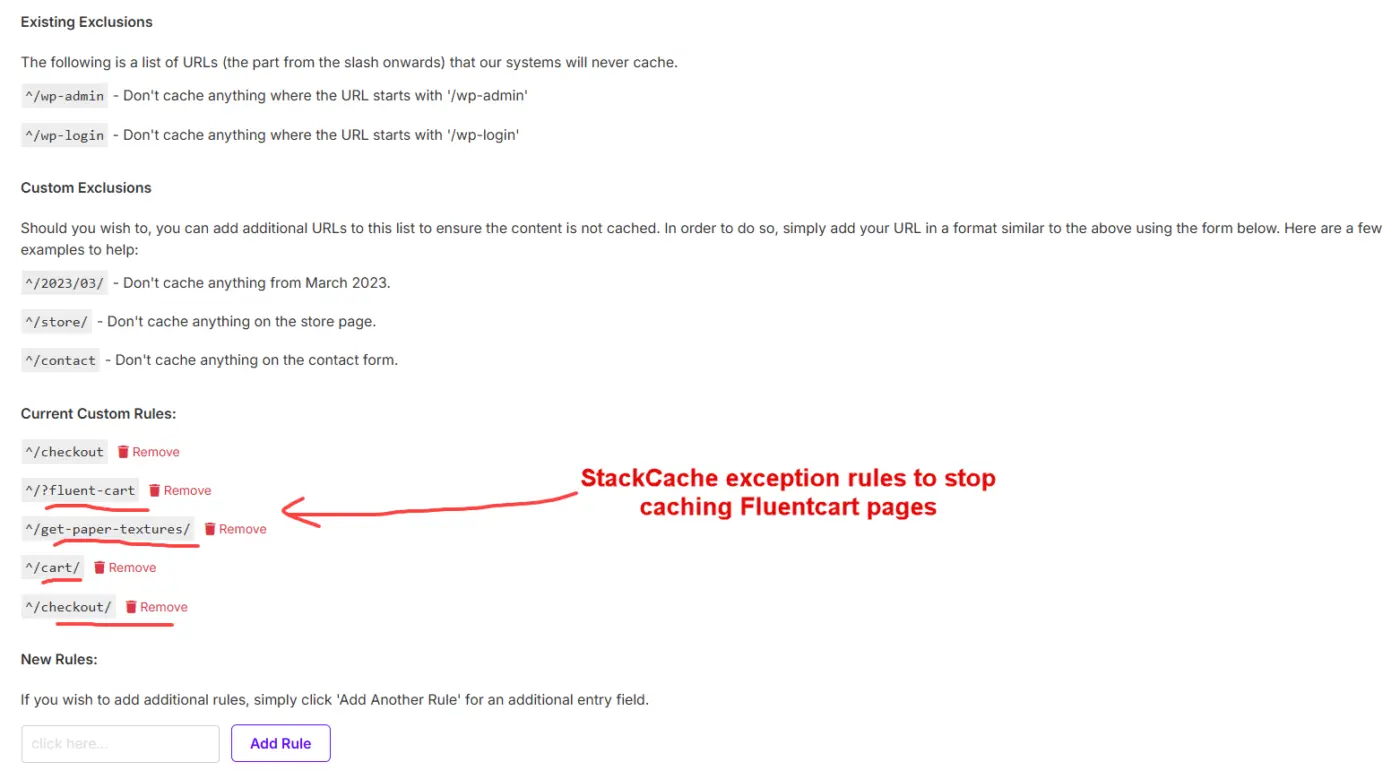
I have exception rules that should disable the cache on all the Fluentcart pages anyway see screenshot below.
Even disabling cache completely doesn't always solve the problem.
In any browser that has had a problem purchasing, I need to clear all browser cache as well. That means that the people who email me and say they got stuck, still can't purchase, even when the cart is working again for new people.
Once I 'fix' it, sales start coming in again from new people until it happens again, but I don't know when that is until I get a new complaint email.
I checked the analytics and I'm getting a 6% completion rate from clicking the buy button which is another strong indicator that there are definitely problem(s)
For comparison, my conversion rate from clicking "buy now" on another cart is around 60%
I can't cause it to happen if its not happening, but it keeps re-occurring consistently over time when caching is on. I can't disable caching permanently on this site, the host turns it back on periodically, and I don't want it off anyway.
Any ideas on how I can fix this?
Thanks very much in advance,
Nicolai
Interesting note: the cart fails on the most popular product first: Pro Access for $59, and then the others later.
I know this because once I see the other ones begin to sell I know that is a sign that the main one is no longer purchasable and people have become desperate and moved on to buy whatever checkout will work.
Then they email me and ask how they can exchange it for the one they really wanted.

is it possible to stay in the portal of FluentCommunity while being in the shop of FluentCart? i dont want to lose the header of FluentCommunity.

I have a site with about 40 Memberpress orders on it. I haven't been able to figure out anyway to easily migrate so I figured I would just manually enter orders so that order history would be present on customer profiles and I can make a full switch to FluentCart for taking payments and managing subscriptions. I'm also doing away with Memberpress so this will be helpful in this regard.
I figured I would just add a product then manually "Create Order" and associate an order with an existing wordpress user.
To my surprise I couldn't find anyway to easily just add an existing wordpress user as a fluentcart customer. I did find that I could enter their information and it would associate the customer with the existing user as long as the emails matched. This is unfortunately tedious, but sure I'll press on.
I entered a customer, then tried to "Create Order". When I'm on the Create Order screen and click "Browse" to browse "Products" it doesn't find anything. I try to search for the specific product, it doesn't find anything. I verified the product is published, cleared page and object cache, and tried again. Still nothing.
When I enter something into the search bar, I see a notification appear that says "Error Something Went Wrong"
Anyone else experience this?
While I think I'm highlighting multiple problems and needs here, my main problem right now is not being able to manually add an order.
I thought I would be able to add a "cash" order as an admin with fluentcart, which is a need from time to time as people want to make payments in person, in cash, and other than the "Create Order" screen I don't see any other way of doing that.

I have had several attempted new subscriptions through PayPal go on hold. I wondered if it was just individuals who did something wrong, but I am getting so many of them I wonder if my setup is wrong? My FluentCart settings say that my webhook is connected (it does not give me the URL to post into PayPal, just an ID), and says 'No further setup needed'. In my PayPal settings, when I look in the develop section, my Apps, go to my FluentCart App connection, the key is setup, but there is no web hook listed. Is this normal Shahjahan Jewel ? What else might be the problem if it is not the ones trying to sign up, but my end?

Hello,
I’m trying to figure out exactly what the difference is between the “Basic” and “Advanced” plans in terms of coupons, reports, subscriptions, and taxes.
Is there any additional information on this?
A tooltip with details in the comparison table would be helpful.





I could not find shipping rules on the roadmap, is this coming?
Like 'free shipping above x $', or weight based shipping rates

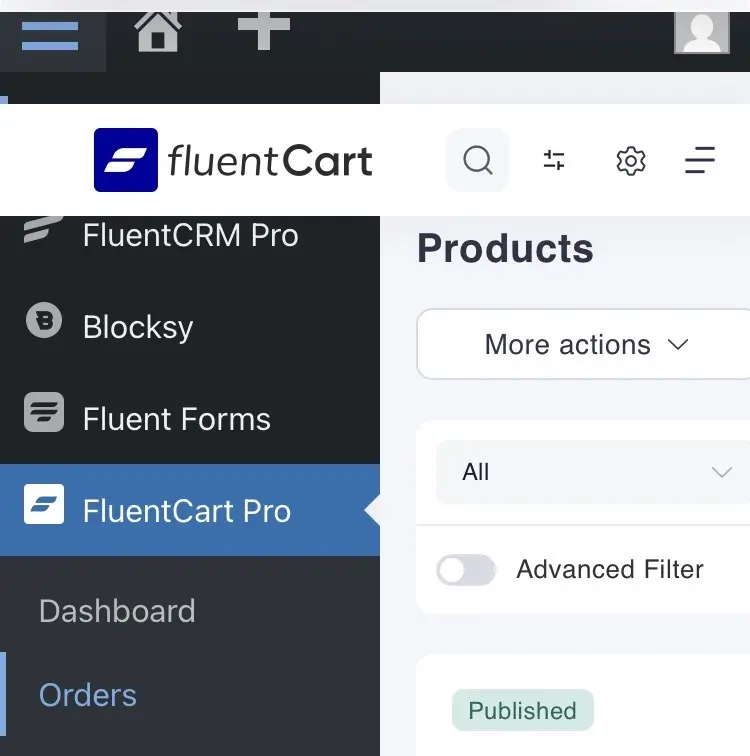
Hi, just tried to use FluentCart on a mobile and discovered the FluentCart white banner doesn't move right when clicking the WordPress menu. So can't easily navigate back to Dashboard. All other Fluent products I use seem to work okay.

I'm having a lot of luck using Claude to analyze the docs and propose code to accomplish what I want. But I bet I'd get even better results if the docs were on github and I could just clone the repo. Are the docs maybe on github already and I've missed them, or does Claude need to just keep crawling the FC docs site?