


In the billing and shipping settings, if you deselect Country as shown/required, there's no setting that allows the State field to populate and no warning, so the cart just won't have the State field populated. It becomes an empty Dropdown with no mention as to why.
Ideally, just like with Shipping Zones, Country should be allowed to be predetermined if it's allowed for us to leave it off, otherwise it breaks the whole cart and people can't checkout.

When store billing is chosen, and the payment gateway is Razorpay, i get the message `None of the available payment methods can process this order. Please contact the store.` in the checkout page. But they do support recurring billing without their own subscription system. https://razorpay.com/docs/payments/recurring-payments/

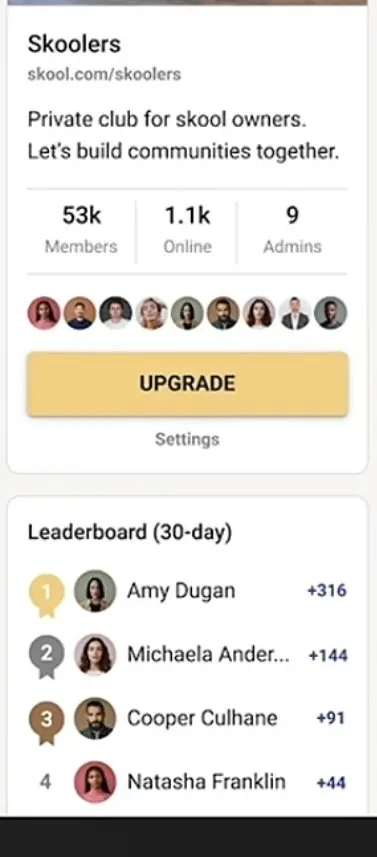
It will be so cool to have some kind of integration or shortcode for fluent community for which we could optionally put an “Upgrade” button in the right or left side bar.
Eg.: freemium communities, with payed tiers, could benefit so much of this.
I’m thinking of a pop up while clicking on the button so as to have a straight away upgrade.
Skool uses this and I think it’s a really nice feature! We used to use a similar approach in our old non-FC community, and it was also really interesting for conversions.

Would be nice if there was a coupon type for a free trial. At the moment, when you add trial, you allways have to give trial for all signups. Sometiles you only want to give this to select people or for an specific campaign

Hi, I just started my first project (german webshop) with fluent cart and am a bit confused that I need an extra plugin (Loco?) for translations. My site-language is set to German but the plugin (backend) is still English. Usually plugins have language files included that switch the plugin to the admin language. Are there any plans for translations? Am I missing something? I do see "Localization & Translation Improvements" in the roadmap but no details.
Thanks
//
Hi, ich bin gerade dabei fluent cart für einen deutschsprachigen Shop aufzusetzen und bin bzgl. Übersetzungen etwas verwirrt weil hier überall von einem extra Plugin gesprochen wird (Loco?). Meine Seiten-Sprache ist Deutsch, das Plugin selbst bleibt jedoch in Englisch (inkl. aller Texte im Frontend). Üblicherweise haben Plugins eigene Language-Files die je nach Admin-Sprache geladen werden. Gibt es Pläne für eine Plugin Übersetzung oder übersehe ich da irgendeine Einstellung? Ich habe in der Roadmap "Localization & Translation Improvements" gefunden - da stehen aber keine Details dabei.
Danke

FluentCart has just introduced native Divi modules, and this could completely change how Divi users build online stores.
Checkout FluentCart: http://diviuniversity.com/fluentcart
In this video, I show you how to use the new FluentCart modules inside Divi to create fully customised ecommerce layouts without being restricted to the default store templates.
You’ll see how to:
✅ Add FluentCart products directly to Divi pages
✅ Create custom product layouts
✅ Build product carousels
✅ Add testimonials and Divi modules to checkout pages
✅ Customise the customer dashboard
✅ Add onboarding videos and useful customer links
✅ Design receipt and thank-you pages
✅ Add a mini cart to a Divi Theme Builder header
✅ Control module styling using Divi presets
✅ Create responsive store layouts for every device The biggest advantage is flexibility.
You can now combine FluentCart functionality with native Divi modules, presets, columns and design controls to create an online shop that properly matches your brand.
I’m currently using FluentCart for Divi University, and it has been working extremely well. I’ll also be publishing more FluentCart tutorials covering store design, automation, MCP integration and ecommerce workflows.

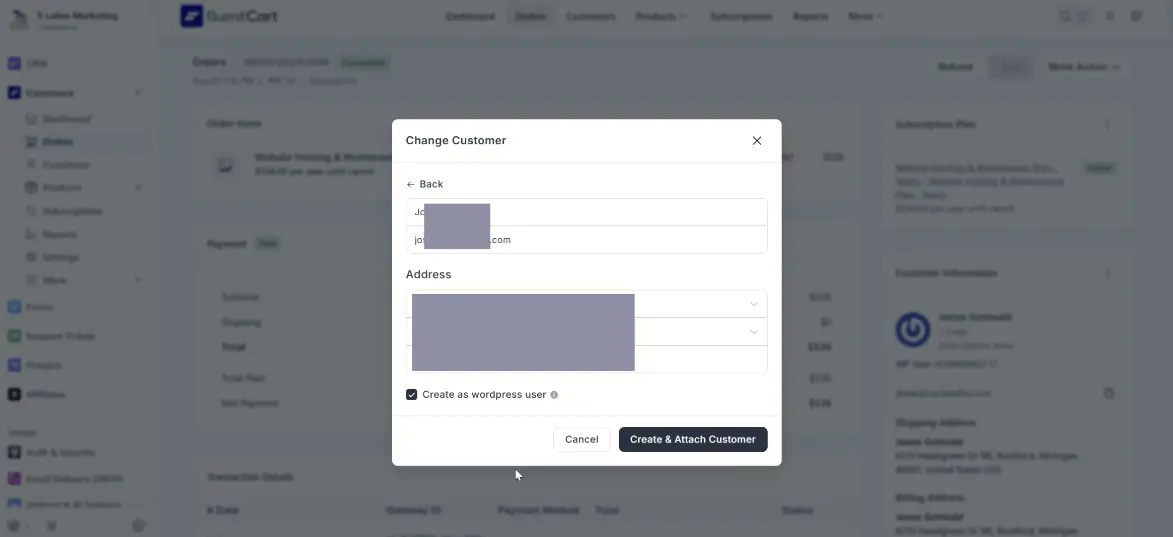
Hello, I am trying to change a subscription order to a different customer as he entered the wrong email, when i press change order and try to "create and attach customer" it doesn't do anything, its like the buttons dead.
The users email we are trying to change it to doesn't have a fluent cart profile so its not showing in the dropdown, even though they do have a fluent crm contact.

as a 90 % b2b vendor, we still have a lot of payment via invoices or after 30, 60 days for public companies etc.
so "after payment" really put a stone in my shoe.
Is there a simple option to just create an account after order placed?
in addition i would still like to have the option to send newsletters to someone who opted in but then didnt finish the first purchase ... just an example.

I have set my shop page, check out and cart pages to FluentCommunity Frame theme how do I get single products to display FluentCommunity Frame as well? currently single products use site theme.
My theme is Thrive Themes Builder.
Also how do I edit that product? like button color?

I'm curious to see what the FluentCart community is building. Has anyone created a custom plugin, add-on, or integration for FluentCart?
I'd love to see examples of your work, learn how you approached development, and hear about any tips, challenges, or best practices. Feel free to share screenshots, GitHub repositories, or demos if possible.
I'm planning to build custom FluentCart add-ons myself, so I'd love to learn from the community's experience. 🚀
#fluent-cart