


Hi FluentCart community! 👋
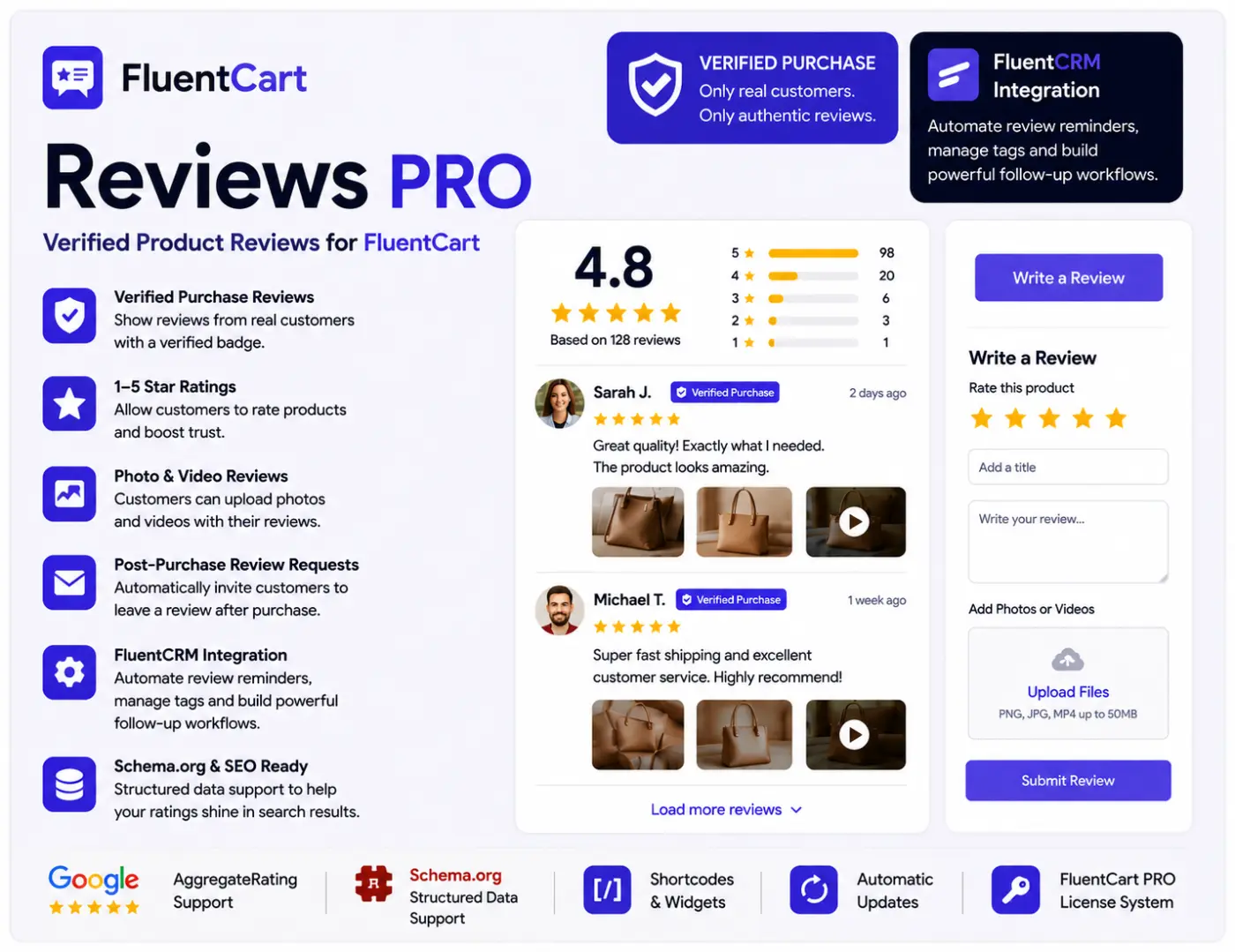
We’ve just released FluentCart Reviews PRO, a new WordPress plugin built specifically for FluentCart to add a complete post-purchase product ratings & reviews system.
The goal is simple: turn completed FluentCart orders into authentic social proof by collecting reviews from real customers — with ratings, photos, videos and automated follow-ups.
⭐ What is FluentCart Reviews PRO?
FluentCart Reviews PRO connects customer reviews directly with the FluentCart purchase journey.
When a customer purchases a product, the plugin can recognize the purchase and allow the customer to submit a Verified Purchase Review.
This means stores can distinguish reviews submitted by actual buyers from regular feedback.
🔥 Main Features
⭐ 1–5 Star Ratings
Customers can rate purchased products from 1 to 5 stars.
✅ Verified Purchase Reviews
Reviews from customers who actually purchased the product can automatically receive a Verified Purchase badge.
📸 Photo Reviews
Customers can upload product photos together with their review.
🎥 Video Reviews
Reviews can also include video content, making it possible to collect richer user-generated content and testimonials.
🛒 Post-Purchase Review Collection
The review workflow is connected to FluentCart orders, so review requests can be sent after a real purchase.
📊 Average Product Ratings
Display the average rating and review information directly on product pages or anywhere else on the website.
🛡 Review Moderation
Store administrators maintain control over submitted reviews and can approve and manage them before publication.
💜 Deep FluentCRM Workflow
One of the most useful features is the FluentCRM integration.
FluentCart Reviews PRO can work with dedicated customer tags:
🏷 Review Pending
🏷 Review Submitted
This makes it possible to build complete post-purchase review automations inside FluentCRM.
For example:
Customer purchases a product
↓
Order completed / delivered
↓
Review Pending
↓
Wait 5–7 days
↓
Send review request email
↓
Customer has not reviewed?
↓
Send reminder
↓
Customer submits review
↓
Review Submitted
Once the review is submitted, the customer can move out of the pending-review workflow.
This means you can use FluentCRM to create your own timing, email copy, conditions, segmentation and follow-up strategy instead of relying on a basic fixed reminder system.
🔎 Schema.org & SEO Support
FluentCart Reviews PRO supports Schema.org AggregateRating structured data.
This gives search engines structured information about product ratings and helps create an SEO-friendly review implementation.
🧩 Shortcodes & Widgets
Reviews are not locked to a specific product template.
They can be displayed using flexible WordPress shortcodes.
Average Product Rating
[fluentcart_rating product_id="123"]
Product Reviews
[fluentcart_reviews product_id="123" limit="10"]
Review Submission Form
[fluentcart_review_form]
This makes the plugin suitable for FluentCart product pages, custom landing pages, page builders and custom WordPress templates.
⚙️ How It Works
1. Install FluentCart Reviews PRO
Upload and activate the plugin on your WordPress website running FluentCart.
2. Activate your license
Enter your FluentCart Reviews PRO license key.
No Item ID or complicated license configuration is required from the customer.
3. A customer purchases a product
FluentCart Reviews PRO connects the review workflow with the customer's FluentCart purchase.
4. Start the post-purchase workflow
The customer can be marked as Review Pending and FluentCRM can start the appropriate follow-up automation.
5. Ask for the review
Send the customer an email after your preferred delay and direct them to the review form.
6. Customer submits the review
They can leave:
⭐ 1–5 stars
✍️ Written feedback
📸 Photos
🎥 Videos
Eligible reviews can be marked as Verified Purchase.
7. Publish the review
The store administrator can moderate submitted reviews before displaying them publicly.
8. Update the customer journey
The FluentCRM workflow can move the customer from Review Pending to Review Submitted, preventing unnecessary reminder emails.
🔗 Integrations
FluentCart Reviews PRO currently integrates with:
🛒 FluentCart
Orders, products and verified purchase workflow.
💜 FluentCRM
Tags, segmentation, post-purchase emails and automated review reminders.
🔎 Schema.org
AggregateRating structured data.
🌐 WordPress
Native shortcodes and flexible frontend placement.
🔑 FluentCart PRO Software Licensing
License activation and automatic plugin updates.
🔄 Automatic Updates
FluentCart Reviews PRO also includes an automatic updater connected to its software license.
Once the license is activated, future plugin versions can be delivered directly through the standard WordPress update experience.
💡 Why We Built It
Reviews are an important part of the eCommerce experience, especially when they come from customers who actually purchased the product.
We wanted a solution designed around the Fluent ecosystem rather than adapting a generic review plugin.
The result is a review system where:
FluentCart manages the purchase → FluentCart Reviews PRO manages the review → FluentCRM manages the customer follow-up.
All inside WordPress. 💜
🎯 FluentCart Reviews PRO includes
✅ Verified Purchase Reviews
✅ 1–5 Star Ratings
✅ Written Reviews
✅ Photo Reviews
✅ Video Reviews
✅ Average Product Ratings
✅ Post-Purchase Review Requests
✅ Review Moderation
✅ FluentCRM Integration
✅ Review Pending / Review Submitted Tags
✅ Automated Reminder Workflows
✅ Schema.org AggregateRating
✅ SEO-ready structured data
✅ WordPress Shortcodes
✅ Widgets / flexible placement
✅ FluentCart native integration
✅ FluentCart PRO Software Licensing
✅ Automatic Plugin Updates
We’d love to hear feedback from the FluentCart community, especially ideas for integrations or features you would like to see in future releases.

Please tell me that it is possible to send test emails to make sure layout, variables, and merge tags are working when customizing the body of FC reminders and notifications without having to actually run a test and wait and wait for the email to be generated? This seems like a no-brainer to me, but I can't figure out how to do it.

How to setup CAPI properly for tracking meta ads data and send accurate date to meta ads?

When we were building FluentCart, one thing kept bothering me. If you're selling a single digital product, why should your buyer go through a shop page, then a cart page, then a checkout page? That's three blockers for a real conversion.
So we built the Buy Now element with instant modal checkout. You drop it anywhere on your page, tick enable modal checkout, choose your product, and that's it. Someone clicks, checkout opens right there in a popup. Name, billing, coupon, payment, order placed, download link sent. They never leave the page they were reading.
Works in Bricks, Gutenberg, Elementor, etc. And it's in the free version, not Pro.
Paul C from WPTuts just published a walkthrough of it 🙏. He's using it for his Essential Web Designers Documents Pack, and he builds it twice in the video, once in Bricks and once in Gutenberg, so you can see how fast it really is.
https://www.youtube.com/watch?v=PVsZItwalCg
If you've been holding off on selling something because setting up a full store felt like too much, watch this one. It's a lot simpler than you think.

Hi team — I hit a reproducible bug where using any shop filter empties the entire product grid, and I traced it to the price-range filter's value parsing. Sharing full detail since the root cause is precise.
Environment
FluentCart 1.6.1, WordPress, currency GBP. Shop built with the FluentCart Products block (Gutenberg). Catalog max price is £2,705.08.
Steps to reproduce
- Have a store where the highest product price is ≥ 1000 (so it formats with a thousands separator, e.g.
2,705.08), in a locale that uses a comma as the thousands separator. - On the shop page, enable the Filter sidebar with Product Categories + Price.
- Tick any single category (don't touch the price slider at all).
Expected: the grid shows products in that category.
Actual: the grid goes completely empty ("No results"), for every category, brand, or any filter selection. The unfiltered page shows products fine — it only breaks the moment a filter is applied.
Root cause
The filter request always includes the price range, even when the user only selected a category. Observed request:
GET /wp-json/fluent-cart/v2/public/product-views
   ?filters[product-categories]=29
   &filters[price_range_from]=13.53
   &filters[price_range_to]=2,705.08   ← thousands separator
Server-side, ShopResource applies the price constraint via min_price BETWEEN [Helper::toCent($from), Helper::toCent($to)]. But Helper::toCent() (app/Helpers/Helper.php) bails on any non-numeric string:
php
public static function toCent($amount): int
{
    if (!is_numeric($amount)) {
        return 0;                       // "2,705.08" is NOT is_numeric → 0
    }
    $amount = floatval($amount) * 100;
    return (int) round($amount);
}
So toCent('2,705.08') returns 0. The price filter becomes min_price BETWEEN 1353 AND 0 — an impossible range — and every product is excluded. Confirmed directly:
toCent('2,705.08')→0vstoCent('2705.08')→270508- Same category query: comma value → 0 products, plain value → 7 products
The value carries a comma because the slider's default max is the formatted price string, so the front-end submits 2,705.08 verbatim.
Suggested fixes (any one resolves it)
- Front-end: submit the raw, unformatted numeric value for
price_range_from/price_range_to(no thousands separators). toCent(): strip locale thousands separators beforeis_numeric/floatval(respecting the store's decimal/thousands settings).- Server-side guard: if the parsed max is
0or less than the min, ignore the price constraint rather than returning an empty set — a filter should never silently zero out results.
Impact is broad: this hits any store with a product priced ≥ 1000 in a comma-grouping locale, and it disables the whole filter feature, not just price. Happy to provide more detail or test a patch. Thanks!
Hi team — first, thanks for FluentCart. It's been a pleasure to build on.
I've run into a limitation with the shop page filter sidebar and wanted to suggest an improvement.
The limitation
As far as I can tell, the shop filter sidebar supports exactly three facets: Product Categories, Product Brands, and Price. That's because FluentCart ships only two product taxonomies (Categories and Brands), and there's no way to register or enable additional ones that show up as their own filter box. So the practical ceiling is two independent taxonomy filters, and both are already spoken for.
What I'm trying to do
My store isn't traditional retail — it's a catalogue of educational programs and digital recordings. My products naturally sort along several independent dimensions at once:
- Teacher / presenter (multiple different people)
- Series (several distinct series and collections)
- Format / type (training, membership, seminar, webinar, etc.)
A single product often belongs to one value in each of those dimensions simultaneously. What I'd love is for a shopper to see several separate multi-select filter boxes down the left rail — one per dimension — and combine them freely (e.g. "this teacher" + "webinar format").
Right now, because I only get two taxonomy boxes, I'm forced to cram all three dimensions into the single Categories taxonomy. The result is one long, flat filter box that mixes people, series, and formats together — which is confusing to browse and defeats the purpose of filtering.
What I'd like (ideally native)
The ability to create/register additional custom product taxonomies (beyond Categories and Brands) that:
- appear as their own multi-select filter box in the shop sidebar,
- have a configurable display name,
- support hierarchy and a product count, like Categories already do.
Even a simple "add custom taxonomy" option that surfaces in the same filter settings would completely solve this. A related nice-to-have would be filtering by product attributes as facets too.
Why I think it's broadly useful
This isn't niche to me. Any store whose catalogue has more than two meaningful axes hits the same wall — course/LMS sellers (instructor, level, topic), media and audio libraries (artist, genre, format), digital-download shops, membership sites. WooCommerce covers this via custom taxonomies and attribute filters, and it's one of the few gaps I notice when comparing. Supporting it natively would make FluentCart a much stronger fit for content- and knowledge-based stores, not just physical retail.
I'd much prefer a native solution over custom-coding a bespoke shop template, so I wanted to raise it here. Happy to share more about my exact use case if it's helpful. Thanks for considering it.

Just wondering if this is on the roadmap for fluentcart in the future Shahjahan Jewel

I was trying to build a system like most popular process like woo cartflow to fluentcart. After lots of task its running smoothly still need more time to get it polish work.
Do you guys trying or having any system to use like cartflow to run onepage campaign task?

Hello great people!
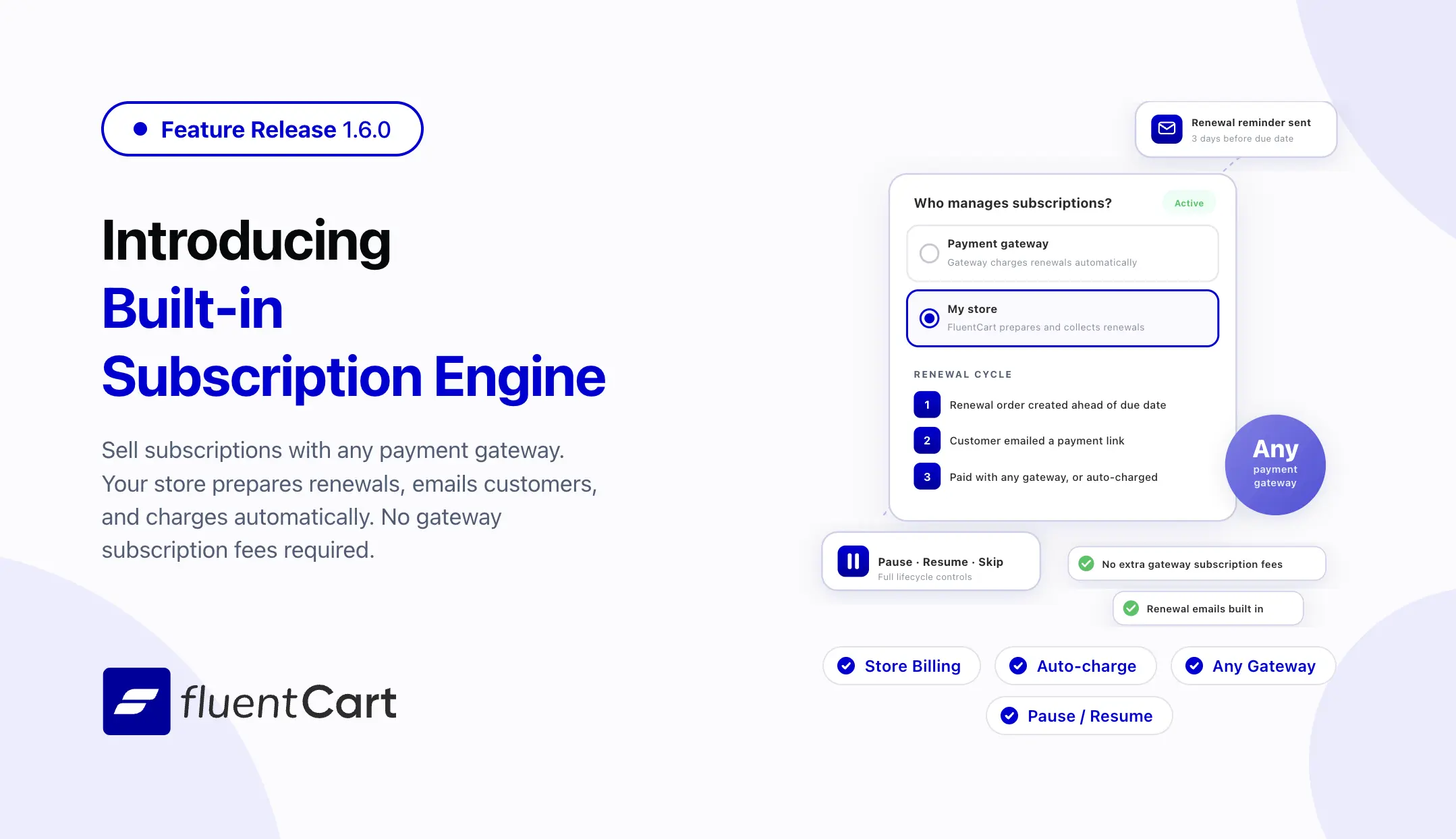
It's been nearly 2 weeks since we launched the Managed Subscriptions. As we work on the Woo Migrator (for which the Store Managed Subscriptions was a prerequisite), we anticipate there might be caveats and nuances in how the subscriptions system will interact with the Woo Migration process.
Before we launch the Woo Migrator, we would prefer to make any neccessary changes to the Managed Subscription System. What we change really depends on your experience with it.
So we're looking for feedback on the Store Managed Subscriptions. Anything from a bug report, ux insight to feedback on the management system itself is welcome.
Your feedbacck will not only improve the Subscriptions capabilty, but also create a stronger foundation for our Woo Migrator.
Thanks in advance for any constructive feedback we get.
Cheers!

I don't think the Fluent ecosystem can yet handle the kind of invoicing we need - but please sanity check this use case on the chance I've missed the functionality:
We need to create a one item invoice (taxes not needed) that can be emailed to customers, and they can pay with a link or invoice number. All of which ties back into a central system.
The real trick in this case is that the payment is not due/will not be paid when the invoice is created. It gets paid separately after booking (whether booking is created by FluentForms or FluentBooking).
I understand this is not the process that gets taught for modern online payments. But as we enjoy 0% receivables, there's no need to force customers into another process. (In fact, changing the current billing process would tank our conversion rates. 😫)
Bonus points granted if the invoice can be created from within FluentBooking or if a FluentCart invoice can be tied to a FluentBooking event.
Double bonus points if it all ties back to FluentCRM.
All suggestions welcome. But I don't think I get here fully within the Fluent family (at least not just yet).