

What storage provider(s) are you using for backups + media storage?
Let’s talk storage providers for newbies!
For site backups:
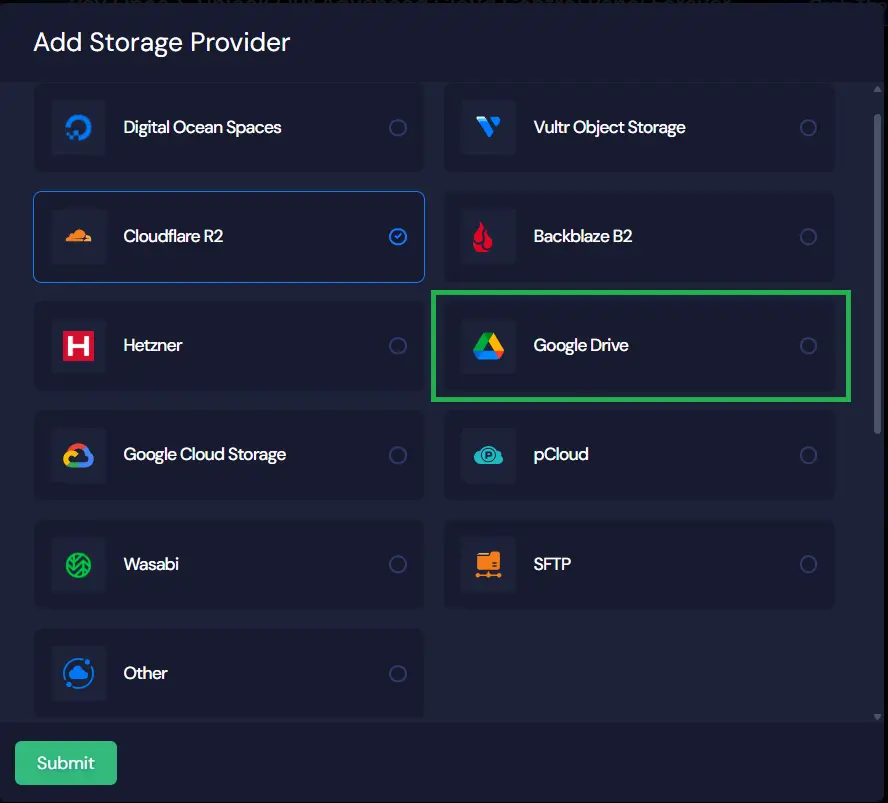
#1. In xCloud “Storage Provider” config, there are multiple options (at attached in the first image). Which one do you use?
#2. Do you use more than one storage provider? If yes, would appreciate your reasoning behind it.
#3. Google Drive option is free up to 15 GB (and even the paid one is quite affordable). So, I’m wondering why would anyone not choose it? 15 GB should be more than enough for a new community for at least a year or two, right?
For media storage:
#4. I read Shahjahan Jewel's post about recommended configs, where he says, “We suggest to use Cloudflare R2 as it's more cost-effective and faster.” However, as I checked the Cloudflare R2 pricing page, it seems quite complicated. Any real user can share how much it’s costing monthly?
#5. Sorry if this one sounds silly. If we buy Cloudflare R2 storage plan, can we use it for both “site backups” + “media storage”? I mean, site backup files will include media files too, won’t they?
Thanks in advance for your thoughts and suggestions. <3

The GS the core philosophy for backups is 3-2-1 Rule: Keep three copies of your data, on two different types of media, with one copy offsite. So depends on your needs you should follow the above rule unless you want to think that you have a backup but in reality in case of disaster you have nothing.
When it comes to storage: R2 vs GDRIVE there is a difference how these two are designed.
Dont use GDRIVE for Public website assets and use R2 (or something like: Bunny.net for videos storage).
Google Drive is great for a personal file storage and is "cheap" - it has significant drawbacks for automated website backups:
- API and Throttling Issues: Backup plugins often struggle with the consumer-grade API limits of Google Drive. Frequent, large, automated backup transfers can hit rate limits or throttling, leading to failed backups.
- Security Context: Its often linked to a personal Google account, which may violate security policies for business data.
If you are heavy Google WorkSpace account then you probably know why using GDRIVE is not a replacement for any public storing/offloading any WP media files and how CF CDN can help you out. - No object Storage Features: GDRIVE is a file system, not true object storage. It lacks features like S3 Storage Classes (for archiving) and granular Lifecycle Policies necessary for managing huge volumes of old backup files efficiently (especially important for large websites).
Note: Dont forget that you should not use GDRIVE for streaming audio or video and use dedicated streaming hosting for these files (if applicable).
Note: for backup you could use your hosting backup + wpvivid gdrive backup (helpful for staging and WP plugin updates) and a non-public cloud bucket plus local pendrive of course.
The strategy for media is focused on speed and cost-effectiveness and using Cloudflare R2 in this case is great choice.
Its not easy to give you a precise answer which cloud provider to use. It all depends on your traffic, media types, some technical knowledge, budget, file loading time experience etc..
ps. when you use a Public bucket ex: R2 for your backup and someone will discover that bucket link then its easy to hijack your website from that backup - ex: S3 bucket

The GS in many cases CF R2 should be fine and free for media offloading but even if you cross that free tier limit it will be still cheap.
If you want to use alternative: AWS S3 for storage then you wont have CDN by default but you can add AWS CloudFront - it will be more/way "expensive" than CF R2 (it also has a free WAF).
https://r2-calculator.cloudflare.com
ps. when choosing a cloud storage just check if CDN is included in the service unless you are local based business and dont need CDN.

For storage backups I use pCloud in xCloud and WPvivid also to pCloud, everything is synced to my NAS. For my blueprints (plugins/themes) I use Cloudflare R2 free account. So no costs anymore.

Kevin Heinrichs I also use pCloud in XCloud—so curious why you also use WPvivid? Is it to create redundancy?
Abby W in xCloud I have just 7 days full backup to pCloud and do manual backups for testing/developing, mostly I prefer this dashboard to handle it quick. In WPvivid I have set incremental backups, every 1 hour database, thatis on focus to safe my customers databases
Kevin Heinrichs Thanks for sharing your process in detail!
Thank you so much for sharing these details, Kevin! If you don't mind, could you please share the average monthly cost of pCloud?
The GS Nothing anymore, pCloud has lifetime offer, I paid for 10 TB storage 799$ few months ago. I checked now, they still have Black Friday offer: https://landing.pcloud.com/de/BF2025
Kevin Heinrichs Oh, I see! That's amazing to know! Thanks again, Kevin!
The GS Enjoy, its a good and cheap setup if you plan to do longterm online business ;)

I have AWS but switched to Cloudflare and love it.
I use it for both xCloud and my communities now.
Jeff Brigman Thank you so much for sharing this, Jeff. If you don't mind, could you please share the average monthly cost of Cloudflare? Or is it managed within the free tier?
The GS the cost on aws for me was minimal and varied between $2-4/monthly.
So far cloudflare has been free and I’m doing daily site backs for 12 sites plus file storage.
Plus I already use CF for dns management.
Jeff Brigman Whoa! This is so amazing to hear! 🤩
I've also set up DNS using Cloudflare. Thank you so much for sharing this, Jeff! This was so helpful! <3
The GS only issue I’ve had is setting it up for FCom. For whatever reason I could not get the normal settings to work, so I manually set it in the wp-config file along with the custom R3 domain so it serves it all from my domain via cname.

Jeff Brigman Did you do the switch yourself? I'm considering it but worried about complexity. Also, I started using Lite Speed Cache and their built in CDN, not sure if I need CloudFlare also..
Parm Saggu I did it myself. It was somewhat a pain simply because I've never used CF for anything other than DNS management and the FCom docs are outdated for doing this.
The wp-config part was easy and their docs are still good for this.

I use Backblaze B2 for all site backups, Hetzner StorageBox for custom Borg backups, and Cloudflare R2 für anything website related (blueprints, FluentCart products, FluentCommunity Media). Backblaze has rules for managing Backups, like moving old backups to archive and eventually delete, keep weekly backups longer than daily, etc. Hetzner has Borg support built-in, but that is a custom solution. Cloudflare is easiest to manage for my own products.
André Daus Thank you so much for sharing your setup and experience. I just checked Backblaze B2, didn't even know about it. I appreciate your help, André! <3

There are a lot of S3-compatible companies.
- Amazon's AWS S3 (Simple Storage Service): Reliable, bit more expensive (standard tier) to super cheap (glacier tier) for storage of assets, only pay for what you use even if that's just a few cents per month, and has a free tier for the first year. That said, they charge for bandwidth, and that can get expensive if you have a lot of people downloading your files. (And for Glacier, that's great for backups, but you could have to wait up to 12 hours for access to your files.)
- CloudFlare R2: Reliable, first 10 GB of storage is free, cheaper than S3 but more than some others, free bandwidth for downloads, extremely fast.
- Wasabi: Meant for backups but can be used front-end facing as long as your bandwidth doesn't exceed 3x your amount stored, files have a minimum payment life of at least 90 days (so you keep paying for the first 90 days even if the file is deleted in that timeframe), and you have to pay for a minimum of 1 TB of data each month. Very cheap.
- Backblaze B2: Reliable, only pay for use, one of the cheapest options.
I'm currently using Wasabi as my primary, with some things going to CloudFlare and AWS (previously used AWS for everything but moved my files off of there some years back for the most part, though emergency insurance backups are to their Glacier tier.)
I did a talk about backups at a conference last month, here's a slide from my presentation showing some of the costs for each service if you want to compare.
