

User registered with administrator account!
I use FluentAuth to protect from spammers and scammers, and it usually works fine (I see hundreds of failed logins each month and get notified for suspicious file edits).
However it seems something bypassed it today and it's quite scary. I had a user registering with full administrator rights on wordpress without even using an email!
I have no idea how that could happen... Nothing I can see in the logs that seems relevant. The only thing that might be related is that a regular user registered moments before the admin registered, but I don't see how someone with a subscriber status could add a separate administrator user.
I changed the admin user to have no role on the website, but didn't delete them completely, in case it's useful for troubleshooting. Ironically, I had to add a fake email to the user because I couldn't change their role otherwise.
How could that happen? How can I best protect my website in the future?

Could it be related to this? https://community.wpmanageninja.com/portal/space/community-meta/post/rest-api-settings
Or could it be related to the PHP version? A couple of days ago I reverted to 8.2 to fix a bug, and it caused other problems I realised later. Today I changed it to 8.3, after this admin registration thing happened.

Most probably, you have "administrator" role selected on the WordPress Settings.
Check this settings under WP Settings -> general
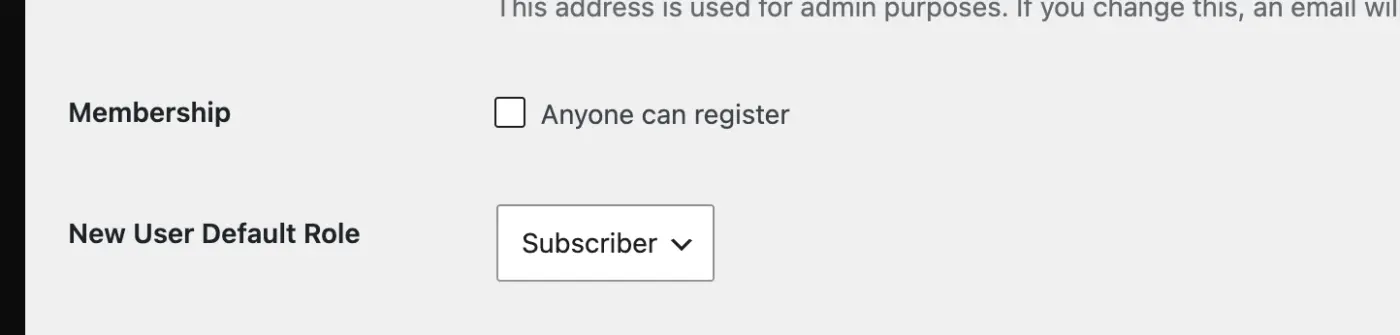
Shahjahan Jewel no, I had it set to subscriber and it hasn't been changed.
Antonios Triantafyllakis maybe something is wrong. Could you recreate the issue by yourself?
Shahjahan Jewel sure, but I have no idea how. What steps should I try? Registering for a new user account on an incognito window requires email as it should and registers a user with subscriber role, not admin. What steps could I follow that would result in a new admin getting registered, especially without providing an email? It's definitely not through wp-admin. Could it be that someone gained access to phpmyadmin on my server? It's on a VPS.
Antonios Triantafyllakis Yes, try with incognito window and see when you try register what role are you getting.
Most probably your site got hacked and the hacker created a new admin account.

sorry to hear this happened to you.. keep us posted on progress. Great having Jewels responding 👍

Probably a backdoor. Take a look at your root folder for odd named php files, take a look at your plugins for a scripting plugin you didn't install and do a check on your database. I have had a few of these intruders and they bypass the system in another way than via an account login.
Yeah, it turns out my whole server was infected with malware (I purchased and installed ImunifyAV on my VPS server to remove all infected files and prevent future infections). But this means it wasn't related to FluentAuth, as the breach happened from somewhere else.

A lot of WordPress sites have been compromised recently, there’s been a number of reasons, one I had on a small site was an issue with UpdraftPlus backup - it’s now been patched and updated. But the issue allowed upload of compromised plugin/code that created an Admin user, once they had access they proceeded to add a number of other user accounts and back doors and api/app passwords. Took a while to sort, but it’s worth monitoring and checking your sites regularly.

I had this a little while back too. It scared the s%^t out of me. I think its more wp general thing. I asked my AI what to do and how it happened. It gave me a hardening snippet which I added via Fluent Snippets:
/**
- WordPress Security: Hardening Suite
-
- Disables Default Registration Page (Redirects to Home)
-
- Hides "Register" link on Login Screen
-
- Prevents Privilege Escalation (Auto-deletes unauthorized Admins)
*/
- Prevents Privilege Escalation (Auto-deletes unauthorized Admins)
// --- 1. DISABLE DEFAULT REGISTRATION PAGE ---
// Redirects bots trying to access wp-login.php?action=register back to the homepage.
add_action('login_form_register', 'wp_security_disable_register_page');
function wp_security_disable_register_page() {
wp_redirect(home_url());
exit();
}
// --- 2. HIDE REGISTER LINK ---
// Visually removes the "Register" link on the login screen so bots don't see it.
// This keeps the registration function active in the background for frontend form plugins (like Fluent Forms).
add_filter('option_users_can_register', function($value) {
if ( is_admin() ) {
return $value; // Keep settings correct in Dashboard
}
global $pagenow;
if ( 'wp-login.php' === $pagenow ) {
    return 0; // Hide link on login page
}
return $value;
});
// --- 3. STOP PRIVILEGE ESCALATION (The "Ghost Admin" Fix) ---
// This acts as a firewall. If a bot exploits a plugin to register as 'administrator',
// this script catches it the moment the user is created and deletes them instantly.
add_action('user_register', 'wp_security_prevent_admin_injection', 10, 1);
function wp_security_prevent_admin_injection($user_id) {
// SECURITY CHECK:
// If the user is being created by a logged-in Admin inside the Dashboard, allow it.
if ( is_admin() && current_user_can('create_users') ) {
return;
}
// Get the new user data
$user = get_userdata($user_id);

// Check if they somehow managed to get the 'administrator' role
if ( in_array('administrator', (array) $user->roles) ) {

    // Log the attack attempt (Optional - writes to debug.log)
    error_log("SECURITY ALERT: Blocked unauthorized Admin creation for user ID: " . $user_id);

    // PERMANENTLY DELETE THE MALICIOUS USER IMMEDIATELY
    require_once(ABSPATH . 'wp-admin/includes/user.php');
    wp_delete_user($user_id);

    // Kill the process so the bot gets an error
    wp_die('Security Violation: Unauthorized Admin Registration Attempt Blocked.');
}
}
Hope it helps!

You should connect using an AI and the Novamira plugin with MCP. Your problem will be solved in a few minutes. Remember to back up your site before using AI via MCP, as errors are possible.👍👍👍