

REST API settings..
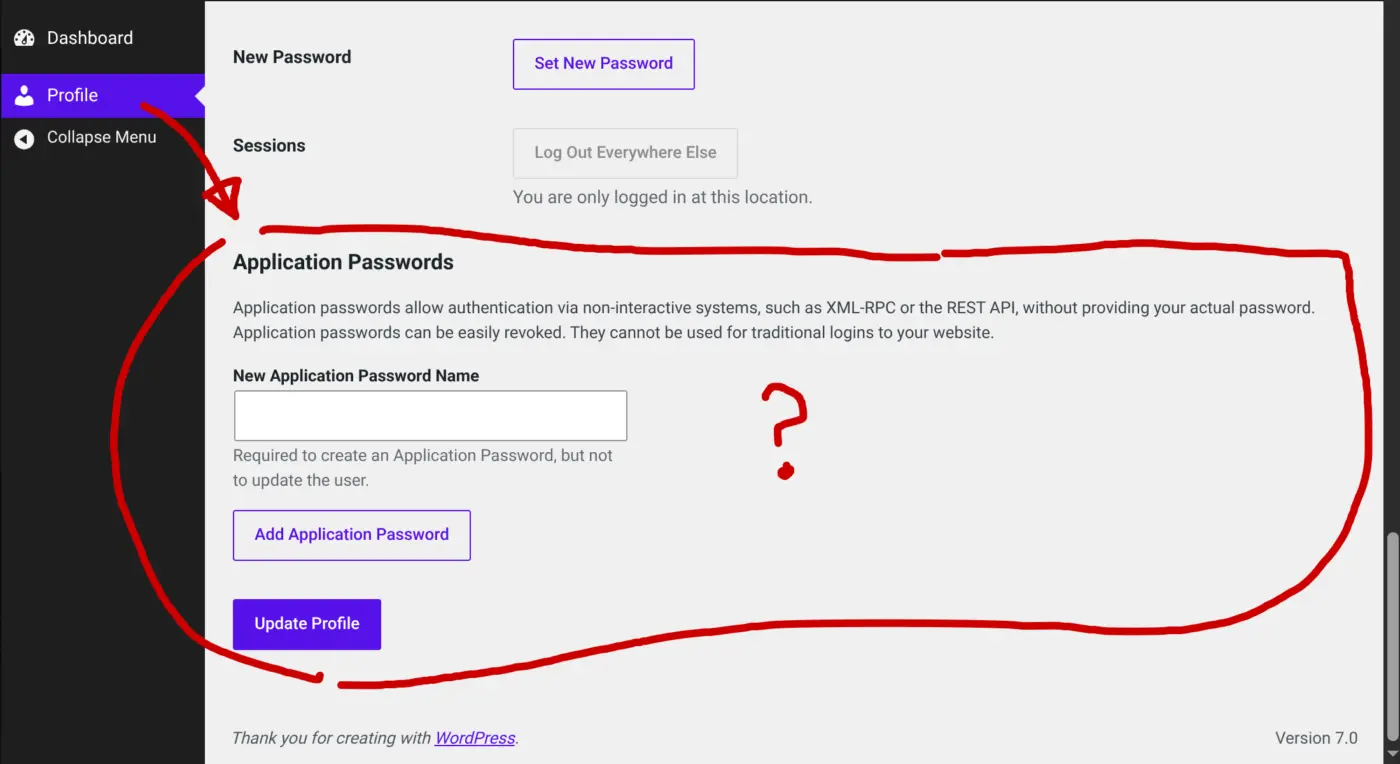
Hi.. curious how to control REST API settings, Is there a way to disable this for users of community? Or at least require admin approval? When a FluentCommunity user accesses www.site.com/wp-admin/profile.php the API setup is visible. Can this be controlled via FluentCommunity, or via wordress? Thanks

I used "FluentAuth" to keep members out of the Dashboard and the Plugins "Admin and Site Enhancements" (ASE) to disable all the other stuff I don't need.
That is one of the features I would love Communi to have out of the box, to keep Members and / or specific roles completely out of the dashboard.

Janina Feuchthofen this might solve a problem I just had, with someone registering for an admin account without even an email!

Janina Feuchthofen thanks for message.. I'll test FluentAuth today asap. I was kinda shocked to see a regular user can get API access to wp. Cheers
Antonios Triantafyllakis Yikes!! Thanks for sharing and good luck locking down your site from that ever happening again.
Janina Feuchthofen this plugin is incredible! Thanks for the tip

This is a WordPress-specific feature, not a Fluent Plugins feature.
Shahjahan Jewel is there something we can do about it?
Shahjahan Jewel Thanks! Is what Janina Feuchthofen mentioned a good solution? I think FluentAuth is part of Fluent Plugin suite, or do recommend a an alternative plugin, best practice. Again thanks to you and Ninjas hard work 🥷
"FluentAuth" to keep members out of the Dashboard and the Plugins "Admin and Site Enhancements" (ASE)..
Thanks Janina Feuchthofen for the suggestion for FluentAuth..!! Perfect solution for controlling access (Restrict /wp-admin for low level user roles). I cant believe our dashboard was visible to regular community users who could easily flood/spam the site via API.
There should be a feature built in FluentCommunity, or a reminder to install it during the setup wizard. Maybe I missed it.. noob
FluentAuth plugin https://fluentauth.com

Obviously, it's best to disable REST/API entirely if you don't need it, but if you need it (for example for MCP servers / AI), then it's best to only enable them for admins. There is no need to use a separate plugin for that, this simple PHP snippet (using FluentSnippets for example) will do this:
add_filter( 'wp_is_application_passwords_available_for_user', function( $available, $user ) {
return user_can( $user, 'manage_options' );
}, 10, 2 );
As always, disable the admin panel with FluentAuth for all the users/roles that don't need it (which is all users except admins, support agents, maybe group leaders if you use Learndash, etc). Subscribers have no business in the admin panel.
Another good security measure is to enforce 2FA for admins, ideally with Authy or similar, and making sure anyone posting publicly (which makes them instant targets for hacking) doesn't have admin priviledges and also has 2FA on their accounts.
Screenplay Unlimited yes, but if you want posts on public spaces of your community to be displayed without logging in, that relies on REST API as I discovered the hard way, so I cannot disable it.
Antonios Triantafyllakis Well that's very bad then. But I don't see what that has to do with disabling app passwords for non admin users. That's the real security flaw that you want to close when you want to enable REST API, and that's the purpose of the PHP snippet I suggested. This is what you should do when you have to leave REST API enabled for whatever reason.
Screenplay Unlimited yes, I was only referring to disabling REST API! I added the snippet you recommend.