

Signing up
Shahjahan Jewel, Many "less savvy" users primarily use my community. The biggest problem I'm having is people not realizing they have to sign up before accessing the full features of the site.
After monitoring it for a while, I realized they never see the "signup" option on the registration form. It's tiny and buried at the bottom of the form, where people won't see it before filling out the login.
Short of using a custom registration form, can we make that option more prominent?

Let me just make a suggestion, why not activate Google sign up or Facebook sign up or magic link. Before WPManageNinja could do something about it.

WiLson Eberechi, Honestly...? While it would give them an option and may resolve the problem for about 30% of the people, the rest would have no clue what to do with those options.
The only way I've been able to increase adoption is to assign advocates and either positively have them invite them or point them to a custom registration form.
This was meant as an alternative to social media services like Facebook, which most refuse to use.
Using google account might work "after" I explain to them (individually) how that works.

I think a custom Login and Registration Forms using Fluent Forms might work better for what you need. I have a site for older users, and they almost need hand holding with big signs and arrows.
David Churchill, I absolutely agree.
Sadly, it's not just the seniors; it's about 70%+ of the population.
The sad part is, if they try once and have any problem, they're hesitant to try again.
Or they login once and either forget their password or never log in again.
My advocates are driving adoption, but it's slow and the Fluent Forms custom login page (which I'd created) helps make things more visible.
I just edited that page to show the sign-up form a different color than login.

Wesley Peace Another option I had used is to create wordpress page (name it what you want) with 2 buttons - one linked directly to login the other linked directly to registration. Decorate and make button as big as you want. Go to your community settings - > General and put the created page link in the "Use Custom Login Page".
Debo Ogunrinde, that is what I'd done in the past, and it wasn't sufficient.
What I've settled on will have to work, but it's not as straightforward as I would like. Here are the steps:
- Remove Signup from the login
- Created a new custom page with a FF signup form with a background to denote a separate function.
- Added a login button below
- Use FluentAuth to redirect logins to "/portal"
What I lose - some of my spaces are public, so people navigating to the community no longer can see them.
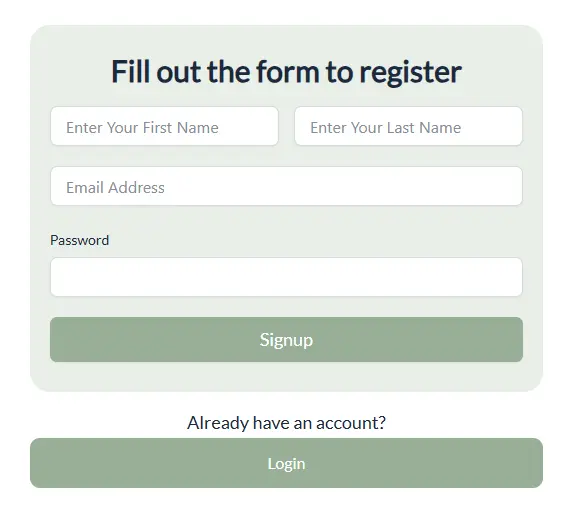
Wesley Peace looks nice!