

Schedule time date formatting
Is there anyway to change the schedule date format from military time?
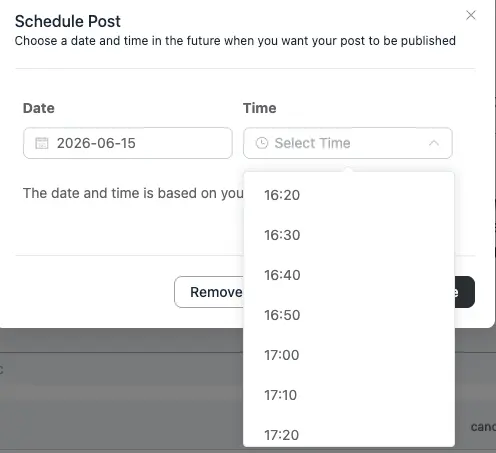

The Date/Time Format is set in WordPress > Dashboard > Settings > General.
But assuming you mean the military/UTC-style timestamp format "DDHHmmZMMMYY" (day, hour, minute, Z for Zulu/UTC, abbreviated month, two-digit year) - WordPress won't output that exact string by default, you would need to use a custom snippet, but I am not sure if FluentCommunity would also output the same format.
Probably worth checking this https://wordpress.org/documentation/article/customize-date-and-time-format/

David Churchill Thanks. I mean't to say in my post I wanted to change it from military time.
Bob ah! in that case, go to the Dashboard > Settings > General and change the time to something like this 👍
g:i a = 1:23 pm (12‑hour, no leading zero, lowercase am/pm)
h:i A = 01:23 PM (12‑hour, leading zero, uppercase AM/PM)
Bob although, I've just tested it and it's still 24 Hours - perhaps Shahjahan Jewel can explain if it's possible?

Thanks for raising the issue. Fixed in dev.
Md. Ariful Islam Thank you! Does that mean it will be fixed in a future release?
Bob Hopefully Yes
Md. Ariful Islam Thanks!