

Introducing Audio Posts - FluentCommunity 2.7.5 🎶
I am really excited about this one. We have been wanting to bring audio to the feed for a long time, and it is finally here, along with a bunch of things you have been asking for.
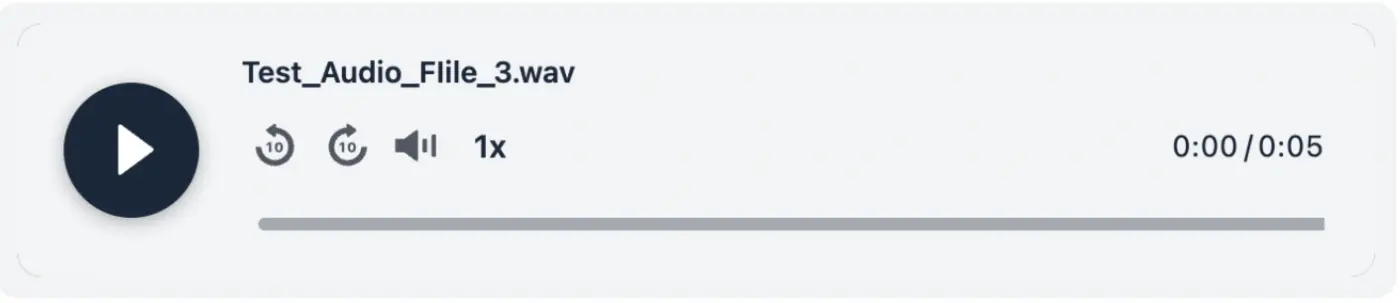
- Audio posts: Your members can now share audio right in the feed, next to photos and videos. Podcast clips, voice notes, recorded Q&As, music, whatever your people are into. It runs through FluentPlayer, so it is a proper player, not a download link, and it matches your color schema. You can rename each track and add cover art too. Turn it on by installing FluentPlayer and enabling it from addon settings.
- Two new lesson blocks for course creators: A Details block to hide hints or answers behind a click, and a Math block for writing real formulas in LaTeX that render as you type. The Math block needs WordPress 6.9 or newer.
- You now pick the color schema: Light, Dark, or System. Your members who keep their device dark get a dark portal automatically, no setup needed.
And a few small wins that just remove daily annoyances: change your password right from your profile, rename documents without re-uploading, and a much cleaner notification preferences table.
On top of all that, this release is noticeably faster. Feeds, notifications, and permission checks all got quicker, plus a long list of fixes and some security hardening.
Update whenever you are ready 🙌
Full notes: https://fluentcommunity.co/blog/fluentcommunity-2-7-5/
More cooking 🧑🏻💻

Audio added.🖤🖤
Password change from profile added🖤🖤

Congratulations! Nice addon. And when can we expect to get a simple paperclip to comments and posts allowing us to add attachments?
Stefan Lachmann i didn’t understand what you meant here
I would love to allow attaching eg documents to comments. Not just images, emojis, gif and now audios. But files. Just like in Circle community.

I'm really happy to see this. I found the switch in the settings to enable audio, but I'm not sure how to add audio to a post or comment. I just updated FluentCommunity,
Just found the music note icon under the post editor. Had to refresh, but nice to see it's there.
I'm still unclear how to add FluentPlayer mid-post if needed. I'd love to see a /command for FluentPlayer, if possible. Same way it works in the course editor.
You mention this is for uploaded audio, and that's definitely helpful. I would request that we also have a feature to play from a URL to play hosted podcasts.
Thank you!

William Beem After enabling, a new music/audio icon should show up on the new post UI. You may need to reload the page.
Shahjahan Jewel Absolutely correct. That, and I also had to change a setting to allow users to access FluentPlayer. This opens so many possibilities for me.
I take it the uploads go to our media settings - Cloudflare R2 in my case.

The audio release is massive, but I can't accesss fluent player settings
Bryan William The settings should be available under FluentCommunity Settings -> Addons

Bryan William, curious why you would say the Audio Release is Massive. Is this old guy missing something?

Owen Kane We have been waiting for it for so long, that's why
Shahjahan Jewel Done... it works

Very cool!

Cool...the detail blocks and the math blocks...gradually, fluent community is now advancing toward becoming a solid LMS as well.
arjun arjun I'm still figuring out that part, I don't know how to use it yet
Bryan William This "not-knowing" of yours is an indication that you do not really require them yet .... and it's completely natural... you can just relax at this discovery!!!

Heck yes!
Nice update

This is AMAZING!!! Thank you, Thank you, Thank you and Thank you for adding the audio feature!!! You guys are the best. Keep the great work!

You guys move at the speed of light! I love it!

Do we have to have a paid FluentPlayer license for this to work?
Connery Johnson it will work with the free version.

Is this new feature also available in Fluent Messaging? 😃
Would be nice to have the option to send audios through the private chat too!
Jorge de los Reyes Good idea.

I haven't updated my test site yet but can the change password function be disabled? We authenticate against a separate system and already have a password change form for that system. Worst case, I assume it could be hidden with CSS if needed.

Thomas Oates, option has been added in v2.7.7.

and no events yet. Great.

Tindaro Battaglia did you know there are at least 2 very capable events plugins from third party authors? you could support them and use one of those instead of waiting :)
Scott Hopkins I know that but I don’t need them, I need a native solution, just like I read before buying fc in their official roadmap years ago
Wow this is an excellent update. Thank you for your team’s work!! PS) I tried to download the new version (2.7.5) but I don’t have the opportunity to do so. The last plugin version on wp is 2.7 (so the last one).

Audio post : check !
Password change in profile : check !
LaTex compatibility : cheeeeeeeeccckkkkk !!!!!!!!
Thank you team ! Thank you Shahjahan Jewel ! You're awesome !

Shahjahan Jewel PWA, please 🙏
Mike M I need it too...
Mike M 100% needed Shahjahan Jewel can you please let us know if you guys are working on this or if you're planning to do it in the future? Thanks

JF Anne-Sophie W We have already planned this feature and will start working on it soon.
Regarding the roadmap, we'll keep it updated regularly from now on. Sorry for the inconvenience 🙌
Raiyan Marzan this is great news, thanks! How long is "soon" ?
Is it the same PWA that you are using for this community?
Raiyan Marzan I'm happy this is coming from you. Let's keep the hope alive
I don't understand how to activate the Audio mode on FluentPlayer. Is that a pro feature..? I really hope not...
Anne-Sophie W here are the step
- Go to settings, and click "features and add-ons
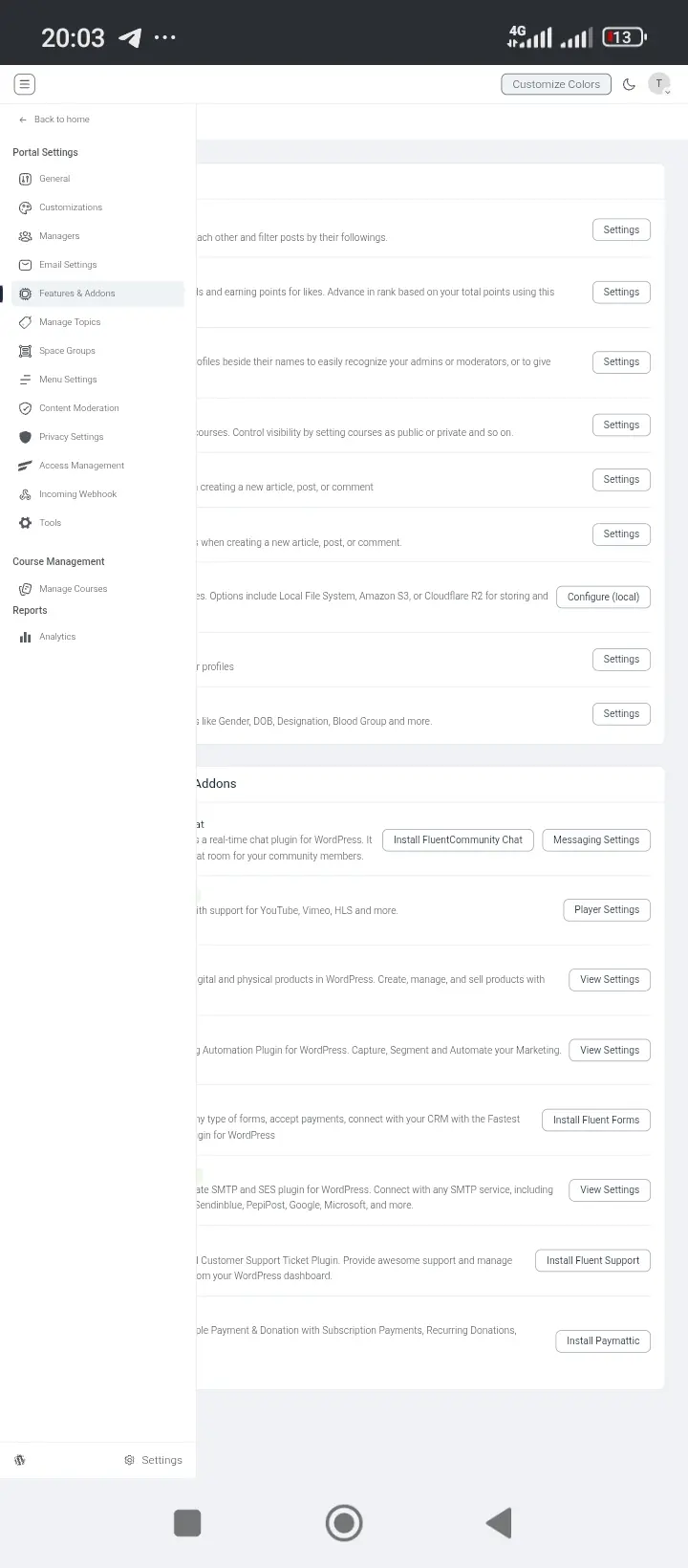
- Go to fluent player, install and click the settings.
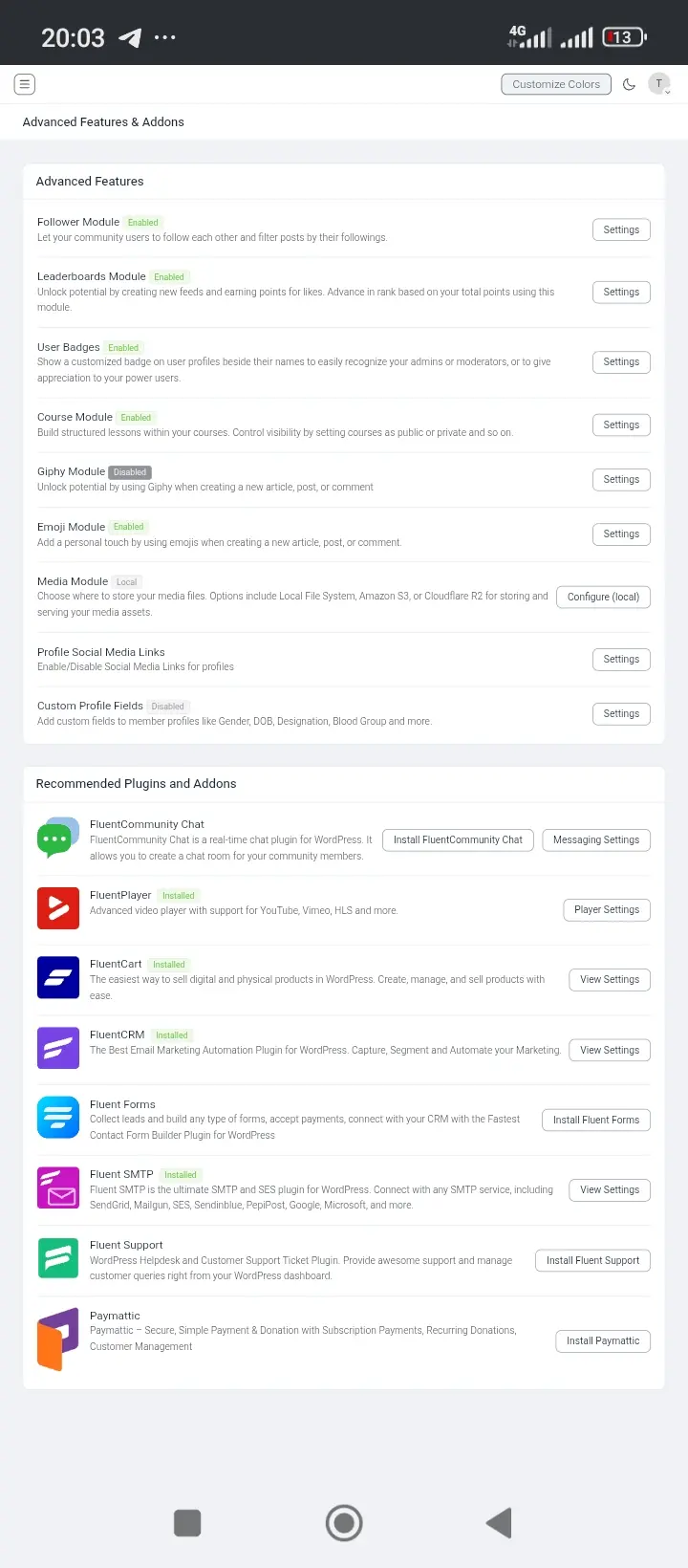
- Turn on video player, turn on audio player, set your preferred configuration, as you can see in the image below.
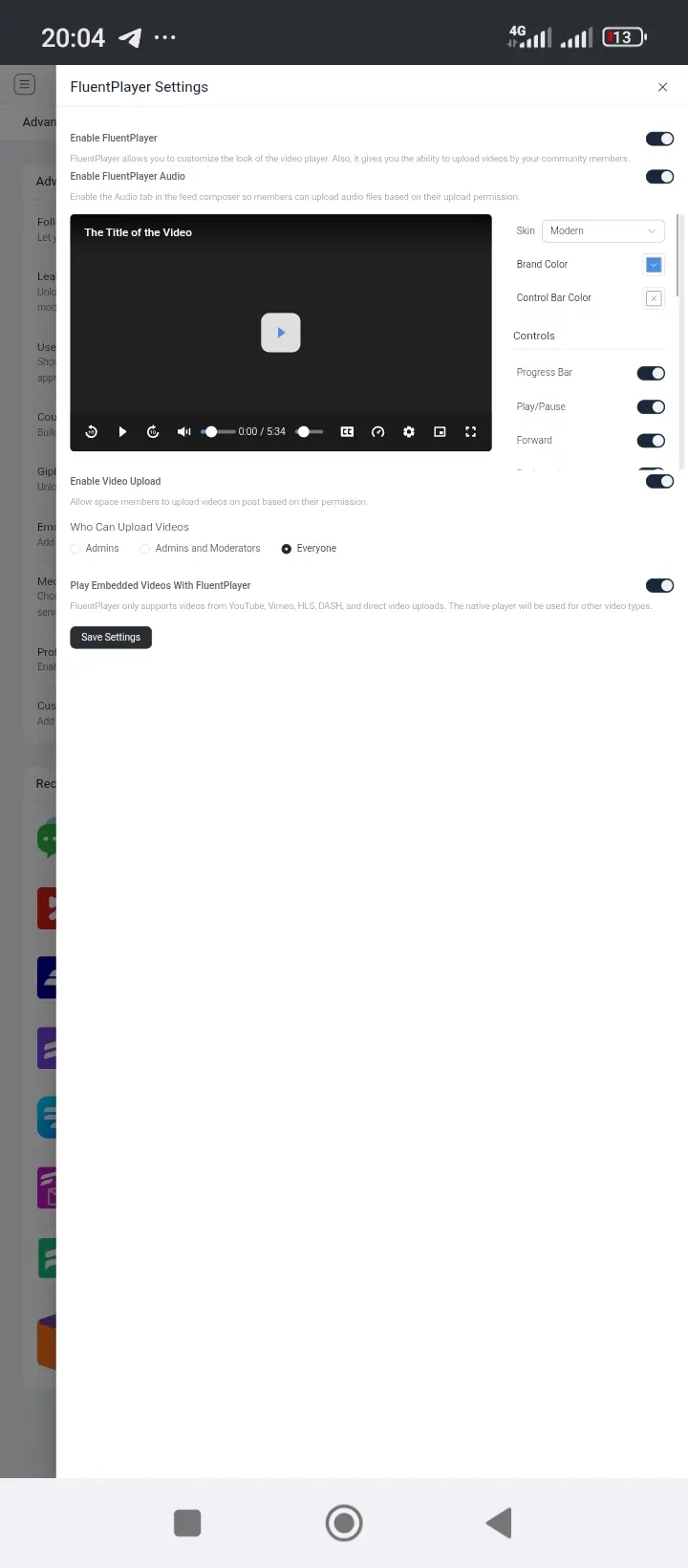
- Go to composer and you'll see 🎵 click it and record or upload.
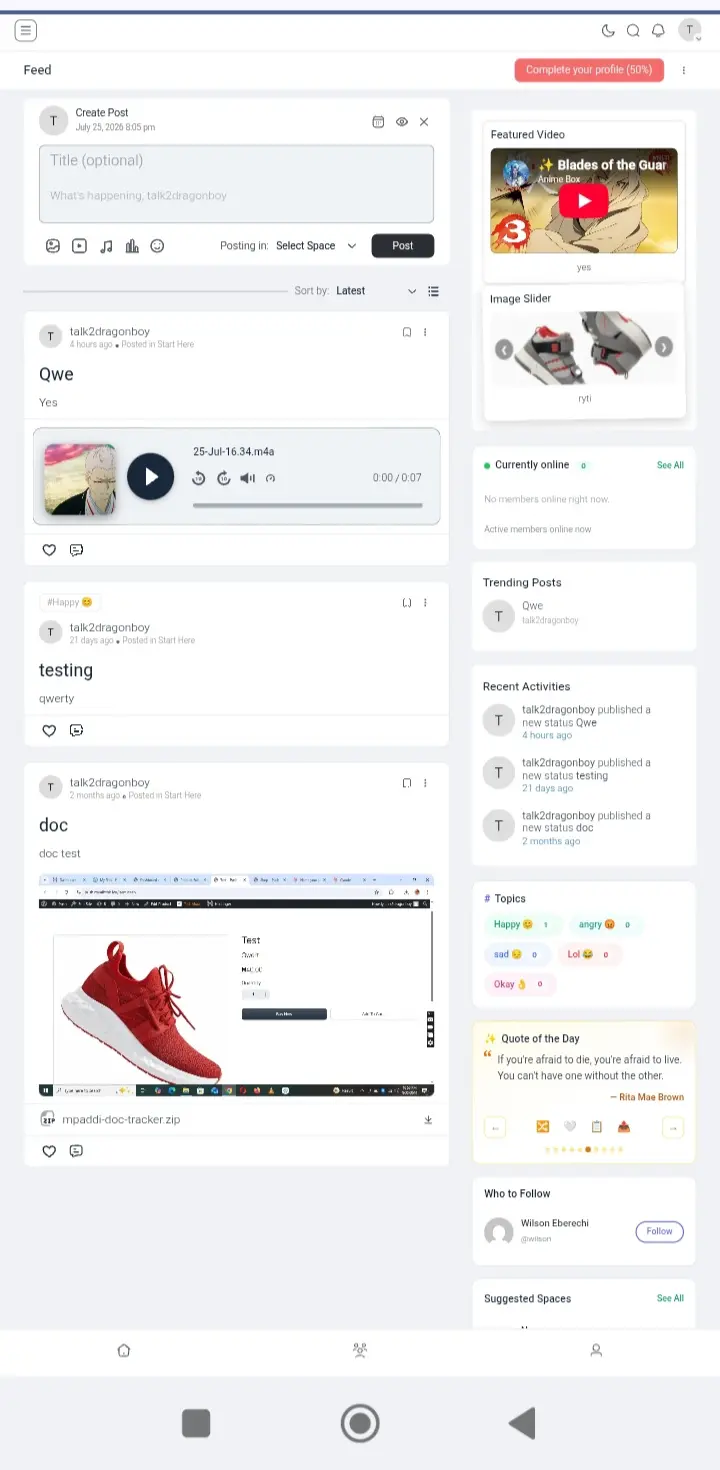
I hope this helps
WiLson Eberechi Thank you very much! I managed to do it at last thanks to you. :)

Would be lovely into the chat also with audio inbox.


Is it possible to restrict audio posts to Admins only? And do I configure that
Sifiso Madwayi yes, We are planning to do that.
Shahjahan Jewel Thanks, it will be a game changer especially for my musician clients, now the only think missing for FluentPlayer is to monetize the audio/video using FluentCart. Like someone buys an audio track as a product and get to listen and/or download it.

Finally, this is the functionality we've been waiting for. It looks and works great.

Thank you Ninjas for the Audio Posts!! This is a great feature. 😎🔊👍

Not working with new update... when inserting youtube o vimeo link the player swith to native player from those plataforms... also current videos do not inherit the fluentplayer embed... Please take a look at that...
Javier Barriga, forwarded the issue to the FPlayer team, thank you.

Javier Barriga Hi Javier, sorry about the trouble. When FluentPlayer can't load on a browser/device, it falls back to the native player by design. Please clear your site/browser cache and confirm "Play Embedded Videos With FluentPlayer" is enabled. If it persists, open a support ticket with more details and let me know you ticket id— that helps us pinpoint it and get you a fix faster.

Woah, amazing. If I share course audio via Fluent Player, is it secure? ie: No easy way for users to download it?
Lee Busch There's always a way to download it. I have Audio Hijack on my Mac. While I use it with Loopback to create a virtual mic that delays enough to sync with my video camera, it can just as easily redirect audio from any source on the computer to record as a file.
William Beem That's why I said EASY way. Yes, we all know there's always a way. I'm merely asking if downloads can be turned off / non-obvious