

HTML in the description field
In the description field for a space, it seems that the only recognised HTML-tag is a link (a-tag).
Is there a way to add a line break between paragraphs, see attached image?
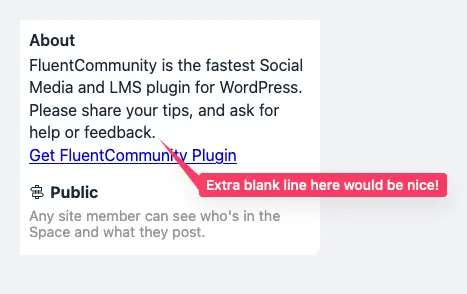

<br>works for me.

you can use the <p> twice when creating your link anchor tag.
Like <p><p><a href><p><p>
That would create a double paragraph line break, if you need one paragraph line break, the use just one <p>
Oh I just read Thomas Oates comment, you're talking about line break and not paragraph? If that's it use <br> with no closing tag

Thanks. Unfortunately the \
tag does not work for me. It gets removed. Same with the \
tag.
And just to clarify, I am talking about the "About" field, like the one in the top right corner of this page!
Regnskab this is how i did, use this method. you could see the "tour" is on a line break
WiLson Eberechi Thanks a lot for the screenshots. I see it works for you, and that leaves me wondering why it doesnt work for me.
If I inspect the generated HTML for the Description, I can see that my \
's gets stripped away. NO clue why they do that for me, and not for you.
Any idea?
Regnskab what generated html are you talking about?
WiLson Eberechi Thanks for taking your time to help with this!
When I enter the description, I can add \
tags and other HTML tags.
Then, when I look at the space, and inspect the text I have entered, when it is rendered next to the "About" label, it is a slightly altered text. All HTML tags I have written are stripped, and some, that I haven't written, are inserted.
It can be viewed using the browsers Web Developer Tools, particularly the Inspector Tool (usually brought up by pressing Command-Options-I).
You can see the attached image, top part is what is rendered, bottom part is what I have written in the description field.
Regnskab that's because you are not using the right html tag properly.
<br>dette forum er for...
<br>kursuskordinatorar: Jeanette....
<br>team: Charlotte...
Use the above syntax I just written above, paste it on your space description and it will work. And make sure you click "save settings" when you are done
WiLson Eberechi Thanks, I tried it, but same result, no extra line break, see below.
Regnskab make me an admin on your site let me fix it for you

WiLson Eberechi How did you put the image slider on the right?
WiLson Eberechi None of the payment options you provide are valid from Spain. :-(
Buceo Madrid sorry about that. Go to Mpaddi.com and send me a direct message
Buceo Madrid I have replied
this is how i did, use this method. you could see the "tour" is on a line break