

How to remove the WP bar at the top and the left sidebar from the homepage?
- How can I remove the WP bar at the top? (Already turned OFF the "Show Toolbar when viewing site" setting in the WP admin.*)
- I applied the "FluentCommunity Full Width Frame" on the homepage template. Can we remove the left sidebar from the homepage?
I'm trying to align the homepage design layout similar to the FluentCommunity portal — but without the left sidebar. Is this achievable?
TIA! <3
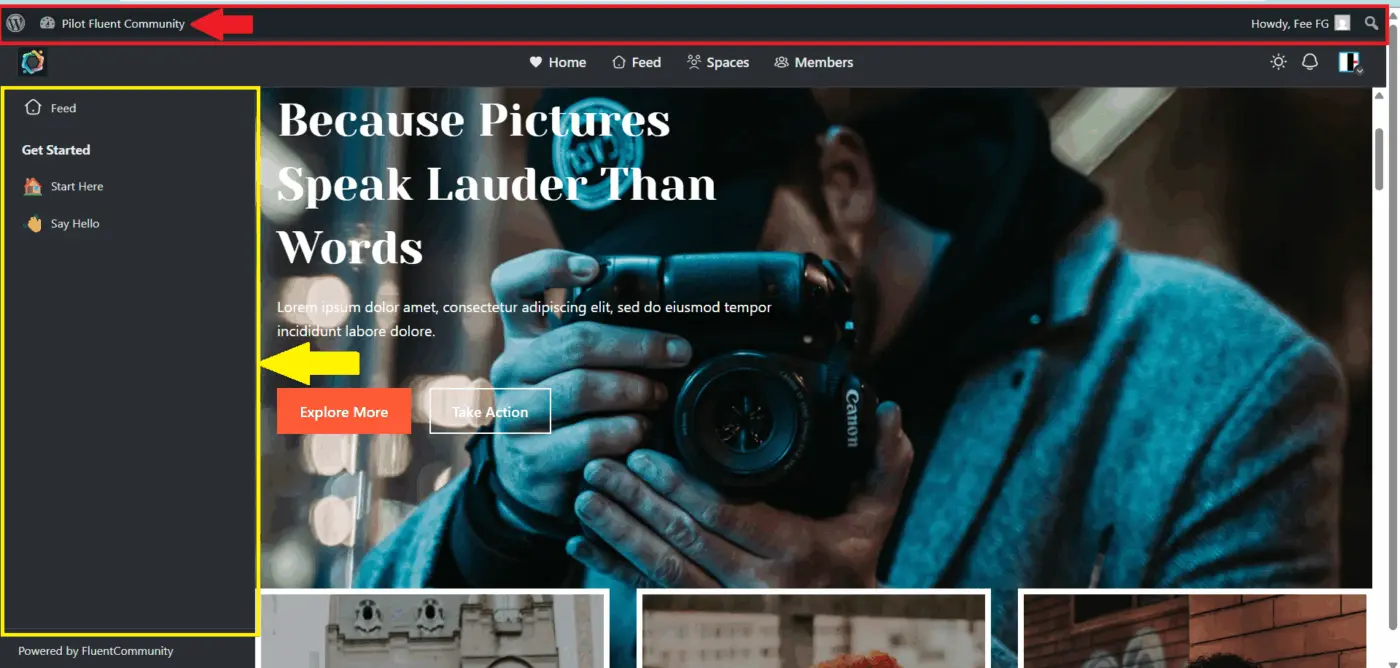

Apparently, keeping this "Show Toolbar when viewing site" checkbox off should remove the WP bar from the top, but it's not working for me.

I use this code in my theme's functions.php file to disable the toolbar for all users except administrators.
    add_action('after_setup_theme', 'disable_admin_bar');
    function disable_admin_bar() {
        if (current_user_can('administrator') ) {
            show_admin_bar(true);
        } else {
            show_admin_bar(false);
        }
    }
Thomas Oates Awesome! You're amazing! Thank you so much for taking the time to help me with this! I appreciate it so much! <3
And this CSS should hide the left sidebar for a specific page. Replace 245 with the ID of the home page.
.page-id-245 .feed_layout .spaces {
    display: none !important;
}
.page-id-245 .feed_layout {
    padding-left: 0px !important;
}Thomas Oates Thank you so much for your help, Thomas! Much appreciated! <3
Thomas Oates — Both of your custom code solutions did work! 🤩😍
Once again, thank you so much! 💚🙏