


How to enable 2FA with FluentCommunity login?
Hi everyone,
Quick question for the community:
Has anyone successfully enabled Two-Factor Authentication (2FA) for all users while using the FluentCommunity login page?
I'm using FluentCommunity Pro 2.7.5 together with FluentAuth, but users logging in through the FluentCommunity authentication page are not prompted for a second authentication step.
If you've managed to get 2FA working, could you share how you configured it?
Thanks in advance!

This is a bug, I did highlight it in the past but not yet fixed.

Manoj Sharma, can you provide the post link/support ticket for that?
Tawsif Ahmed Riyad all you have to do is install Fluent Auth and then enable 2FA, and then try to login via community login, it will bypass the 2FA, as far as where did I post it.. check it in my profile, you might find it there... also you might find some other useful things that I recommended, one of the things I recommended is to allow search my own posts... which is pending also and you will find somewhere in my profile post...
I would first recommend you try and recreate the issue.

Confirming this on our own install, with one detail that makes it more serious
than "2FA is skipped" — and a second symptom that looks like the same root.
Setup: FluentCommunity portal at the site root, FluentAuth 2.1.2 with the
emailed two-factor code enabled.
1) The second factor is bypassed, and the resulting session is a full one
- Signing in at wp-login.php as an Administrator DOES require the emailed code.
- Signing in at /?fcom_action=auth with the same account and the same password
requires no code at all. - That session then reaches /wp-admin fully, with no further challenge.
So the factor guards one form rather than the account. Anyone holding the
password takes the other door and lands in the admin dashboard.
2) FluentAuth's magic-login setting is ignored there too
With magic login set as the primary method in FluentAuth, the FluentCommunity
login form still shows password first and magic login underneath as the
secondary option. wp-login.php honours the setting; the portal form does not.
Taken together these read as one root cause rather than two bugs: the portal
login form appears to reimplement authentication instead of going through
FluentAuth, so it inherits neither the challenge nor the configuration. What we
would most like is simply that the two forms behave the same.
Worth knowing before it gets suggested as a workaround: switching the login
form type to "Use custom login page" does not help. It changes where the portal
links to, but /?fcom_action=auth keeps serving a working login form and keeps
authenticating without the code.

Tawsif Ahmed Riyad please give attention to it.
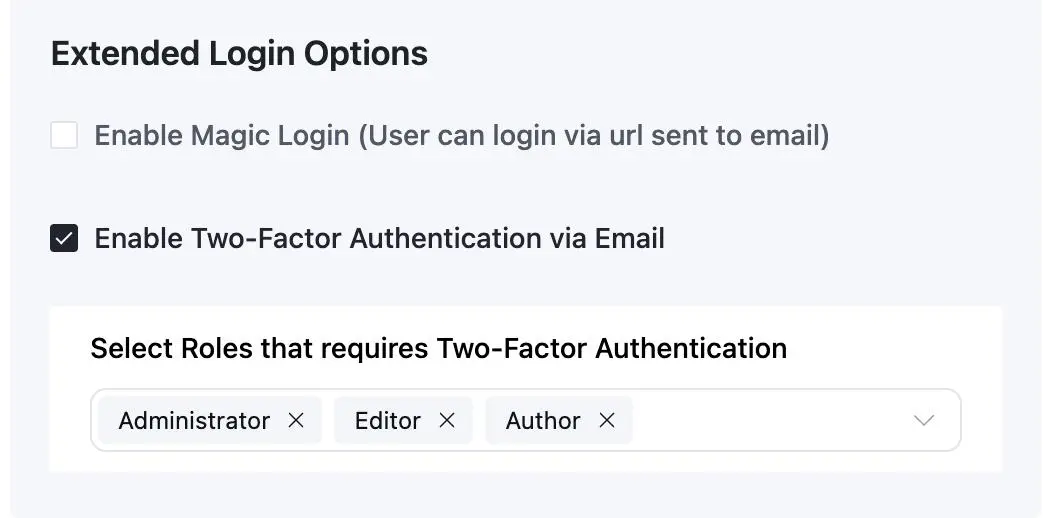
arjun arjun, Kevin, we couldn't recreate the 2FA issue, with fluentAuth, it is working fine. Check the screenshot below, is the option enabled with the role selection or not (chosing none will work for all).
If the issue persists, can you please create support ticket along with providing more contexts such as screen recording, logs, etc? It will be helpful.
Tawsif Ahmed Riyad I haven't looked into it myself...but since Kevin brought this issue, I just felt like drawing your attention so that you could provide us a definitive answer to whether the issue raised is a global issue or a site specific one.
Hi all, support managed to pin down the issue:
"After thoroughly investigating your site environment, I found that the "Login or Signup Forms Shortcodes" option is disabled in FluentAuth.
This is why the Magic Login and other FluentAuth functionality were not available on your FluentCommunity login page. Enabling this option should resolve the issue."
I have confirmed it works now and suggested improving the explanation under this setting to make its importance obvious (which it isn't now). Case closed for now!