

FLUENT PLAYER PRO
Hi... I can't connect my libraries, which are in Bunny Stream, to my WordPress site. Bunny Storage works, so I can upload videos from there to my WordPress site. But I obviously need access to all my libraries in Stream. There's only one key in Stream, so I can't go wrong. I don't understand.



Hi! Thanks for reaching out.
Could you first confirm — have you configured the BunnyCDN Stream integration in FluentPlayer?
To check: Go to FluentPlayer → Settings → Storage → Bunny Stream and let me know:
- Is "Enable BunnyCDN Stream" toggled on?
- Is there an API key entered?
- What does "Test Connection" show?
If not configured yet:
- Go to dash.bunny.net/account/api-key
- Copy your Account API Key (the main account key, not a storage zone key)
- In WordPress → FluentPlayer → Settings → Storage → Bunny Stream
- Toggle Enable → Paste the key → Save
- Click Test Connection to verify
Note: BunnyCDN Storage and Stream are separate integrations with different API keys. Having Storage working doesn't mean Stream is configured. The "one key" you see is your Account API key from Account
Settings → API — make sure you're copying from there, not from a storage zone page.
Let me know what you see!

Habibur Rahman Delwar Thank you, but please understand that when we ask a question, it's because we've followed the instructions to the letter. And if we're here, it's because we know how to use the tool. Of course, all of that has been done.
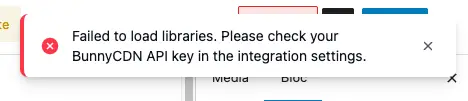
DAVID MOUSSEBOIS Apologies for the basic steps. Could you open browser DevTools Network tab, try loading libraries again, and share the error response? The toast message doesn't show the actual cause.

Is BunnyCDN stream support already present in FluentPlayer? As far as I understood, this will be a pro feature and FluentPlayer Pro has not been released yet?