

Circle to FluentCommunity migration skill for Claude Code
If you're like me — having a FluentCommunity lifetime deal license sitting idle and not yet having moved away from your Circle community — then this one is for you.
We are an adult academy, running a large course catalog. We currently have 3 Circle community-driven courses with three full-year courses containing hundreds of items, and I faced the challenge of migrating all of these to FluentCommunity. I didn't want to do it manually, so I used Claude Code to handle every single part of the migration — without touching FluentCommunity manually even once (after the initial setup).
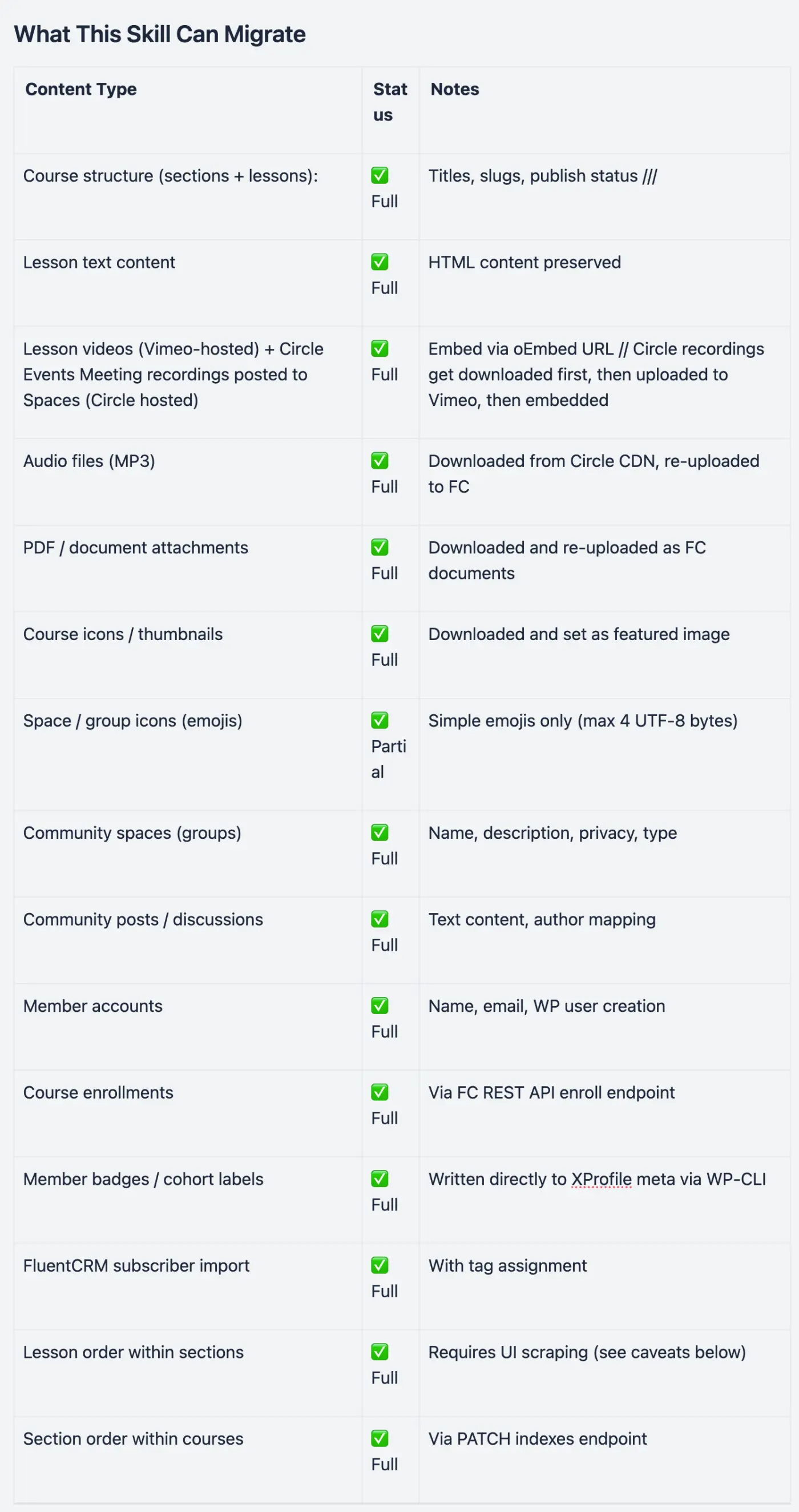
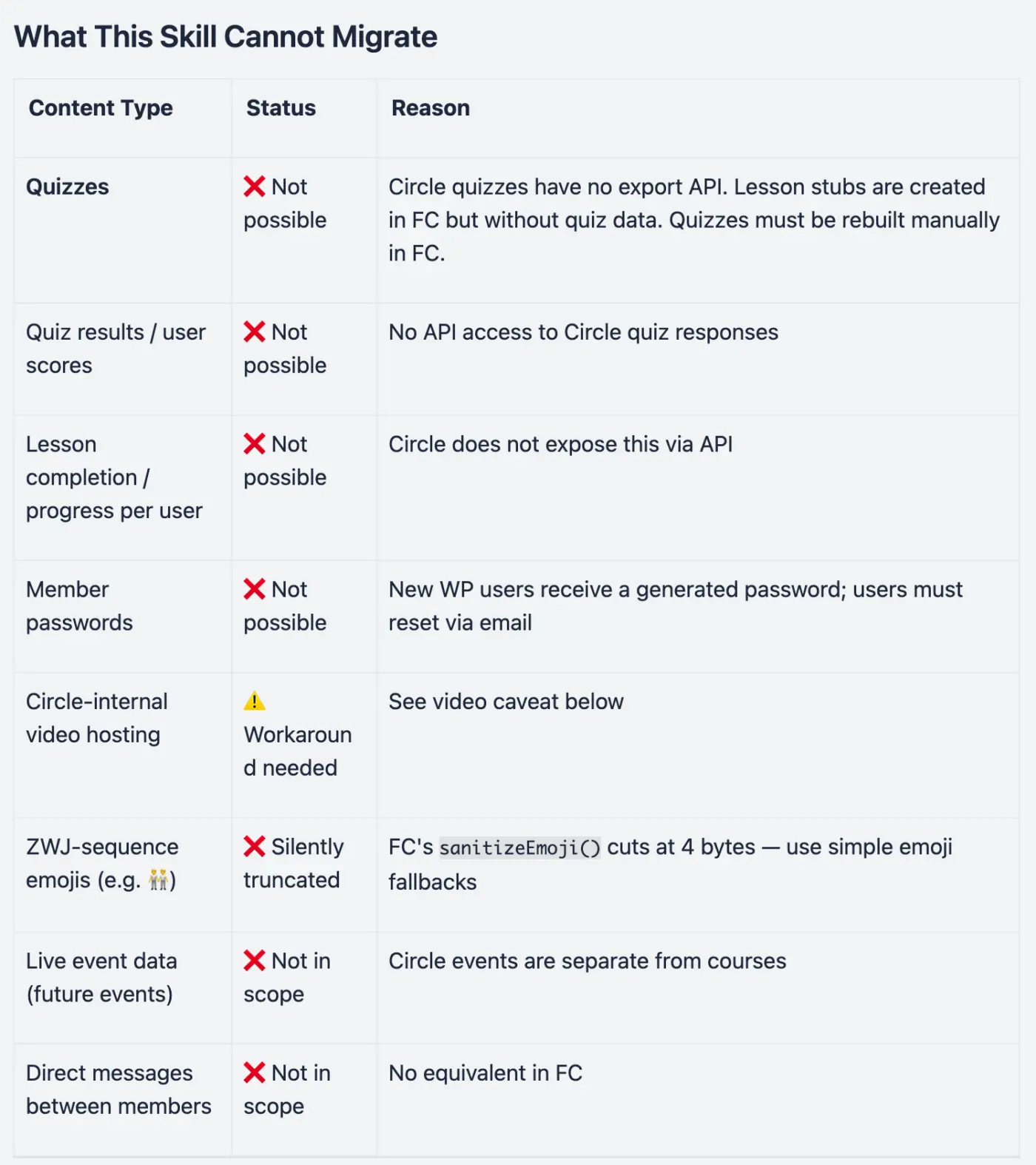
Here I want to share the skill I created out of this completed migration. You can use it if you're on the fence about migrating your Circle community to FluentCommunity. I asked AI to generate a summary of everything this migration skill (and all the included python scripts) can do, and you can simply download it, , unzip it, install it (tell Claude to also use the python scripts), and get started.
Note: To use the Circle API you need their Business plan (USD 199.- /month), but you can wait until the last 7 days before your next billing cycle, and upgrade then and only pay the difference for those 7 days (and then quit).
Here is that summary:
Circle.so → FluentCommunity Migration Guide
A practical guide for applying this skill to migrate eLearning content from a Circle.so community to a FluentCommunity (WordPress) installation.
What this skill can and can't migrate -> check the attachments
Important Caveats & Workarounds
1. Circle Admin API v2 Returns Wrong Lesson Positions ⚠️
The position field in Circle's Admin API v2 responses does NOT reflect the actual display order in the Circle UI.
Example: In Modul 7 of a Numerologie course, the API reported all Quizzes at positions 19–30 and Meditations at 31–42 — but the Circle UI actually shows them interleaved directly after each Lebenszahl lesson.
Solution: Always scrape the correct lesson order directly from the Circle browser UI using Playwright.
2. Circle CDN URLs Must Never Be Embedded in FC
Circle media is hosted at https://assets-v2.circle.so/.... These URLs:
- Require Circle authentication to access
- Will break when a Circle subscription ends
- Must not be stored in FC content
Solution: Always download Circle assets locally first, then re-upload to FC via the WP media library (POST /feeds/media-upload) or document endpoint (POST /documents/upload).
3. Lesson Videos: Circle "Featured Video" Requires a Workaround
In Circle, lesson videos are typically stored as "featured video" (Active Storage blob), not as a URL in the lesson API response. The lesson API returns no video URL for these.
Solution: Since most Circle videos are hosted on Vimeo and then embedded in Circle, retrieve them directly from your Vimeo account:
-
Fetch all videos from the relevant Vimeo folder via Vimeo API
-
Match each Circle lesson title to a Vimeo video title (fuzzy word-overlap matching)
-
Embed the Vimeo URL in FC using oEmbed format:
{ "type": "oembed", "url": "https://vimeo.com/{video_id}", "content_type": "video" } -
For webinar recordings not yet on Vimeo: upload using PyVimeo (
vimeo.upload(filepath))
4. XProfile Username ≠ WordPress user_nicename
FluentCommunity creates XProfile usernames by removing hyphens from the WP user_nicename. For example, clemens-mazza becomes clemensmazza as the XProfile username.
Impact: REST API badge/profile endpoints use the XProfile username, not the WP nicename. Always look up the actual XProfile username via WP-CLI before making API calls:
wp eval '$x = \FluentCommunity\App\Models\XProfile::where("user_id", 123)->first(); echo $x->username;'5. XProfile Must Be Created Before Badge Assignment
New WP users created via the REST API do NOT automatically get an FC XProfile. XProfiles are only created on first portal login — or explicitly:
wp eval 'foreach ([101, 102, 103] as $uid) {
` $u = \FluentCommunity\App\Models\User::find($uid);`

` if ($u) $u->syncXProfile(true);`
}
echo "Done\n";
'
wp fluent_community sync_x_profile --force is insufficient — it only runs for already-active portal users.
7. Wordfence Rate-Limits Bulk Media Uploads
Bulk file uploads (MP3s, PDFs, images) trigger Wordfence security rules at high frequency.
Solution: Add 0.5s delay between uploads. If still blocked, use Playwright browser upload as fallback (drag-and-drop via admin UI).
8. Badge Assignment: WP-CLI Is More Reliable Than REST API
Writing badges via the REST API requires the correct XProfile username (see caveat 5). Writing directly to the database via WP-CLI bypasses all these issues:
wp eval '$x = \FluentCommunity\App\Models\XProfile::where("user_id", 123)->first();
$meta = is_string($x->meta) ? json_decode($x->meta, true) : ($x->meta ?? []);
$meta["badge_slug"] = ["your-badge-slug"];
$x->meta = $meta;
$x->save();
'
9. Circle API Must Be Called From Local Machine, Not Cloud Sandbox
Circle's API blocks requests from cloud sandbox IPs (e.g. ctx_execute sandboxes get HTTP 403). Always run Circle API scripts locally:
python3 /tmp/fetch_circle_lessons.pyStep-by-Step Migration Order
- Course structure + lessons — text, status, section hierarchy
- Lesson order correction — scrape Circle UI via Playwright, apply PATCH indexes
- Videos — fetch from Vimeo, match by title, embed in lessons
- Audio files (MP3s) — download from Circle CDN, upload to FC
- Documents (PDFs) — download and re-upload as FC lesson documents
- Course + space icons — fetch and set as featured images
- Members — create WP users, sync XProfiles, add to spaces
- Badges — define badge slugs in FC, assign via WP-CLI
- FluentCRM — create tags, import subscribers
- Lesson order final check — re-verify via Playwright UI scrape vs FC order
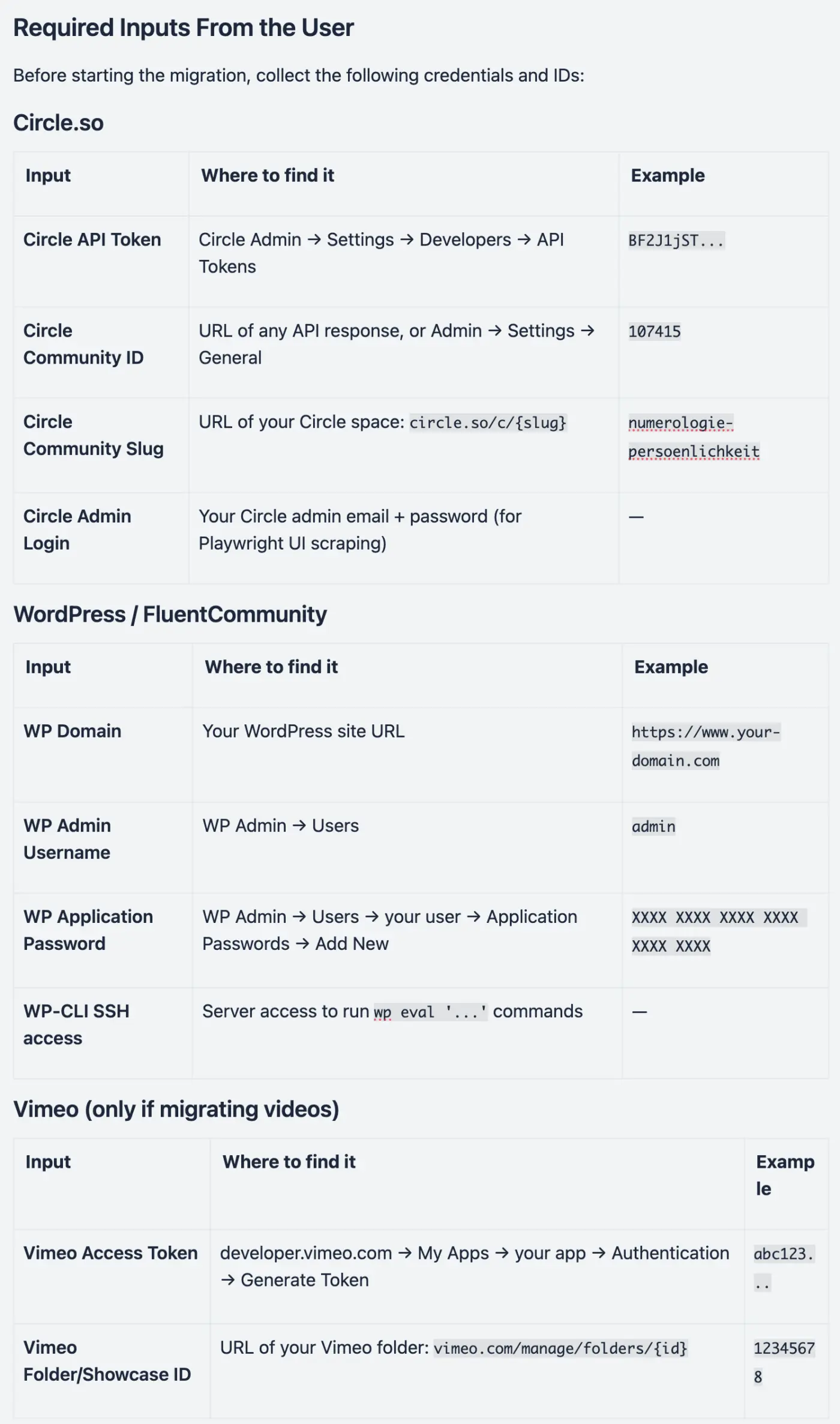
Required Inputs From the User
Before starting the migration, collect the following credentials and IDs:
Circle.so
Input Where to find it Example Circle API Token Circle Admin → Settings → Developers → API TokensBF2J1jST...
Circle Community ID
URL of any API response, or Admin → Settings → General
107415
Circle Community Slug
URL of your Circle space: circle.so/c/{slug}
numerologie-persoenlichkeit
Circle Admin Login
Your Circle admin email + password (for Playwright UI scraping)
—
WordPress / FluentCommunity
Input Where to find it Example WP Domain Your WordPress site URLhttps://www.your-domain.com
WP Admin Username
WP Admin → Users
admin
WP Application Password
WP Admin → Users → your user → Application Passwords → Add New
XXXX XXXX XXXX XXXX XXXX XXXX
WP-CLI SSH access
Server access to run wp eval '...' commands
—
Vimeo (only if migrating videos)
Input Where to find it Example Vimeo Access Token developer.vimeo.com → My Apps → your app → Authentication → Generate Tokenabc123...
Vimeo Folder/Showcase ID
URL of your Vimeo folder: vimeo.com/manage/folders/{id}
12345678
Technical Prerequisites
- Python 3.10+ with
requests,PyVimeoinstalled - Playwright MCP active in Claude Code
- WordPress MCP configured with your domain + application password
- WP-CLI access to the server (SSH or local) - can be done manually
- Claude Code running locally (not in cloud) for Circle API calls

Nice job !

Wow, this couldn't have come at a better time. Thanks for sharing this!

Margaret Thomas Let me know how it works for you.