

Best Way to Organize Courses
I have a number of old courses I'd like to make available; there's over a dozen categories for the types of courses and probably 5 or 6 dozen courses total, if not more. Most of the courses are a single track of 3-5 lessons, though some are more detailed with individual sections or lesson groups and are longer.
If I wanted to put them into a FluentCommunity course, what would the best way to go about it?
I could create a menu group for these older courses so it'd be easy to hide or minimize them, and then create individual courses inside each one. That'd be best for tracking progress, but then I've got potentially 70+ courses which would clutter the sidebar.
I could create a menu group for the older courses, and then an individual FC course for each category of courses, and then a course section for each individual course with the lessons below that.
Or, I could create one massive course, separate each individual course into a section, with the lessons below that. This would be best for the sidebar navigation, but I'd lose the categorization of the types of courses, and wouldn't be the best organizationally for the couple of more complicated courses.
For added context, these courses are all about a decade old; we have created a few new courses to update some of the older ones which will be separate and placed alongside the new courses we are creating, and while most of the content in these older courses is evergreen some of it is obviously not relevant. We do want to maintain access for anybody that purchased the courses in the past, but plan on shutting down the old membership site, and I do have an idea for selling the old courses as a "pay what you want" deal for anybody that wants to browse through them and isn't a current member that already has access.
So...any suggestions for how best to organize these? Or should I just not set them up as courses and instead put them onto my website outside of FluentCommunity and stick to the new courses in the community?
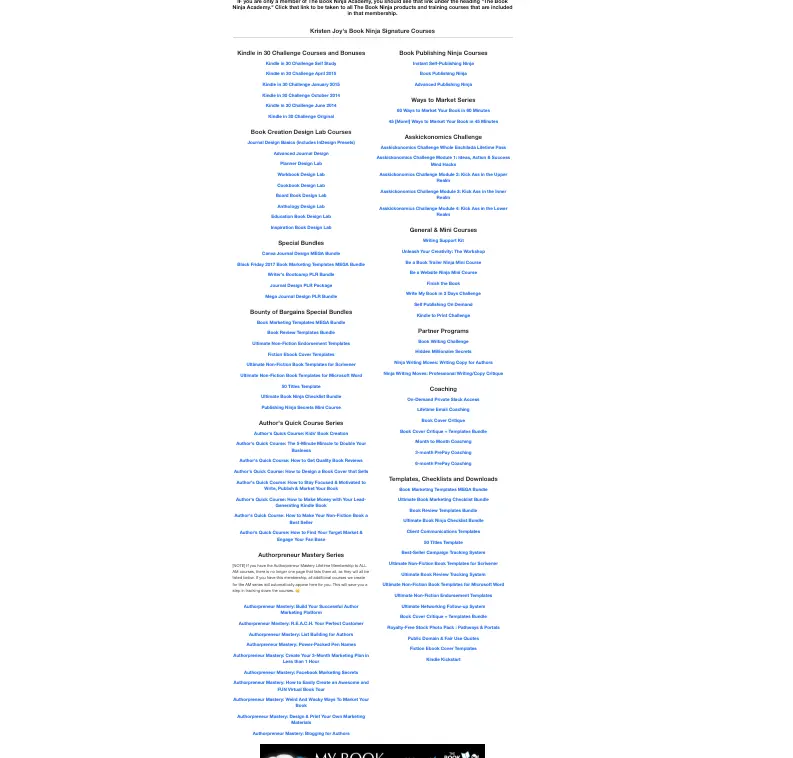

That's a long list. My first question is if these courses are still pertinent or relevant? Aging courses can take up space and clutter access to newer material. I ask this because I'm getting ready for a big shift on my community and may clear out some older courses to avoid confusion or irrelevance.
Assuming they are relevant, finding courses depends on what someone needs. Can you categorize the problems that the courses help people solve? Are they for beginners, intermediate, or advanced students within a category? Are they quick or lengthy? Multiple lessons or single lessons? Do they fit within correlated themes?
Those a things that I'd consider.

William Beem There's good information in them, but I don't expect that they'll get a lot of attention going forward, and definitely some dated material (service providers that have gone out of business or rebranded, updates to software, etc.)
I considered removing them altogether, but people did pay for them (before I bought the business) and we do get folks asking now and again about accessing them. And sometimes, the best answer to a question from a client is to point them to a course that directly addresses it.
One thought I had after writing the post and still noodling on it is to set it up as a custom post type in the main WordPress area where I can organize them appropriately and then just having one link to the main page that lists all of the organization; then I could create a similar interface to the newer courses and wrap it in the Fluent Community wrapper, but not clutter it through search etc. by basically excluding everything except the entry page describing what's available and linking to things from search terms and nothing but the one page needs to be included in navigation.
Would want to put in a "Mark as Complete" type of functionality somewhere though so folks could track what they've watched and what they haven't just because that is useful.
Blaine Moore Regarding the courses that people purchased, it's not uncommon to withdraw them if they no longer serve a purpose. In a legal sense, lifetime access means the life of the product or service. In my case, I have a course for an application that was replaced on the market years ago. I created a new course for the new product and deactivated the old course - although I did wait a bit so it was there for users who hadn't migrated yet.
If there is still interest in the old courses, I can see why you want to keep them around.

It's an older add-on so may have some quirks (updated one in the works) - but my free Pages for Fluent Community add-on aims to do something that could help with that. If you added all your courses as individual courses, you can then create a new Page with a specific subset of courses listed. So you could have a page for each of your course categories then only show courses for that category on that page. That would reduce your sidebar items down to 13.
https://fluentcommunityaddons.com/download/1880/?tmstv=1763320538


I'm following this thread closely because I have similar struggles with Blaine Moore . For now, I'm still adding them to the library, but putting the older courses in a separate space and setting course privacy to "secret" so only people with access would see the set.

I posted this when FComm first came out so I know the team is evaluating how to handle this.
Just think of it as relevant content that can be sequenced into a series of related posts - Remove the word "COURSE' from the conversation.
Mature sites that add FC may already have 100's of video tutorials, blog posts, faq's and other content that is still valuable.
What's frustrating now is that many of the current WP themes dont' allow archive pages and post pages to use the Fluent Header and footer feature.
You end up with 2 different sets of menus, no access control and an obvious visual disconnect.
For now what I do is just add tutorials/posts/docs as single lesson 'courses' and not using a menu link for them. They are available by search online in the courses page and organized by tags.
Not my first choice but it works for now. Search for the topic or pick a tag on the FCom courses page.
4 things I would love to see even if the menu/submenus for courses isn't changed.
- Remove the need for a 'Section' before a lesson. - If you only have one lesson there is no need to add a section. There are a number of LearnDahs plugins that create 'single lesson' courses.
- Figure out a better way to display/categorized and archive Content other that static courses/spaces.
- Allow the 'Courses' to naming to be changed.
- My Big Ask :-) No matter what gets decided with the menus and submenus for courses is that this valuable content in the FC communitiy/crm/support/cart/ be available to any of the ai tools. Right now the WP MCP connection doesn't connect to FluentComm natively and the self created ones are hit and miss with access to only parts of th FluentComm or FluentCRM plugins. I have build claude connectors for fluentCRM and Fluentcommunity. They are separate and dont' have full access to the plugin/content.
Just my 2 cents - from a Big All-IN fluent Fan !!!!!
