

Badge size
I thought I read here that someone posted about how to increase badge size using CSS.
But I can't find the post.
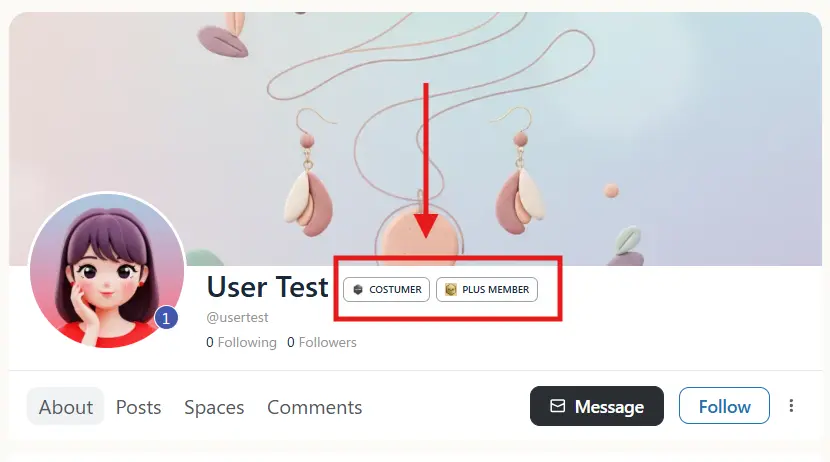

I got this code to increase it a little more, in case it's useful to anyone, here it is:
/* Propiedades de la imagen (manteniendo el tamaño fijo de 25x25) */
.user_badge_inner img {
    max-width: none !important;
    width: 25px !important;
    height: 25px !important;

    flex-shrink: 0 !important;
    flex-grow: 0 !important;

    /* Mantenemos tu margen derecho negativo para acercar el texto */
    margin-right: -3px !important;
    object-fit: contain;
}

/* El contenedor principal */
.user_badge_inner {
    display: inline-flex !important;
    align-items: center !important;

    margin-top: 5px !important;

    /* 🚩 MODIFICACIÓN CLAVE: Reducción del Relleno Izquierdo (padding-left) a 5px.
       [top=3px] [right=8px] [bottom=3px] [left=5px] */
    padding: 3px 8px 3px 5px !important;

    min-height: 25px !important;
}

/* Propiedades del texto (manteniendo el tamaño y el peso) */
.user_badge_inner span {
    font-size: 12px !important;
    font-weight: 600 !important;
    line-height: normal !important;
}
Sombri Luna added your post to bookmarks)

I am just commenting so I don't loose this feed, since the bookmark is for 10 feeds only.
WiLson Eberechi Oh... I just noticed that there are only 10 posts in my bookmarks... That's very annoying.

+1

Depends on what you're wanting to achieve, but a quick and simple way is to increase the font size. I would also avoid using !important as much as possible. Instead use greater specificity on the target selector. Depending on what browser you use to inspect the element, you can hover over the class or id and it will give the specificity number. To avoid having to use important, just add other classes/id's before it to give it the greater priority.
So for an actual example, this code will increase the badge size simply by increasing the font size.
.object_name .user_badge {
  font-size: 15px;
}
If you want to target the inner badge styling, hit it with this and add the css styling you want:
.object_name .user_badge .user_badge_inner {
  border: none;
}