

Introducing FluentKit - Unified UI for All Fluent Plugins
If you run more than one Fluent plugin on the same WordPress site, you already know the friction. Fluent Forms in one WordPress admin menu, FluentCRM in another, Fluent Support somewhere else, FluentCart in its own. Same site, same business, separate experiences.
We tried to soften that quietly over the years, so you'd get little wins like:
- Purchase history showing up inside a support ticket
- Form submissions on a CRM contact profile
- License info one click from the support agent
Small bridges between islands. Useful, but you still had to hop between them every day.
Today that part changes. FluentKit puts every Fluent plugin you already have on a WordPress site under one menu in your admin. No account changes, nothing moves between accounts or sites. In this version you get:
- One dashboard for every Fluent plugin
- Collapsible menus so the ones you're not using get out of your way
- One-click install for the ones you haven't tried
- A single place where AI shows up across the lineup, starting with FluentCRM v3 yesterday, instead of thirteen different places
A quick note on what this release is. The dashboard is unified, and that's a real step forward. But the deeper stuff, like shared contacts across products and a single view of every customer in one place, is still the work we're starting on. This release is the foundation we needed first. The next six to twelve months is where it gets really fun.
So here's what would really help. Install it, play with it, and tell me what feels off.
Ten years in. Still small, still building, still listening. Thanks for being on this side of it with us.
The full launch post is here: https://wpmanageninja.com/introducing-fluentkit/
How to install FluentKit
- Download & Install FluentKit addon
- Activate the plugin, then go to FluentKit and activate the unified UI
- That’s it.
More cooking 👀

Great 👍

Right on! Just installed on the first site. Can't imagine life without Fluent products. We're getting closer and closer to Fluent Press.

love this

Cool. In the first few clicks, I noticed that the left-side menu disappears on the FluentForms pages like entries and others

Sebastian Weiss yes. The forms team will release an update next Monday.

how can i had fluent community inside fluentkit?
André Góis more coming soon!
Shahjahan Jewel thanks

Shahjahan Jewel You're a true wizard 🧙♀️
Is a FluentKit widget for the WP Dashboard planned?
Sebastian Weiss what the widget should have?
Shahjahan Jewel I built this for me, these are just links. Menu items in WP Sidebar are hidden to get everything much cleaner. Could be extended with some statistics.

working toward the dream of one big, beautiful, fully integrated plugin! Looking forward to installing this!

Fantastic!

Nice for those who might like it, but it's not for me. I could maybe see the point of a single Fluent entry in the admin left sidebar, with all the fluent tools as a submenu, because the fluent family is taking a big place in my admin sidebar, but I don't like that it's separate from all the other plugins.
I guess if you only use fluent plugins, it might make sense to save this link as an entry point, but as soon as we're in Fluentkit, we have to go back to access anything else, so it doesn't work for me as it adds steps and restricts the view.
I'd rather be able to jump from one tool to the other at the same admin level, whether I need a fluent tool or a non-fluent tool. I also miss the top admin bar that gives me quick access to admin tools.
But I can totally see how someone using only Fluent tools might find this desirable.

Amazing plugin... Installing it right away

Is there already a plan for the launch of FlentPlayer?

Heads up! ⚠️
When Fluent Unified UI is active, Full Screen Mode on FluuentBoards doesn't work.

I like the idea, but I see 2 glaring problems.
- It's not obvious how to return to WordPress admin. It wasn't until I launched it a second time that I noticed the small WP icon in the lower left corner.
- Now, instead of one click to get to Fluent Forms, Fluent SMTP, FluentCRM..., now there are more
Is "Settings" working? I clicked on it and it does nothing.

Wesley Peace
I am having same issue. Click the gear icon at bottom of FluentKit dialog and nothing happens.
Also not showing FluentSnippets nor FluentSMTP in FluentKit
AND
FluentCRM and Forms are still showing in the WP left menu -- along with FluentKit.
Am I missing something?
Suggestion re option to return to WP Admin, instead of being at the bottom of the FluentKit sidebar, move it to the top where the site icon is now
-OR-
add to the drop-down menu at top -- which would be more in line with the block editor, Elementor and Bricks (maybe?)

Since we are making updates and I dont know where else to put this, but,:
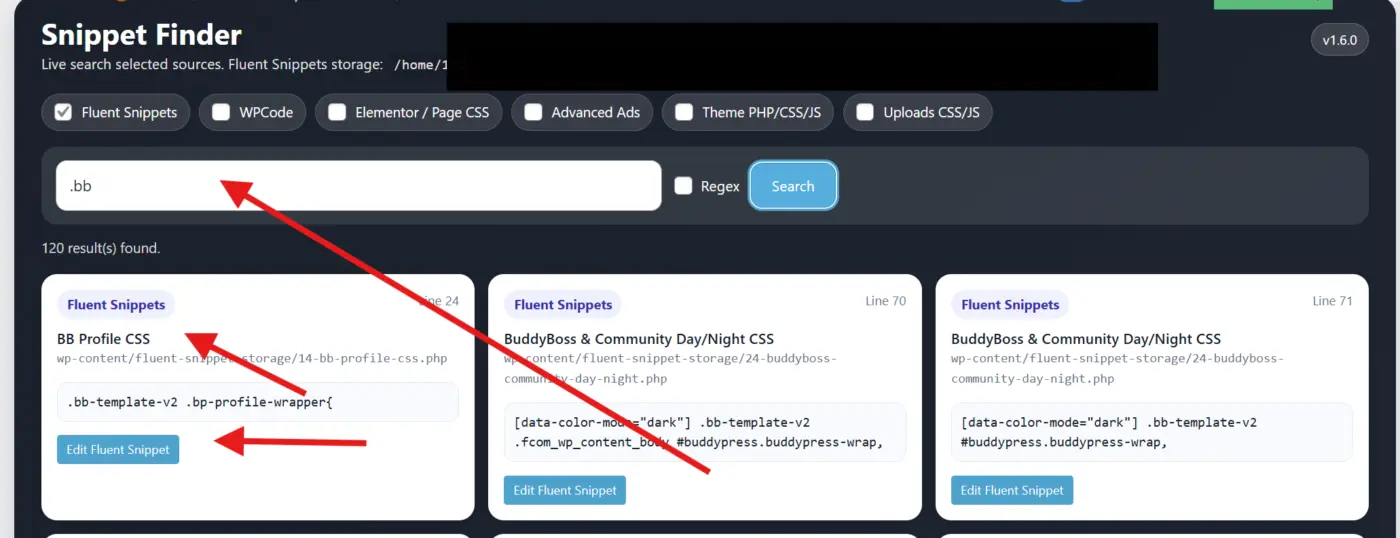
This makes the difference between Fluent Snippets and an expensive alternative: A content finder to find which snippet the code or css may belong to:
Me and Claude made this and appears at the top of the Fluent Snippet Page. Would be happier if there was a supported version available for everyone, and strengthen your ecosystem.
Thanks for all your hard work to date also !

🔥🔥🔥🔥🔥
Keep going! ✨🚀💫♾️

Cool, but not sure this is for everyone. And AI is going to be managed from FluentKit? What if you don't want FluentKit but do want to use AI in several Fluent plugins?

This is great! Will/are SMTP and Auth integrated with this as well?
Shahjahan Jewel I’ve found a reproducible issue with FluentKit (2.x) that breaks the Easy Updates Manager plugin. This wasn't an issue with the older FluentToolkit (1.x)
How to reproduce:
- Install FluentKit (2.x)
- Install Easy Updates Manager (free, I used the latest 9.0.21)
- Go to Dashboard → Updates → “Check again”
- Open Easy Updates Manager → Plugins
Result: The plugin list crashes with this error:
Code
Error: Cannot use object of type stdClass as array
This happens because FluentKit’s update metadata is returned as a stdClass instead of an associative array, and EUM expects an array when rendering plugin update information.
Removing FluentKit (or reverting to FluentToolkit 1.0.2) immediately resolves the issue.
Could you update FluentKit’s update API response so it returns a proper array structure?
Thanks!
Shahjahan Jewel Can you reproduce the above? Can we expect a fix? I downgraded to the V1.0.2 of Fluent Toolkit, but it doesn't have the new AI options. I use MCP servers for all the Fluent plugins at the moment as I'm still with FluentCRM 2.x, but once I'm able to upgrade to FluentCRM 3.x I'd like to be able to use the integrated AI options for that and the other Fluent tools. Thanks!
I've created ticket #159819, hopefully this will be solved soon. Thanks!
I've also created a ticket for the UEM devs here: https://wordpress.org/support/topic/fluenttoolkit-2-0-breaks-compatibility-with-eum/#new-topic-0

Same issue here, but without Easy Updates Manager installed — FluentKit 2.0.3 breaks the native WordPress Updates page directly (/wp-admin/update-core.php), so it's a WordPress core issue, not specific to EUM.
Marco Mandaliti The devs are working on it (as well as other issues with MCP servers), it should be fixed soon. You should try 2.0.4 in case it helps for the WP updates.
Screenplay Unlimited great! 🔥

This is just awesome. Thanks!!! Ive been sleeping poorly thanks to all the new stuff....seems like its not going to change soon 😂.

Shahjahan Jewel will need back to wp admin button on mobile similar to that for the desktop…for Fluentkit

That's a promising plugin, thanks !
I hope FluentCommunity is coming soon.
One question:
What's the difference between FluentKit and FluentToolkit?

Fabien B the name...
Lukas List Actually, they're two different things. I checked with Fluent support:
- FluentKit is the new unified dashboard to manage the entire Fluent plugin lineup from one place.
- Fluent Toolkit is a utility/beta-testing plugin used to test beta versions before they go live.
So not just the name 😉
Fabien B Both are same. We built the Fluent Toolkit for beta testing and then renamed as FluentKit. Maybe we will change the name in the coming weeks as we finalize everything.
Shahjahan Jewel Thank you for the clarification. I had a different version from the support team.
Lukas List You were right 😉
Hey Shahjahan Jewel, just wanted to flag an issue I ran into with FluentKit 2.0.3.
After installing it, the WordPress Updates page (/wp-admin/update-core.php) stopped working completely.
Error in the logs:
PHP Fatal error: Uncaught Error: Cannot use object of type stdClass as array
in /wp-admin/update-core.php on line 520
in list_plugin_updates()
What was happening:
- The Updates page returning a 500 error
- Only some plugins listed (page crashes mid-render)
- "Select all" checkbox doing nothing
- No updates applicable through the dashboard
Root cause: The icons field in FluentKit's update object is being returned as a stdClass instead of an array. WordPress core's list_plugin_updates() iterates over icons as an array at line 520, causing the fatal error.
The _site_transient_update_plugins option also gets stuck as a:0:{} because the check crashes before the transient can be properly populated.
Fix: Deactivating and uninstalling FluentKit restored the Updates page immediately.
Hope this helps the team track it down — looking forward to a fix because I'd love to actually use the plugin!
Environment:
- WordPress 6.9.4
- FluentKit 2.0.3
- PHP 8.2 (alt-php82, CloudLinux)
- Plesk hosting
This is most likely related to the issue I already reported with Easy Updates Manager. It should be fixed soon.

Shahjahan Jewel is it possible to talk with you guys about this plugin and another one I'm working on for possible integration/compatibility.

When FluentKit is active, only the pro version of plugins is being updated.

Are there plans for an equivalent unified front end account/dashboard?

Hi WPManageNinja Team,
The Fluent Hub extension provides a good overview of the Fluent ecosystem.
To make it more practical, I would like to suggest an improvement: add a "Settings" (or "Dashboard") button for plugins that are already installed.
Currently, the table shows:
- Plugin
- Status
- Action (Changelog / Up to date / Install)
For installed plugins, having a direct "Settings" link next to "Changelog" or "Up to date" would save time. While some plugins have their own top-level menu, others like FluentSMTP are located under WordPress Settings, which makes navigation inconvenient.
Proposed UX:
- Installed plugins: Show a Settings button that redirects directly to that plugin's settings page.
- Not installed plugins: Keep the Install button as it is.
This addition would make Fluent Hub a true unified control panel for the whole ecosystem.
Thank you for your time.