

How to Reduce Registration Form in FluentAuth?
It takes 7 actions to sign up for an account. I would like to reduce this to the bare minimum. I don't know where to customise this and the docs don't say.
If I could ask for just:
1) first name and
2) email
...and then email them a password reset that would be perfect.
I'm getting a terrible sign up conversion rate. The vast majority of people exit the page.
How can I reduce the amount of info required to signup?
Thank you in advance!
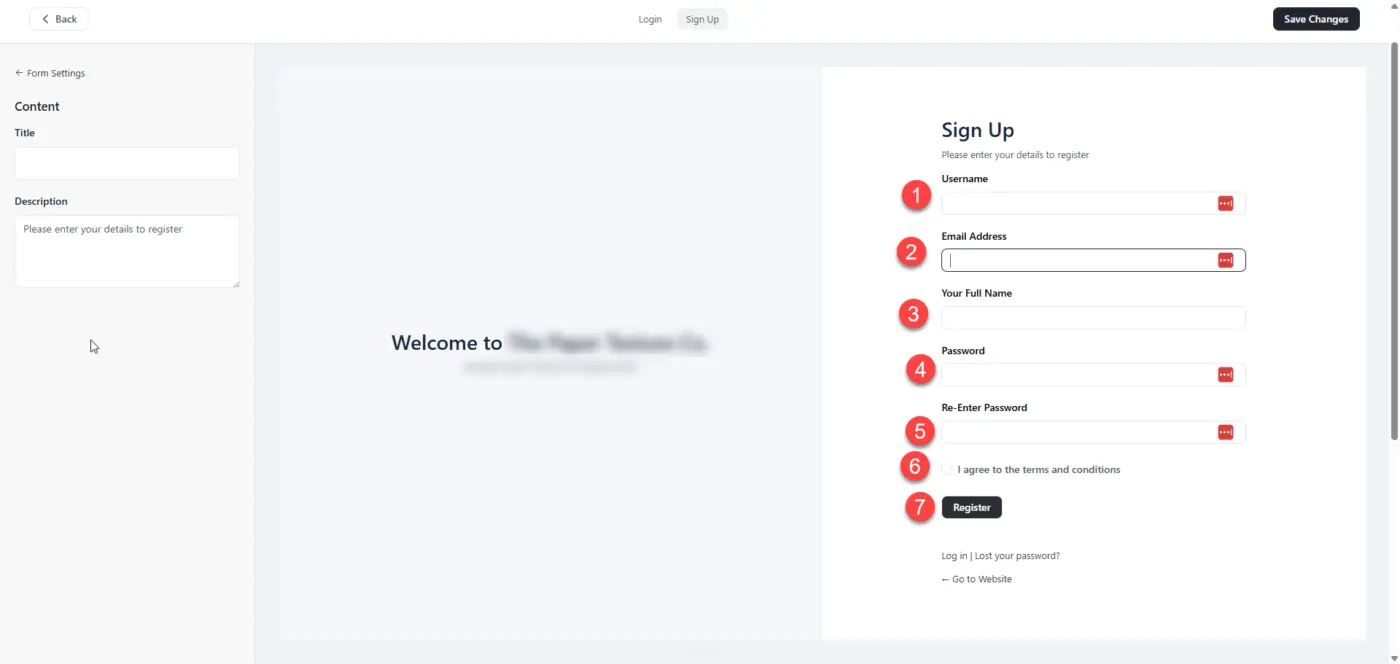

What about using fluent forms. Ask for name, email.
Then in integrations, set the account creation.
🤔
*Sign up email will still be custom by Auth.

Jorge de los Reyes Hmmm. It's that easy? I guess because I don't know how to get there. I struggled to get it like it is now :)
I have so many moving parts on this site that affect the user...Wordpress user, FluentCRM contact, FluentCart customer, Fluent Community member. Some users are some and others are all.
I barely know how it all works or how it happened, it just does.
I simply installed FluentAuth, and there was my new signup form and all the redirection options were set as I needed. I don't really know how to replace it.
Honestly, yes, I think it may be that simple. Occam’s razor comes to mind: the simplest solution is usually the right one.
You can create a Fluent Form with just first name and email. Then, under Settings & Integrations, you can:
• create the WordPress user, with an automatically generated password;
• add or update the contact in FluentCRM;
• add the user to FluentCommunity.
Each integration feed can use conditional logic, so not every user has to be sent everywhere. FluentCart can create the customer when an actual purchase happens, and FluentAuth can continue handling authentication and redirects based on user role.
Am I missing any other function that the current registration form needs to perform?
I think you are right Jorge de los Reyes and that about covers it but the one thing that I still don't get is how do I get that form to show up here?
https://mywordpresswebsiteaddress/wp-login.php?action=register
Nicolai That’s the default WordPress login page, which FluentAuth can customize.
If you want users to register through a fluent form instead, you’ll probably want to disable direct access to the default login/register page (at least for regular users).
About login page, it’s actually considered a good security practice not to use WP-login, as it reduces the number of bots constantly targeting wp-login.php with login attempts.
I’ll just create a new landing page, and set there the shortcode.
Ah ok! I think I've got it now. It all sounds so sensible when you say it Jorge de los Reyes I'll give it a go. Thanks a million for all your help. 🙏
You’re very welcome! 😊
I’d probably keep it simple:
- FluentAuth for the login experience.
- Fluent Forms for user registration if you want a more flexible and customizable signup form.
I checked the docs, and Fluent Forms can be used for login, but it requires a custom PHP snippet. FluentAuth already handles login natively (and gives you things like 2FA, social login, login protection, redirects, etc.), so I’d stick with that for authentication.
That combination gives you the best of both worlds: a simple registration flow with Fluent Forms and a robust, secure login experience with FluentAuth.
If you run into any issues while setting it up, just let me know. Happy to help! 😄
I managed to make a perfect signup flow on a page of it's own. Super easy to sign up with just an email, they get redirected by fluentauth to the page they need to be on and then something (fluentauth?) emails them a password reset link. PERFECT.
But now This final part is proving to be really difficult.
I tried to redirect from /wp-login.php?action=register to the new page but nothing works.
I tried many different things in .htaccess (thanks Claude) but it always still goes to the huge old Fluentauth signup page I want to replace with my new page at .../signup
I have replaced the menu links to signup on my site to my new page .../signup but I know a lot of plugins, automated emails, error messages, etc send people to /wp-login.php?action=register so I have to find a way to redirect that to /signup
Then there are other signup pages on the site like /account/ which is yet another signup page and looks different again, with different fields (maybe it's FluentCart?) Maybe there are others too. I don't know.
That's the hard part of all this stuff, as flexible as Wp and the Fluent universe is, there are a dozen ways to do anything, and a dozen places with settings to set them up.
For now though I need to figure out how to get FluentAuth to let people go to
/signup
when the url is
/wp-login.php?action=register
Nicolai Sadly, FluentAuth doesn’t currently include that option.
I’d either create a small custom snippet or use your own custom login page.
Most security plugins let you disable wp-login.php or redirect it to a different URL. However, I wouldn’t install a security plugin just for that feature alone.
It could actually be a nice feature request for FluentAuth.
Personally, I’d also aim to make the whole authentication flow as cohesive as possible. For example, I’d have a single login page as the entry point and keep all plugin-specific access pages (FluentCart, Community, etc.) hidden or inaccessible to regular users whenever possible. That way, users always have one consistent place to log in, regardless of which Fluent app they’re trying to access.