

Fluent Forms – T&C Acceptance Not Legally Valid
As a lawyer, I’d like to raise an important issue regarding the current implementation of the “Terms and Conditions” field in Fluent Forms.
At the moment, the system only stores whether the checkbox was ticked or not. However, I’ve identified two major legal concerns:
- There is no audit trail or immutable record of what was accepted. The terms text can be edited freely by the admin at any time, which renders any supposed acceptance legally void.
- The accepted terms are not shown in the exported or printed entry. You only see “Accepted” or “Not Accepted” — but not what was accepted or when.
Unfortunately, this does not meet the minimum legal standards for valid consent.
A reliable solution should, at the very least:
- Store a timestamp of acceptance
- Log the exact text of the terms shown to the user at that moment
This feature could become a powerful tool for legal compliance (especially with regulations like the GDPR, ePrivacy, and contract acceptance in digital environments).
But in its current state, it creates a false sense of security for users who believe they are collecting valid consent — until the moment they are required to prove it…
Yes, you can try it... but it won't be easy. And it could be fixed just adding the full text and a time-stamp on the report document to be printed.
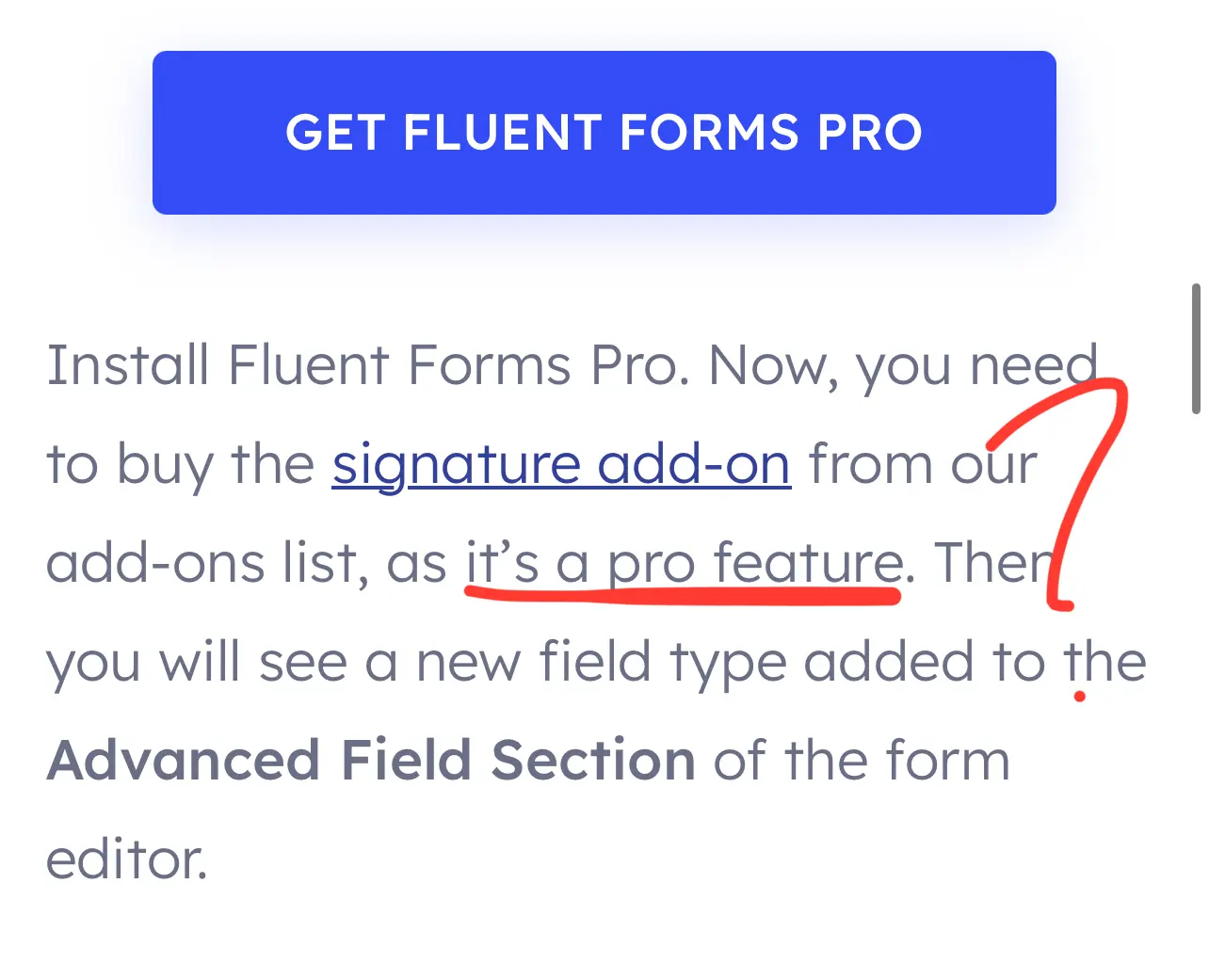
Lastly, I was surprised to see that the Signature Add-on is not included in the Pro license. Given its relevance in legal workflows, I would strongly recommend reconsidering this.
Happy to provide further feedback if useful.
Best regards.
Screenshot:
- Signature add-on is a “pro feature”: makes no sense it’s not on “pro” license.
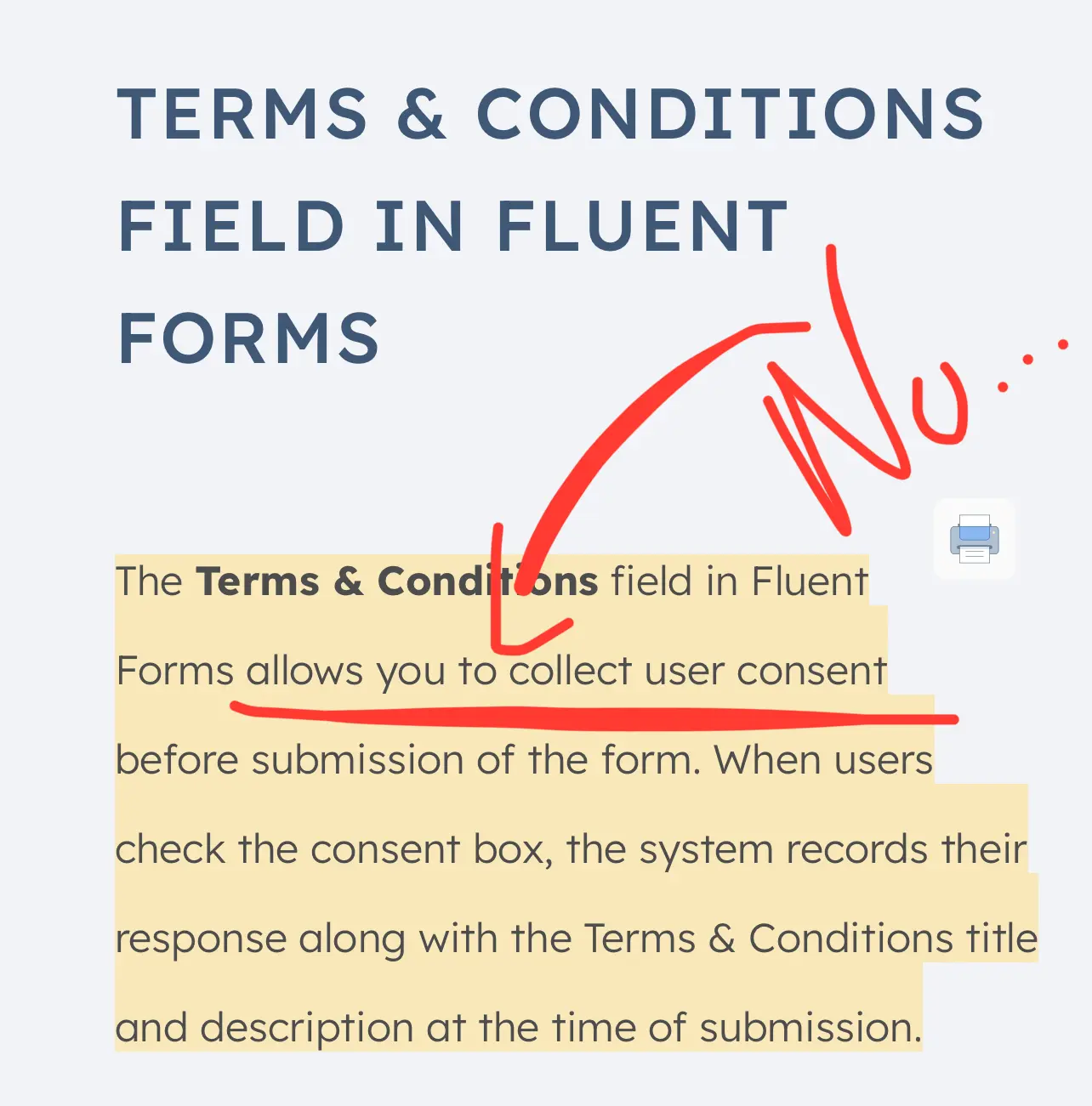
- Terms and conditions explanation on site: says it allows you to collect consent: not the case without the aforementioned requirements.

Following

Interesting. Thanks for sharing.

William Beem You're welcome William! Thank you for appreciating it.
I really hope we can have an update for including just this two precisions 🔍
Jorge de los Reyes My current concern is for responding to charge disputes. I recently learned that I had my registration form conflgured incorrectly and it wasn't using an address verification system. That invited a lot of problems with stolen credit cards and a lost dispute response that cost me some money.
Lesson learned.
Now what I'm gathering is that there's more I need to do to counter any disputes, but I'll have to figure out how to deal with the issue you raised here.
The good news is that changing my form to collect address information to use with verification basically stopped the thieves in their tracks.
William Beem Yes — collecting and verifying full billing address is indeed a well-known Stripe best practice, and I agree: sometimes, these lessons are learned the hard way.
Losing a dispute, while painful, can often be reframed as “an investment in knowing better” — and in this case, it clearly paid off, since your new setup stopped the fraud in its tracks. Well done.
Now, regarding the Terms and Conditions and proper consent capture — that’s a topic I deal with dozens of times a year, and interestingly, it often escalates beyond expectations. What seems like a small checkbox issue quickly becomes a compliance can of worms, revealing bigger regulatory blind spots.
A dissatisfied client might not want to go through the hassle of a full lawsuit or arbitration — especially in B2C — but they can do real damage simply by pointing out procedural or legal irregularities. If a business hasn't anticipated those, it can get caught off guard and lose not just money, but valuable mental energy — energy you’d much rather invest in learning FluentCart or testing new WP Manage Ninja releases 😅
Jokes aside, this is a serious topic. And, as you've noticed, it’s often left half-done by developers or site owners.
There’s no perfect solution:
- Either you go full formal, using a document management or contract signing system with proper audit trails — which often makes the process too rigid unless you automate heavily.
- Or you use the typical form checkbox, which falls short unless you add a second layer to store the exact version accepted, with timestamp and proof.
Lately, I’ve been studying how Revolut handles this (they change their terms nearly every month!) — and they have a beautifully transparent legal archive:
👉 https://www.revolut.com/es-ES/legal/terms/history/
If any dev here ever figures out how to replicate something like that with WordPress + Fluent Forms + automation... that would be amazing. Because although we’re not banks, we’re still contracting and collecting consent daily via simple forms — and that’s enough to carry legal weight.
Jorge de los Reyes I usually only need to get punched one time to learn my lesson. Not only do I have the form with the address information pushed to Stripe and Zip Code confirmation on the credit card line, but I also went into Stripe RADAR to enable some rules to block postal verification fails, address fails, risk categories, etc.
The thing that would help me now is if I could include my Terms of Use text in the receipt page generated by Fluent Forms. I don't see a way to do that yet.

Jorge de los Reyes Wouldnt adding the second layer be pretty easy if you simply send a full copy to both the user and to an archive email address with the user name in the subject line? Then that becomes your fully time stamped, hard copy of whatever they agreed to.
Anthony Sakovich that would be a good fit if the content of the text (that you insert into the description) is sent to both thr user and admin.
But my findings are that they will only receive (like if you enable notifications to admin) the label and value true or false. Not the specific text.
Hence, same problem.
But yeah. If that is possible (I tested its not- but maybe there is a way to do so… ), would be a possible way.
However I think that being able to have this info directly on the form report will be easier.
Have you tried that kind of notification and tested if it includes de description Info? (This is, the full text)?
I actually use it all the time. You can program whatever it says when you check that box in the responses. The conditional formatting is incredibly flexible and dynamic. And whatever you program it to say are the terms it will send to both email addresses as the terms.
Anthony Sakovich Wow! I’ll definitely check this out Anthony.
Much appreciated.
Anthony Sakovich Hello Anthony. I had the chance to further investigate the smartcodes available for Admin notifications. And sadly, we only have available (as I mentioned before): Entry input and labels.
The description field (that is the place in which you will post your legal terms and conditions) is not available among the smart codes so, the problem could not be fixed this way. Nor it is a valid workaround.
Would be handy, tbh.
You can create conditional responses in both the PDF Feed, the email, and the conditional response tab for display.
You can create conditional responses in both the PDF feed, the email, and the conditional response tab for display.
You can technically just put in under “value“ the full text, but it’ll just be one giant copy block if you do.

As a form plugin we should not go in the legal contract area. If we want to track and bind all the fields, that will get complicated for most of the users.
Shahjahan Jewel It doesn’t necessarily have to include all the fields (although that would certainly be helpful). But it’s not strictly required for the specific point about Terms and Conditions (TyC).
The key issue is this: if there is an element labeled “Terms and Conditions,” at the very least, the text shown in the description should be stored.
Of course, this isn’t a signing or contracting plugin (which would come with its own legal requirements). But if you’re going to include something called “Terms and Conditions,” users shouldn’t be misled into thinking it’s legally valid if it doesn’t actually meet the basic requirements such a field should comply with.
Saving the exact text at the moment of consent would already be a significant improvement. Otherwise, I would suggest renaming the element or adding a disclaimer like: “This is not legally valid.”
Many users may run into serious problems if a dispute arises with a client or customer and they’ve relied on this element thinking it serves as proof of consent.
As you said, FF is a form plugin. But when elements like “TyC” are promoted on the site as allowing you to “collect user consent” (which, in its current state, it doesn’t really do), and when add-ons for signatures are also available, I believe you’re already entering the “legal compliance” space—attracting users who want to meet legal standards for consent or signature collection. 😅
Leaving the feature as it is now is likely to harm users who believe they are collecting legally valid consent. The FF website currently implies that this feature can be used to do exactly that.
In a legal dispute, that consent record would likely be invalidated almost immediately. These are just some of the basic requirements that any client, auditor, or opposing counsel would check first.
I don’t know what kind of deals users are handling, but I’ve seen high-stakes trials where not just the parties, but also the tools advertising compliance features, were brought into the legal proceedings.
In fact, a simple screenshot of how this feature is currently described on your website could be enough to raise the question of shared liability.

Jorge de los Reyes I agree that I would not want this in a forms plugin. You can easily use a hook to add custom functionality and store the appropriate data in the database.
Andre Daus Wouldn't it be possible to simply allow the report to be printed with the data that is already being shown?
Specifically:
- When you click “Edit”, the full text of the Terms and Conditions is visible — the legal issue here is that the checkbox can be toggled freely, which undermines its validity.
- The timestamp (date and time of submission) is also there — I’m just suggesting it should appear in the printed version as well. The data already exists.
Unless I’m missing something, it seems the issue is not that the data isn’t stored — but rather that the current configuration prevents it from being displayed or exported properly.
Also, a change or update should be necessary (in the plugin, or the site description of the feature). Because I am sure many people could be relying on this TyC element, without any hook pre-configuration. Creating an important compliance problem in the future.
Jorge de los Reyes What do you mean by “printed”? If I print my terms, it’d be several pages of paper. Isn’t it sufficient to store versions of your terms in a document management system and show the latest version on the website? Then, anyone who accepts can easily be tracked to the agreed version. Too simple?
Andre Daus Great question — and you’re absolutely right to seek simplicity.
However, in legal terms, the simplicity must never compromise the integrity of the proof.
Here’s the key: when we speak of “printing”, I don’t mean literally sending dozens of pages to a physical printer. I’m referring to generating a verifiable, immutable record of what was shown and accepted by the user at the exact moment of submission — ideally, in a format that can be exported or presented in court or before a regulator.
We have a preview box in Fluent Forms with exactly the needed data. But if you try to print that for proof, it does not show that preview data.
Storing your terms in a version-controlled system is good practice — but not sufficient if:
- The system doesn’t explicitly link the accepted version to the individual submission.
- The consent is stored only as a binary value (“checked” or “not checked”), with no preserved snapshot of the accepted text at that time.
- The data cannot be extracted and presented as evidence, in a format that includes the timestamp and the actual text accepted.
From a legal standpoint, the gold standard is not just that someone agreed to “your latest terms”, but that you can prove exactly what they saw and agreed to, without relying on your own ability to retroactively define “what the terms were”.
Otherwise, in any dispute, a judge or authority may rightly ask: “How can we know this checkbox referred to the terms you claim it did?”
So yes, the concept is simple. But the implementation must be forensically robust — especially if you want to rely on it in the real world of claims, litigation or regulatory audits.
And if the platform allows users to think they are collecting valid consent (in this case, we can change the consent manually…), without providing these basic safeguards, then it is not merely a technical gap — it’s a legal risk, both for the user and potentially for the tool provider.
That’s why I raised the issue. The data is already there — but how it is presented and exported makes all the difference.
Hope the explanation helps!
I get the point of FF not being a “legal tool”. But having an element like “Terms and Conditions” that does not comply with the aforementioned requirements, could cause problems for those relying on it as a valid legal proof.
If you have a personal system, it’s okey. But I am sure that, if we already have the data… being able to print the data that was actually sent (and not a True or False value) would be much easier. And in fact, useful for compliance and not something that could cause legal trouble.
Jorge de los Reyes Great explanation! I totally agree regarding the T&C element. I always wondered what it might be actually good for and never used it. Many use it for accepting the privacy policy which leads to other problems. Hence, I never touch it.
I tend to disagree with your other reasoning. If a rogue website owner want to spoof the acceptance of the terms, they can easily do so by just changing bytes in the database. Wordpress does not have an end-to-end processing here. I discussed the same with my lawyer and he argued the same way as you (must be something learned at law school 😉 - no offense!). Eventually we agreed that I document the process and let nobody through without accepting the terms.
The terms are in a document management system that tracks all changes and stores the versions. They cannot be altered anymore after saving. And of course, they are reflected on the website for customers to read. If a customer fills in a form that data is stored with a timestamp including the checkmark (since it wouldn't be submittable otherwise). If someone argues about the terms or content or changes, It is easily proofable what version was active at that given time. And since the process is documented (and also stored in the DMS), it is a pretty robust system.
If you want to go one step further, you can also use a webhook that sends the necessary data to your CRM and also stores it there unalterable.
I still think it is a simple process without the need to add too much functionality that is not needed in a forms plugin.
Andre Daus Thank you for such a thoughtful and complete explanation — your contributions are so enriching.
It’s a pleasure to debate these matters with people who bring both technical clarity and practical experience.
You’re absolutely right: many users employ the “Terms and Conditions” (T&C) element for privacy policies. While that’s a common use case, it’s not always necessary — privacy policies don’t typically change as often or as materially as T&Cs do. What’s more common (and problematic) is when the same field is used for marketing consent — which, as you surely know, is not legally compliant under GDPR and other international frameworks if the checkbox is mandatory.
Legally, you can only make a checkbox mandatory for two things:
- Privacy policies (as part of informing the data subject),
- Terms and Conditions for contractual acceptance.
And only the latter — the actual contract — requires strong evidence of consent, including version tracking and timestamping.
That’s why I find your system with version control and change tracking particularly interesting. I admit I’m not entirely sure how your document management system stores and locks those changes technically, but the approach sounds excellent — certainly far ahead of what most users (and platforms) put in place. Hats off.
At the end of the day, this is a B2C world — in B2B or B2G, the norm is proper e-signature platforms with full audit trails and legal enforceability. But when it comes to consumer tools, like Fluent Forms (which I truly admire), that last mile of legal certainty in the T&C field could make a big difference — and is one of the very few missing pieces in what is otherwise a stellar plugin.
What concerns me most is not the one-in-a-million consumer that initiates a forensic inspection. It’s the much more common case of small business owners who use these tools thinking they’re covered. And then, when confronted with legal complaints — often not from one, but from several clients acting in coordination — they end up having to settle. Not because they did anything malicious, but because their technical setup didn’t hold up when it mattered most.
There are quite a few entrepreneurs who could tell you horror stories — stories that began with enthusiastic customers turned sour, and ended in reputational or financial nightmares.
And under European regulations, if a company cannot properly demonstrate that the consumer was clearly informed and gave valid consent, then the right of withdrawal doesn’t expire in 14 days — it extends to 12 months. That alone can turn a small compliance gap into a serious operational risk.
That’s why I raise this issue. Because even if other workarounds exist, blind confidence in a feature that gives a false sense of legal coverage can be fatal.
Again, thank you for your constructive and rigorous input — it’s always a pleasure to exchange views like this!
Jorge de los Reyes We have way too much regulation in the EU. These must not lead to overcomplicate tools we need daily. Red tape all over.
However, it is refreshing to discuss in detail. Thanks for the updates!
Shahjahan Jewel What about allowing us to add text to the receipt? Perhaps that would allow us to store a permanent copy of the Terms in the customer's receipt.
Jorge de los Reyes Perhaps the answer here is not to change Fluent Forms, as Jewel said, because it's a form plugin. Instead, let's see what comes of FluentCart with regard to saving information in a receipt and related issues here.
We already can create an email receipt with all the necessary details and attach a terms PDF document (use a confirmation email). While it’s not the cleanest way, it is simple and already works. If you use FluentSMPT you also get an email log with the details and attachment sent. You can even send that mail to a CRM to document.
This is mandatory anyway at least in Germany if the customer can only place an order but cannot accept an offer "invitationes ad offerendum".
William Beem that will help. Sure.
But in the end, the element on the form will still be misleading for someone trusting it as legal proof of consent.
Also, many will be using forms not only for collecting consent for a product, but for collaborations, recordings, events, and so. So for those usual cases, fluent cart won’t be a solution.
Note: consents must be separated when the goal is different. So, it is usual to use this kind of solutions for separating consents. As “group” or “collective” consents are not valid. Eg.: you bought our product and accepting the terms you agree we use your testimonial, review, or use case. (Not valid if the consent is not separated).
I think a notice or disclaimer should be added to the element, or, an update that allows to fetch the description content should be conducted 😅
Even if is true a Forms plugin should not take charge of the compliance of their users (something that is more wide open); I think it is also true that currently, it is announced and described as a fully complaint TyC element. Which, sadly, it’s not the case.
Today’s anecdote: we got 2 more cases in which this was actually the case with a consumer. With a liability of +$4,000 to the company. And probably, x15 more. And after having to process 2 more refunds due to this a couple of months ago.
Digital business’s are growing. But it’s also the case (probably due to AI) of consumers awareness.
Curious times to be both a consumer and managing businesses.
Jorge de los Reyes OK, let's try another angle. We can store a document in an immutable offsite source, like an AWS S3 bucket with ObjectLock, so it's a write-once, read-many source.
Add a hidden field in Fluent Forms with the version of the document which would be in the record and match the version in the S3 WORM bucket.
If we update the terms, that creates a new document in S3 and a new version to reference in Fluent Forms.
A case for this would be if I change my community registration fee from a single, lifetime fee to a monthly fee. The people who signed up for a one-time payment still have their version of the terms available. New subscribers will get the version that specifies monthly payments rather than a single payment.
We can use a signed URL to view the terms document. That likely needs a plugin like WP Offload Media.
What's your assessment of this tactic?
William Beem you can send the document right away. At least in Germany we’re obliged to share the terms anyway.
William Beem This is where we get to the real core of the discussion — the point where legal enforceability, technical architecture, and user experience intersect :)
Your proposed setup using AWS S3 with ObjectLock combined with a versioning system via hidden fields in Fluent Forms is, frankly, interesting: maybe, a bit too much work - but fine if you feel comfortable with it.
I always try to think here with scalability on mind.
Your proposed approach may meet many of the fundamental legal criteria: immutability, traceability, and version control. If challenged, you can confidently say, “This user accepted version 1.2.3 of the terms, stored immutably, timestamped, and verifiable.” That’s powerful - and well beyond what most setups even attempt.
Good luck trying to demonstrate that your system is not valid: seems pretty solid if conducted properly.
Now, zooming out, I see two major paths here — both valid, depending on the business model and risk profile:
- 🔧 The DIY Approach
This is ideal for B2C, SaaS, subscriptions to digital content, and other lower-risk models. Using a checkbox to accept terms, logging the version via hidden field, and storing the data (including a hash or the document itself) in an offsite, immutable location — like S3 or even emailing it to the user — offers a lightweight but robust record of consent.
Fluent Forms gives us just enough flexibility to make this work. I’ve heard here in the community, though not tested personally, that SmartCodes in the notification emails can dynamically pull the text of the form fields — including the T&C description. That means we may be able to auto-send the user a timestamped confirmation of what they accepted, including the full content.
It’s not quite an audit trail, but for this level of interaction, it’s more than sufficient — and highly defensible.
Probably, not scalable or... "that professional".
- 🖋️ The e-Signing Approach
When we start dealing with:
- High-ticket services
- Recurring payments with service delivery
- Sectors involving closers, agents, or intermediaries
- Or businesses exposed to regulatory scrutiny
- Or even, to selling the subscription B2B or B2G (so as public servants or employees can access)
...then the threshold changes.
In these cases, I personally lean towards proper e-signature workflows. Recently, I came across ApproveMe (WP E-Signature) (after Sascha Liem mentioned here— which claims compliance with eIDAS, UETA, and includes full audit trail and certificate of signature.
Could be an option! (never tested though)
Their tool even integrates with Fluent Forms, which is a huge plus. The downside? Pricing. A $700 LTD for 10 sites isn’t viable for everyone, especially smaller businesses or creators.
And this kind of tools (specially when they rely heavily on LTD), usually are not up-to-date regarding compliance or updates, support, etc.
But the system of the demo looks pretty solid in case you also want to check it out (I asked them if they have 1 site LTD or similar - if it works as it claims, it could be really interesting. Even more if we can exclude the signing and just keep a checkbox). It also has integration for uploading then the PDF with the certificate.
In terms of functionality, it appears to be solid (and integrable with FF). And in certain contexts — especially services — it’s not overkill, it’s just good sense.
Take the insurance sector, for example (one of my personal favorites). Even for a $20/month plan, the onboarding is legally bulletproof:
- Plan selected
- Email with all docs
- Signing flow
- Both parties receive signed copies
Simple. Effective. Legally airtight. And psychologically reassuring for the user.
The Ideal Vision (a Legal Utopia maybe)
What we’d really want is a hybrid:
A “scroll and accept” UX with a backend that behaves like an e-signature platform:
- Immutable versioned document
- Timestamp, IP, email, session hash
- Auto-email with a PDF record
- Centralized audit log
All without disrupting conversion.
It’s possible. We’re just not quite there yet natively in WordPress.
But we can get close with smart DIY automation + some external tools. If anyone ever builds a Revolut-style legal terms archive for WordPress — like this one: https://www.revolut.com/es-ES/legal/terms/history/ — that would be a game changer. Or maybe something like approve me but, more, B2C / TyC oriented.
So to sum up:
- Your AWS + version field idea is excellent for most B2C contexts. Just keep in mind scalability.
- e-Signing is ideal for higher-risk or service-based models. At the end of the day, on an audit, we are asked to prove that we informed properly the consumer prior to the purchase. So for some cases, this may work better.
- SmartCodes + audit-friendly notifications can bridge a lot of the gap.
- And ultimately, the right choice depends not just on legal needs, but on how much friction your user journey can tolerate.
it may not be the same case for B2C subscriptions with thousands of users (less friction +conversion), than something more oriented to small audiences, but a more dedicated and close service, in which people will always be interceding on the onboarding and pre-sales.
Brilliant contribution, William. This is the kind of thinking that makes the internet safer — and saner — for everyone.
My opinion is just, that it may be a bit "too complicated", in an era in which everything changes so fast. And we are pushed to keep our tech stack and workflows updated more often than we would like to.
Hope it helps. And do not hesitate to share your impressions. I will let you know if the approveme team answers us. It could be a nice add on :)
Jorge de los Reyes Fortunately, I'm not running an insurance company. I just charge $10 to join a community. Scalability is not something I anticipate being a concern in my use case.
The biggest obstacle for me is that the pre-signed URL has a time limit of 7 days max. That's not viable to replace the URL every week.
It would take a custom plugin to create an on-demand pre-signed URL. That's possible, but I haven't written code since the days of DOS powered computers.
Most likely, I can keep a version-controlled document on S3 that matches what's on my website and generate a pre-signed URL on-demand if needed to verify that they both match.
Also, I tend to be skeptical that someone will sue me over a $10 fee. I wouldn't rule it out because some people with FU money are just nuts enough to do it.
William Beem That’s a very reasonable conclusion — and frankly, your technical approach is already far more thoughtful than what most platforms ever consider. You’re clearly ahead of the curve tbh.
Now, you’re absolutely right: nobody sane sues over a $10 dispute. That’s not the real risk.
The real issue lies elsewhere — in two often underestimated areas:
- Regulators, especially in jurisdictions like the EU.
A single complaint, even from a disgruntled user, can trigger audits or investigations. These aren’t proportional to the transaction amount — they’re proportional to the perceived non-compliance. And the penalties, even for minor formalities, can be measured in thousands, not tens, of dollars. - Weaponized bureaucracy.
Some users — particularly the low-ticket ones — don’t litigate… but they do know how to make your day harder.
I’ve seen cases where users demand a refund and, when denied, immediately escalate with GDPR filings, consumer protection complaints, and even threats to post public accusations of “illegal processing.”
And the tragedy?
They’re often right in one narrow sense: compliance was never optional.
Yet many small businesses, unaware or underprepared, cave — not because they’re guilty, but because “this isn’t worth $10, or $2000, or my sanity.”
This is where clarity wins.
Compliance isn’t about paranoia. It’s not about expecting lawsuits.
It’s about being structurally unshakeable, so that when friction arises — and it always does — you’re not negotiating from a position of fear or fatigue.
So yes, even in a $10 use case, your instinct to version-control the document and create an immutable reference is absolutely the right mindset.
If more creators thought like you, the internet would be a safer place — and customer trust would be far easier to earn (and keep).
Jorge de los Reyes It's interesting that Risk and Compliance go hand in hand. I can't eliminate the risk, though I can mitigate it with proper compliance methods. My Terms are from a legal service run by a former Supreme Court clerk, so I'm hoping he got it right.
There's always the risk of the unknown. I'm sure some people don't know that Fluent Forms records are editable, so they're not immutable.
That's another issue that needs mitigation. It's a shame that AWS QLDB was deprecated, but there are other append-only services out there.
So I need to protect the document and protect the records in an auditable fashion. Honestly, this is the kind of challenge I enjoy. My guess is that most people don't. I just like building solutions, so new problems are always a treat.
William Beem Love your approach, William.
I also find solving problems to be a very enriching occupation — and as we both know, there are many possible paths!
The risk, perhaps, is losing track of time while exploring them, especially when we enjoy thinking through different approaches.
Business life, I suppose 😄
Regarding the SC clerk service — great source!
That said, I tend not to place too much weight on someone’s past background, particularly in digital matters, where everything evolves so fast and constant updates are required.
It wouldn’t be the first time someone puts too much trust in a lawyer or professional just because they held public office in the past.
I’ve seen excellent professionals leave public service to build outstanding firms…
But also many others — former state attorneys, prosecutors, or judges — who were brought in mainly for the sake of prestige.
The same happens with big law firm brands.
In any case, from what I’ve seen, you have a solid sense of healthy skepticism — always a good and necessary quality, especially when it comes to legal matters. 😄

Jorge de los Reyes If legally binding contracts are a concern, use Approve Me's esignature plugin. For most use cases this is enough. I believe a $27 or even $297 purchase is enough.
But what you're requesting is more akin to being digitally 'notarized'. A paper contract without notary is the same as fluent forms signature function. There's no third party verification or audit trails when someone signs a contract at home and gives it to whoever needs it.
Ana G Thanks for your input — but I think there’s a fundamental clarification to be made here.
The issue I raised is not about whether Fluent Forms should become a contract management tool, or whether its output should be “notarized.” It’s not even about whether a form can produce a legally binding agreement in the abstract.
The real concern is that Fluent Forms currently advertises a field called “Terms and Conditions” as if it were suitable for validly collecting user consent — when in fact, as implemented today, it is not. That’s the key.
Let’s separate a few legal concepts here:
-
Contracts signed in person vs. remotely (distance contracts) are not subject to the same requirements. When consent is given remotely, it must meet specific criteria of traceability, unambiguity, and permanence, particularly in regulated sectors or when dealing with consumers.
-
Terms & Conditions (TyC) are not the same as a signed contract, even though many conflate them.
- TyC typically require clear presentation, acceptance that is verifiable, and proof of what version was accepted.
- A signature (electronic or otherwise) is a different legal instrument, subject to other standards (e.g., eIDAS in the EU).
So again, it’s not about whether a contract is “legally binding” in theory, but about what the plugin claims to do — and what a user might assume it does, especially in a legal dispute.
The Risk Is Misinformation, Not Missing Features
Fluent Forms describes its “Terms and Conditions” field as a way to collect consent. But:
- The checkbox can be edited manually after submission.
- The text shown to the user is not stored in the entry.
- There is no audit trail, no versioning, no immutable timestamp, and no way to prove what was accepted.
If a user relies on this for legal purposes — for example, to prove that a client accepted refund terms, privacy policies, or pricing conditions — they may find themselves with no valid evidence at all.
That’s not a UX problem. It’s a commercial liability — for WP Manage Ninja, and more directly, for the users who trust the description as it currently stands.
About ApproveMe and e-signing
I’ve actually reviewed ApproveMe (WP E-Signature) today.
It looks solid in terms of legal framework — they mention compliance with eIDAS, UETA, and similar regulations. They offer audit trails, certificates, and third-party verification. Great.
However:
- It’s not a $27 or $297 solution. The pricing structure is $700 LTD for 10 sites — and that’s not trivial for many users.
- More importantly, it’s not a “Terms and Conditions” plugin. It’s an e-signature tool — meaning it belongs to a different legal category.
TyC ≠ e-signature. The confusion between the two is precisely what this debate is trying to clarify.
If you want e-signature flows, there are plenty of excellent solutions:
From $0.99 per document in transactional systems to $20/month flat-rate plans — depending on the jurisdiction and volume. And those are perfect when actual signing is needed.
But if you’re only collecting consent to terms at the moment of a form submission, what you need is a reliable mechanism to prove what was shown and what was accepted — not necessarily a signature.
To be clear:
I’m not asking Fluent Forms to become a legaltech platform or contract engine.
But if they offer a field labeled “Terms and Conditions,” and they describe it as “allowing you to collect valid user consent,” then that feature should either be updated to meet that standard, or the description should be revised to avoid misleading users.
Otherwise, many users — perhaps without legal knowledge — will rely on it, and discover its limits when it’s too late.
And that’s the only point I wanted to raise: not to criticize the plugin (which I value), but to ensure clarity, prevent confusion, and reduce risk for everyone involved.
At the end of the day, I am aware of this, and won’t rely on this feature unless updated or modified. But many will.
And because I love the plugin and appreciate the team, and have experience in the field, I just wanted to clarify the issue and point out this.
Hope the explanation clarifies.

love your point.

Would 'printing' to a pdf file satisfy the robustness criteria? If the pdf (hashed) were included in a confirmation email & receipt with a 3rd party server, say gmail (serving as a de facto control system, whose logs can't be touched), perhaps that would demonstrate the deliberate nature of contractual obligation and all nuance, in a verifiable manner (pending preservation of original emails & logs) - sufficient before a court. Maybe there is a solution using pdfs, and the not-included Fluent Forms Double Pro addon?
Simon H Yes -generating a PDF with the accepted terms, attaching it to a confirmation email, and storing that email via a third-party server like Gmail (whose logs are immutable) is a very smart approach.
In fact, is what many entrepreneurs do with GDPR consent. But it's a bit unpractical for the long term.
However, if the PDF includes the user’s data (email, timestamp, IP), and you hash it for integrity, you’re creating a verifiable, time-stamped record -strong enough for most legal scenarios.
It’s not a full e-signature system, but for B2C use cases, this method shows clear, deliberate consent.
Combined with Fluent Forms and perhaps the Double Pro addon, this could be a robust, lightweight solution — elegant, defensible, and far more reliable than a simple checkbox stored in a database.
Today I tried something. To address this checking if the Description of the Field could be fetched on an HTTP request. But sadly, it's only gathering the aforementioned, and usual, value of On / Off.
I am sure that, if we can auto-create a PDF with all the required data, would be more than enough for this B2C sceranios.

Jorge de los Reyes Just wanted to thank you for you entire contribution to this topic and some helpful legal opinion, I have been wondering about this topic fo awhile.
Tommy Mason Big pleasure Tommy!
It is one of the most recurring issues regarding selling goods online.
So, I thought this should be commented. Because it is a very common confusion that affects both consumers and producers.
Do not hesitate to reach out if you have any question. I am always happy to share in this community and learn from all of you!
Jorge de los Reyes Thank you friend! Much appreciated!

Jorge de los Reyes Most online retailers don't provide this with their receipts. I'm wondering if that's also considered compliant?
Parm Saggu it depends on the product and sector (some nuances depending on the case)
Many are not complaint - tbh, fines because of this are not unusual. But many “non complaint stores” prefer not to raise attention on this and other issues and usually make the refund (if they are acknowledged they are non complying…).
Most rely on first copy, And then publicly available terms and notices when changed. (But keeping internal proof of what was accepted first: the exact text).
- It’s not that they have to provide copy with the receipt. But having proof that this info was showed prior to contracting. And what was exactly showed.
- Sending a copy is also something required. But this varies depending on the jurisdiction, country, etc. and mostly applicable only to consumers.

Maybe WPApproveMe Plugin can help, they provide an integration with FF: https://www.approveme.com/
Sascha Liem looks interesting. Thank you Sasha!
This will be more a “Signing tool”, not a TyC one (where there is no need of signing but just of acceptance).
Signing tools, usually have more specific legal requirements. So it will be necessary to check exactly if, as they announce on their site, they actually comply to the laws applicable in each case.
That being said… I was not aware of their existence and the UX and features look pretty useful! - if they have FF integrations and really comply with the applicable e-signing requirements to the applicable country… cherry on top :)
Following - In terms of the timestamp requirement - that is there with the form submission.
Parm Saggu yes! It’s there. But somehow, not on the printable option …

Following

Thank you, @jorgedelosreyes. I will continue to follow this. I also have heard of WPsigner and they do integrate with Fluent. They are relatively new however and I am looking further into whether or not to consider using them.

Thank you Jorge de los Reyes for this enlightening thread. While it had been my understanding from the website copy and functions presented in the Fluent Forms interface that I would have “everything [I] need” to appropriately “collect customer data, payments, and automate workflow”, I will surely be looking for a different solution moving forward.
Kate Woods IMHO, Fluent Forms is among the most advanced and flexible form-building tools out there ( if not the most advanced for Wordpress).
If you haven’t tried Fluent Forms yet, I’d definitely give it a shot! 🙂
Once we have the FluentCart integration, I think it will become even more interesting. Also, the integrations across the entire Fluent suite (especially FluentBooking) make it something pretty unique.
And because it is so flexible, it is usually quite easy to cover almost any additional need through hooks, custom workflows, or integrations.
That said, just keep in mind that, out of the box, it shouldn’t be treated as a tool for providing robust legal evidence of signing or consent. For those specific use cases, you’ll need some additional work or integrations.
And, to be fair, as the team once mentioned, Fluent Forms was never really conceived as a tool specifically for legal processes.
So, as I mentioned earlier in this thread, I don’t think the conclusion should necessarily be that Fluent Forms is not suitable or that you need to move to another form builder.
I would rather adapt the website copy and keep the focus on what Fluent Forms already is: an excellent and extremely flexible forms plugin.
What I would avoid is wording that could lead users to assume that a standard form entry, by itself, necessarily provides sufficient evidence of what was accepted, or the kind of timestamped and integrity-protected record that may be required for certain legal or regulatory purposes.
Those are two very different things.
We actually use hooks and additional workflows for this ourselves, and we couldn’t be happier with the result.
But yes, definitely, as Jean Hamilton-Fford mentioned, I think there is a huge opportunity here for WPMN to go further in adapting and enhancing its plugins for professional service providers, taking into account their actual needs and real-world use cases.
In many cases, it would only take a few relatively small additions to make the suite an absolute game changer for this market.
And I think some service providers may currently overlook the Fluent suite simply because some of these features are missing. Which is a pity, because there aren’t many tools out there as good as the ones the Ninjas are building.
Furthermore, I’m pretty sure there aren’t many communities like this one either, where you can make this kind of one-to-one feature request, discuss an actual professional use case, and get real input from the team behind the tools. 🙂
Jorge de los Reyes I should be clear that I do use and very much like using the Fluent stack of plugins. I wouldn’t feel disappointed with this gap in signature collection were that not the case!