

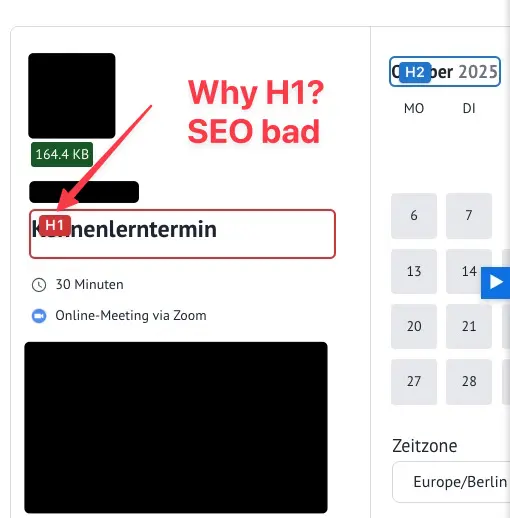
SEO Issue: H1 in Title
My SEO Tool shows an alert and in Source Code I found it
<div class="fcal_author_name">Jane Doe</div></div> <div class="fcal_slot_info"><h1 aria-level="1" class="fcal_slot_heading">Kennenlerntermin</h1>
Could you please avoid all H-Elements for Title and for the months.
Thanks.

Nicole Y. Männl - NY Digital Hook is available; you can set it as h2, h3, or h4 based on your preference.
add_filter('fluent_booking/public_event_vars', function ($eventVars) { $eventVars['title_tag'] = 'h3';
return $eventVars;
}, 10, 1);

Raiyan Marzan Sorry, but I don't want any H, even not a H3.
And what about the month with H2? Look at the blue H2 square. I don't need "October" as a title.
It is not necessary to have any H at all in my opinion.

Raiyan Marzan where can I find a documentation of the available $eventVars items/keys?

You can also set the <p> tag using the mentioned JavaScript. You can use whichever method you prefer.
Thank you!
🔴 I really don’t understand this!
So it’s apparently better that everyone has to live with broken H1 semantics, and I’m supposed to implement some strange workaround?
I honestly can’t believe this has never bothered anyone before. My client is furious right now, and she’s not only focused on SEO.
We clearly have two major issues here:
- It’s an SEO problem.
- It’s a web accessibility problem, because heading structure is an essential requirement.
I would much rather see an option where those few people who absolutely insist on having an extra H1 can add it via a script. That will be a tiny minority of users who actually need it.
But as it stands, the situation is really embarrassing: every FluentBooking user now ends up with this glaring, completely avoidable mistake on their site.
Please have a look to this comment: