

Fluent Form = Fluent Booking
I created a form using Fluent Forms where I inserted the appointment scheduling calendar, but the logo, address, and some fields that I had previously hidden are now showing up. However, when I bring it into Fluent Forms, they appear. Could someone help me? I don't want these fields to be visible; I only want the calendar to appear.
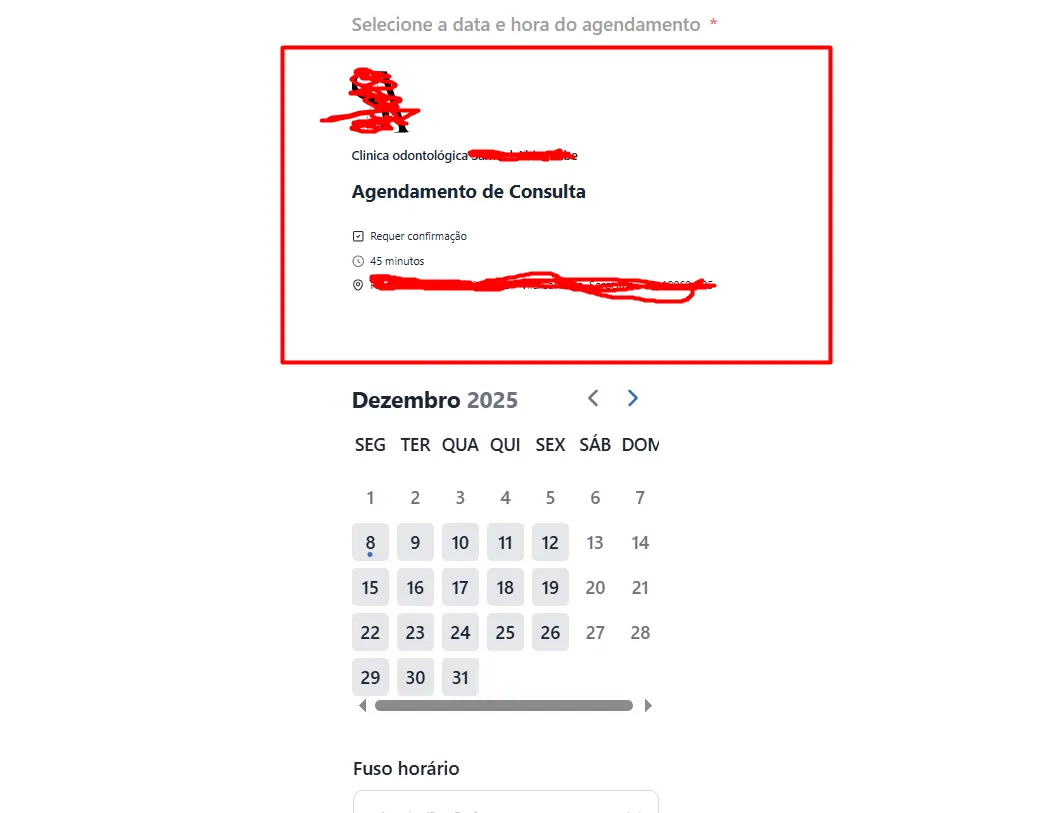

In another section of the site where I didn't use Fluent Form, it appears without the aforementioned fields, as I had configured it.

From memory, I think the setting that you’re looking for is show/hide appointment details. Shout if you need me to take a screenshot; I’ll be at my desk this afternoon.
Hi Charlotte D , but would this be in Fluent Forms? Because the same calendar is published on a page and it appears without the information; only when I create the form with Fluent Forms and publish it does this information appear.

Giovanni Augusto It's a setting for the Fluent Booking block in the Fluent Forms builder
Wendy Perkins Shoef Do you know which one it is? I was looking for something visual, but I don't think I found it, rs.
Giovanni Augusto Here's a screenshot from inside a FluentForm with an embedded booking form. When I click on the booking element inside the form I get the settings screen you see on the right side. I've highlighted the setting that I think you're looking for. When I uncheck "show host info" then I only get the calendar - no other info.
Charlotte D This field doesn't appear for me.
Interestingly, it doesn't appear in the form preview, only when published. I still haven't been able to remove it... and I can't center it either. When I publish it on the page, the block stays on the left side.