

Fields in a calendar entry could use some love
I have a request! Can we revamp the data displayed in a calendar entry? They are redundant and not in an intuitive order.
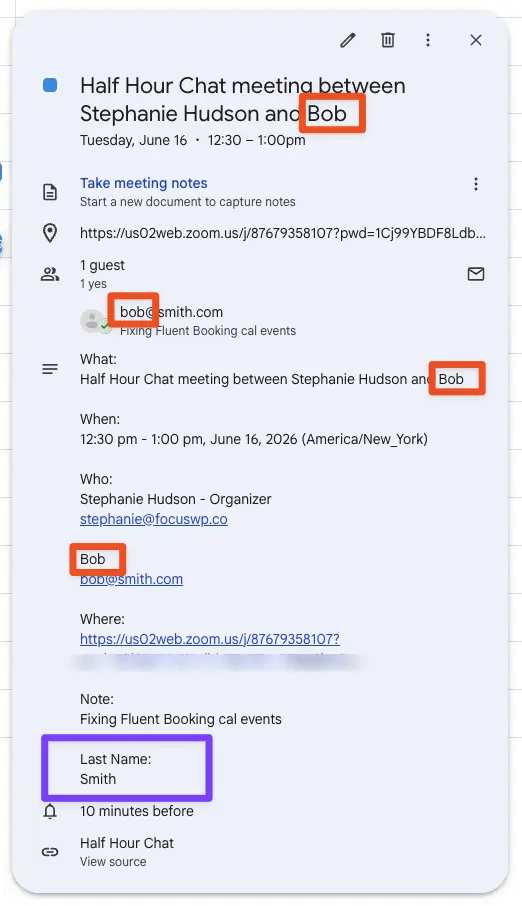
The guest's name appears four times in one cal entry. And the last name is totally separate way down at the bottom. Here are a few other thoughts (see screenshot):
What: [meeting name + attendees] <- why are attendees included here?
When: [time and date]
Who:
Stephanie Hudson - Organizer <- someone else booked this, why does it call me the organizer?
stephanie@focuswp.co
[Guest First Name] <- couldn't we put the guest's First and Last names here?
[guest email address]
Where: [zoom link] <- This is already in the calendar entry above. Is it necessary here?
Note: [note] <- Note should be at the bottom
Last Name: [last name] <- last name is separated from first name. also, it doesn't say "First Name" above (just shows the name), but it says "Last Name" here. Inconsistent.
--
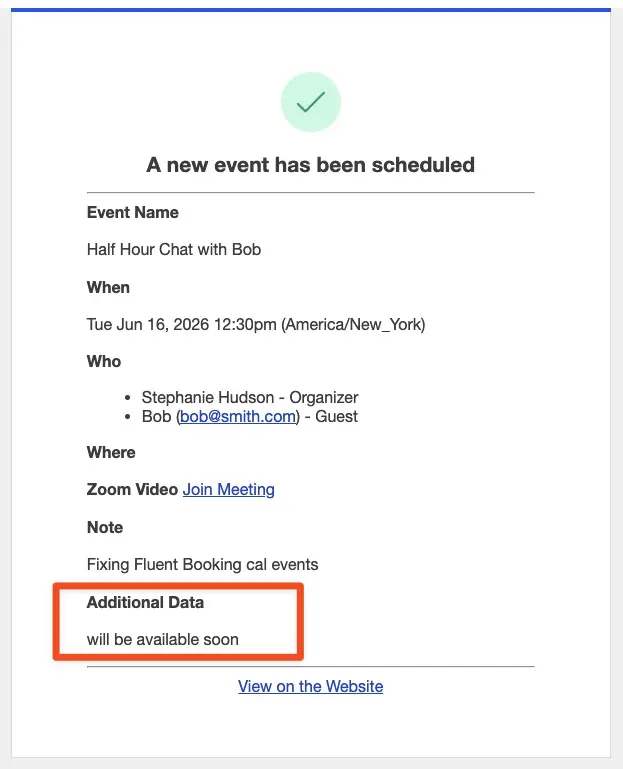
Also, what is "Additional Data: will be available soon"? (see screenshot 2)
--
PS. I don't think this is a bug exactly...but it didn't feel like a feature request or tip either 😉
PSS. This is obviously a dummy meeting, so you can join if you want, but it will be lonely. 😆

I've pased this feedback onto the developers

Taylor Drayson Thanks Taylor!

Regarding the formatting and repeated guest information in the calendar entry, this is actually coming from the Google Calendar notification system. Once Google Calendar integration and notifications are enabled from the host settings, the event structure and email layout are generated by Google itself.
Because of this:
- The repetition of the guest’s name and how the fields (First Name / Last Name) are displayed are controlled by Google Calendar’s formatting logic
- The “Organizer” label reflects the calendar owner (host), even if someone else booked the meeting
- The Zoom link may appear multiple times (header and body) as part of Google’s default event structure
- These elements, unfortunately, cannot be overridden or customized from our end
Here is a reference of how a typical Google Calendar notification looks:
https://prnt.sc/0KIJLhbvjoMn
Regarding your other points:
- Guest Name Placement: Currently, this is not supposed to happen, as First and Last names may appear in the same sections instead of different places.
- Note Section: Notes are normally added at the bottom as expected. Since it’s not appearing correctly in your case, this may need further investigation
- “Additional Data: will be available soon.”: This happens when using the
{{guest.form_data_html}}smartcode, which is currently a placeholder and not fully supported yet
For now, we recommend:
- Removing
{{guest.form_data_html}}from your template - Using individual custom field smartcodes instead, such as:
{{booking.custom.field_name}}
If the Note section is still not appearing correctly, could you please open a support ticket and share temporary access: https://wpmanageninja.com/support-ticket? That will allow us to take a closer look and assist you more effectively.
Additionally, we understand your concerns about the structure and clarity of the calendar entry. If you’d like, we can submit this as a feature request to our R&D team for further consideration.
Ruman Ahmed This was very helpful. Thank you!!
Stephanie Hudson You are most welcome!