


Would be great if there was an option for public calendar to show a button 'login to book' so people can view availability, but need to login to book

When a user enters a list, there’s no option to gather user info like IP, browser, etc. (like you can gather in forms…)
any way to have this info on the opt in of a booking?

Hello, I would like to create an appointment for my clients and give them the choice of a team member. I followed all the online tutorials. Impossible. If it's a site administrator, it doesn't work. If it's a client, they don't appear in the team when the appointment is created. I've been trying for 2 days.
Hi, I would like to use the offline payment option along next to woocommerce, so people have the choice with their booking. But this option is only available with the native checkout.
Can this please be added to woocommerce too?

I hope I’m explaining this well. The documentation explains that you can have breaks between bookings, and set them for I think however much you want?
But is it possible to block off certain hours during the day, for instance begin only at X hour, or prevent people from booking past a certain hour, or to not be able to book within a certain time slot (for instance 9 till 10 am, etc).
Is this possible?
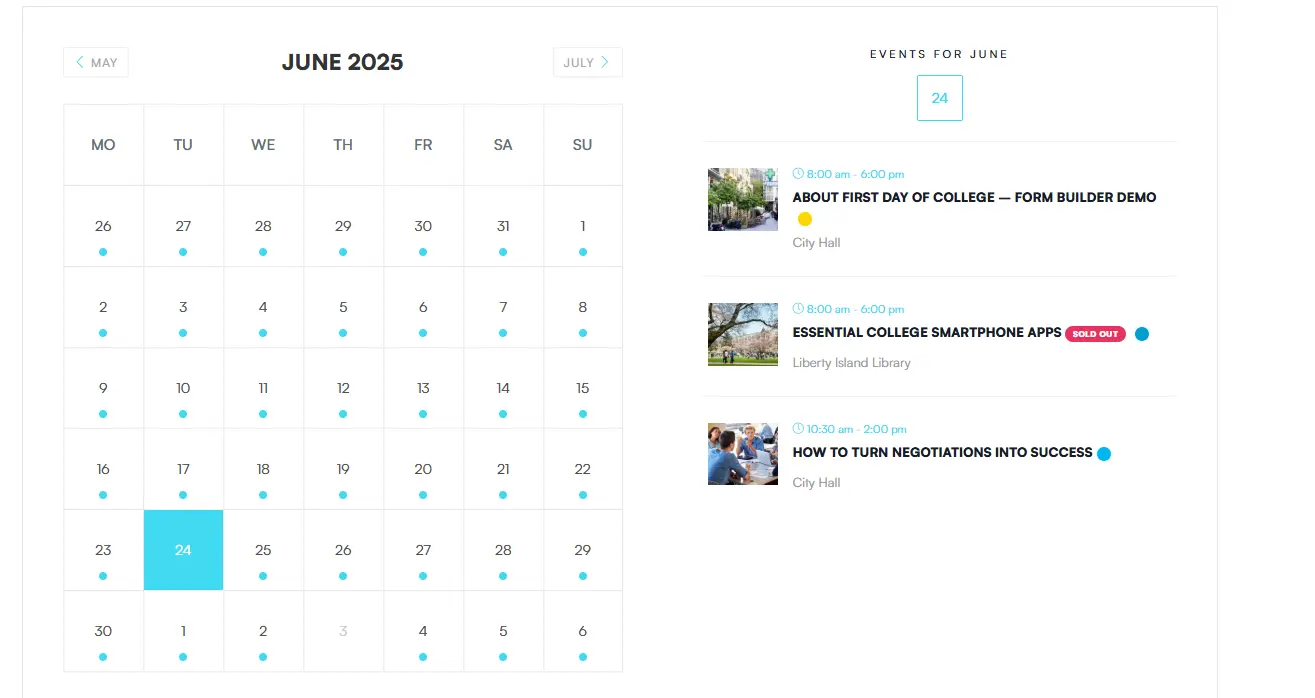
Is it possible to show the booking availability options in a calendar view?
Something like this:
Where you can click on a date, and on the right you see the available calendars/events
Hi, I have a client that wants to use FluentBooking as a yoga studio tool.
She wants to sell multi-session cards and subscriptions for her yogaclasses.
To accomplish this, we need a way to use a creditsystem with FluentBooking. I was hoping to find this 'bundle' or creditsystem native in Fluentbooking, but I can not wait, this client needs it fast.
-
Credits are linked to woocommerce/Fluentcart products/subscriptions, say a loyalty card with 10 credits for 10 classes of a certain kind (for example standard yogasession), or a monthly subscription with 4 credits for example for advanced yoga sessions, or a monthly subscription for unlimited sessions.
-
The credits must be linked to a specific calendar:
- standard yoga session: 1 credit worth 15$
- advanced yoga session: 1 credit worth 17$
- allround credit: can be used on all classes
-
On session registration, they need to be able to choose to pay with money or use their credits
-
Admin needs to be able to manually adjust the amount of credits
-
There needs to be a way to display the subscriptions/available credits on user my-account page
Is there someone here who can help me with this?
Kind regards
Hi, I have a lot of one-off group meetings. I, as a host, want to have a reminder email, but for the moment, I get a reminder email for ALL the attendees.
So if I have 100 attendees, I get as host 100 reminders. Is it possible to fix this?

I'm currently testing out Fluent Booking and have run into two issues that I can't seem to resolve:
1. Incorrect Time Zone for Appointments
All appointment timestamps are being recorded and displayed in UTC, even though I'm located in the America/Toronto time zone.
- The WordPress time zone is correctly set under Settings → General.
- The server is configured to America/Toronto, as confirmed in the
php.inifile (date.timezone = "America/Toronto"). - I also verified the server time zone via SSH using the following command:
[jb@server ~]# php -i | grep "date.timezone" date.timezone => America/Toronto => America/Toronto
Despite this, Fluent Booking continues to display all bookings in UTC instead of the correct local time.
2. Reschedule Email Notifications Not Sent to Organizer
When a user reschedules an appointment, the attendee correctly receives the "Booking Rescheduled by Organizer (email to Attendee)" notification. However, the organizer does not receive the corresponding "Booking Rescheduled by Attendee (email to Organizer)" email.
This notification is enabled in the settings, but no email is being triggered when an attendee reschedules their booking.
Could you please advise on how to resolve these two issues, or let me know if others are experiencing the same problems?
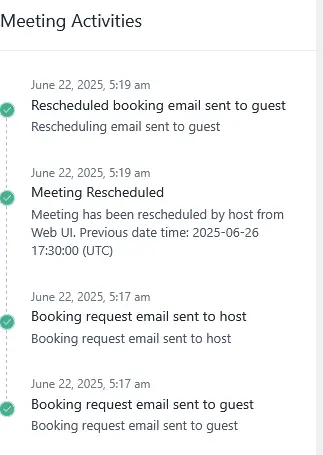

How do I format hours and minutes to 24 hours to send this in emails? I know how to format the date, but not the time.
Thanks,
Charles