

Vertical with Bunny?
I can't figure out how to get a video to play vertically using Bunny stream. Has anyone been able to do this?
Still using Presto Player because almost all the video testimonials I'm working with (on different websites) are vertical (sent from someone's phone).

Wendy Perkins Shoef Yes 😄
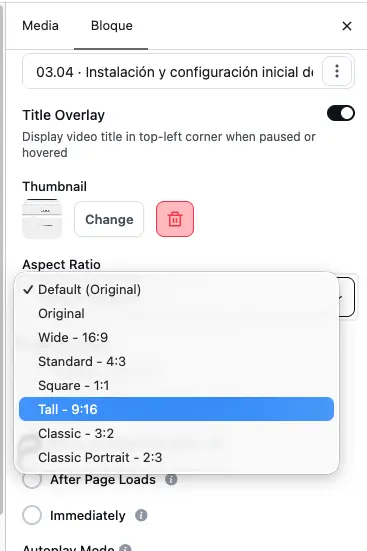
If you’re embedding the Bunny video with the FluentPlayer block, select the block in the WordPress editor and change the Aspect Ratio in the block settings to a vertical format such as 9:16.
It's a bit hidden, tbh.
That should make the player itself vertical instead of keeping the usual 16:9 container.
I had the same issue finding it because the setting is in the WordPress block sidebar, rather than in Bunny itself.

Jorge de los Reyes oooh, thank you. Gonna try this out tonight.
Jorge de los Reyes I need to use shortcode because I use Breakdance. I don't see a way to set it to vertical unfortunately. I guess I'll keep using Presto Player even though I bought the lifetime for FPlayer. 😪 Hopefully they will address this because I'm sure I'm not the only person that needs vertical videos.
Wendy Perkins Shoef Mmm, I do use shortcodes too, and it works.
I think it should still work with Breakdance too 🤔
The aspect ratio is saved on the FluentPlayer Media item itself, so you can go to FluentPlayer > Media, edit the video there and set the aspect ratio in the Block/General Settings.
Then, in Breakdance, you can simply use the normal shortcode:
[fluentplayer id="XXX"]
The shortcode should inherit the settings saved for that Media ID, including the aspect ratio.
And if needed, FluentPlayer also lets you override it directly in the shortcode, for example:
[fluentplayer id="XXX" ratio="9:16"]
So using Breakdance shouldn’t prevent you from displaying vertical videos. 😊
Jorge de los Reyes Thank you. I got it working! Not sure why I didn't see the aspect ratio before (I swear I was looking). Been missing certain things lately... I think I'm tired. 🥱
Wendy Perkins Shoef oh! No worries. I found this setting pretty hidden too tbh 😅
An auto-resize option depending on the source aspect ratio would be super handy.
Just saying, in case someone from the team checks this 🙂
Jorge de los Reyes ya. I also had to add a bit of css to get it to fit inside the div correctly but that was relatively easy. Unfortunately, I will have to do it item by item because it does effect horizontal display. Maybe the team will read all this and take that into consideration, too.