

How to fix the spacing/size of image radio button selectors?
I am using images for 2 radio buttons. They are very narrow and I'd like them to better fill the space they are in. Looks like they are in columns. How can I make them span the column they are in more at least so the text doesn't wrap? I would like bigger images as well, but it seems to restrict them to very small. And bonus points if they can be centered!
Thank you for any ideas here...
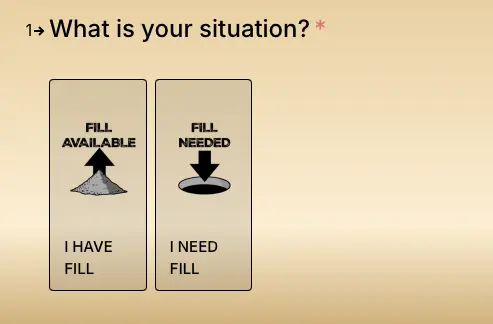

You apply custom CSS to achieve this. Can you share the live link?

Thank you Nishat, I kinda figured that but I have no idea where/what to put code. Yes, you can see it here: https://earthkingz.com/

Tommy Mason We have checked your site and hope this css can help you
.fluent_form_17 .vff .field-multiplepicturechoice ul.f-radios li {
flex: 0 0 calc(50% - 8px) !important;
}
Please use this css in our forms Custom CSS section and let us if this resolves your issue.
Here is the outlook we have achieved: https://prnt.sc/wPIXvWLBfchu
Chinmoy Biswas Thank you so much!!! That did it! I really appreciate that, it's been driving me nuts. 🙏😁