

How to delete submissions in Fluent Forms?
Hi, I would like to delete my test submissions in Fluent Forms (I can see only option to delete entries). Is it possible?

Yes, it is absolutely possible to delete your test submissions, and you are correct that Fluent Forms uses the term "entries" interchangeably with "submissions."
You can delete entries individually or in bulk. Deleted entries are first moved to Trash, and you must empty the Trash to permanently remove them from your database.
How to Delete Form Entries (Submissions)
1. Delete Entries Individually or in Bulk
-
Navigate to Entries: In your WordPress dashboard, go to Fluent Forms → Forms.
-
Select the Form: Find the form containing your test submissions and click on the Entries link located right below the form title.
-
Perform Deletion:
-
To delete a single entry: Locate the entry you want to remove and click the Delete icon (a trash can icon) next to it.
-
To delete multiple entries (Bulk Delete):
- Check the box next to each entry you wish to delete.
- At the top of the entries list, select the Bulk Actions dropdown menu.
- Choose Delete Entries Permanently (or Move to Trash), and then click the Apply button.
-
2. Permanently Delete from Trash
When you delete entries using the steps above, they are moved to the Trash list.
- Access Trash: On the same entries management screen, look for a filter or link at the top (usually next to All and Unread) that says Trash. Click on it to view all deleted entries.
- Empty Trash: From the Trash list, you can permanently delete or restore entries. You can select individual entries and use Bulk Actions to Permanently Delete them, or look for an Empty Trash button or link to delete all of them at once.

Nishat Shahriyar Thank you!

Has the ui been updated since this post? I don't have checkboxes available when viewing entries

Hey
New to FF (free version atm).
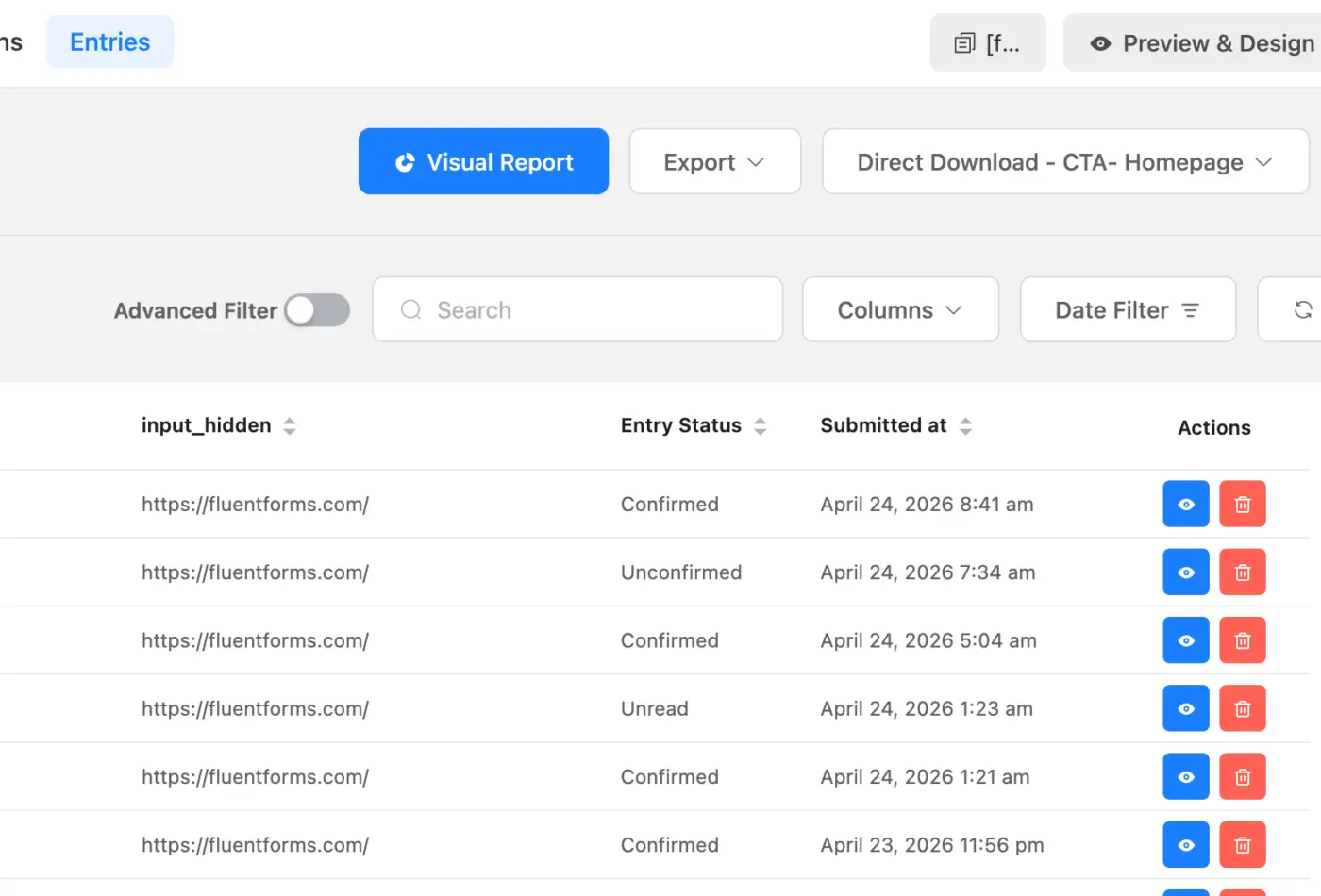
I can't see the Delete / Trash can no matter what I do.
I can view the entries, and view individual entry info.
But when trying to delete I cannot delete the entry.
Any ideas anyone
Anyway of putting some form of captcha / question field to stop form submission abuse?
Lastly, form not being sent to admin email or email of choice
Can someone let me know what's going on.
TIA
Amir
Amir A the delete button in the entries page (See action column), you can mass delete entries too
Lastly, form not being sent to admin email or email of choice
Did you set up SMTP in your WordPress?
Anyway of putting some form of captcha / question field to stop form submission abuse?
You need to set up security settings from the global settings, there are lots of options available there
Nishat Shahriyar can't see the delete button at this stage. If I hover over entry I still do not see the delete option.
Tried on 2 browsers as well