

Fluent Forms not capturing UTMs from cookies via hidden fields (GTM setup)
Hi everyone,
I'm having some trouble capturing UTM parameters in Fluent Forms and could use some help.
The User Flow: Users arrive on my landing page and then navigate to a separate page where the form is located. Because they change pages, the UTM parameters are lost from the URL. To fix this, I set up a system to store these UTMs in cookies.
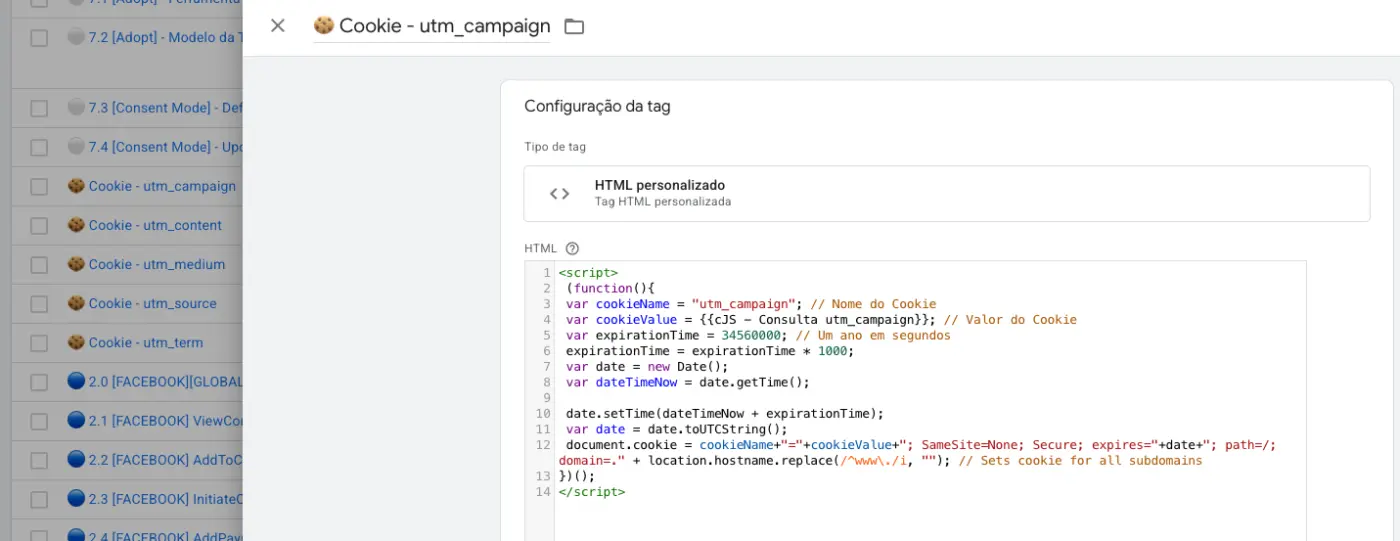
The Setup: I'm using Google Tag Manager (GTM) to capture the URL parameters and store them in a cookie.
- Here is a screenshot of my GTM setup:
When I inspect the site, I can verify that the data is being stored perfectly.
- Here is a screenshot of the browser inspector showing the cookie:

The Problem: Inside Fluent Forms, I am using a hidden field to try and pull this stored cookie information. However, even though the cookie is clearly present in the browser, the form is completely ignoring it. When the form is submitted, the field remains empty and the data is not registered.
Has anyone else experienced this issue? Is there a specific configuration in Fluent Forms or a workaround to force the hidden field to read the cookie data correctly?
Thanks in advance!

We have noticed the issue and devs already fixed in the dev version. We will release an update in a few days.

Shahjahan Jewel Do you know if the problem has already been fixed?