

Can anyone explain me...
why 3 columns. I understand Label and values, but what is the calc values for?
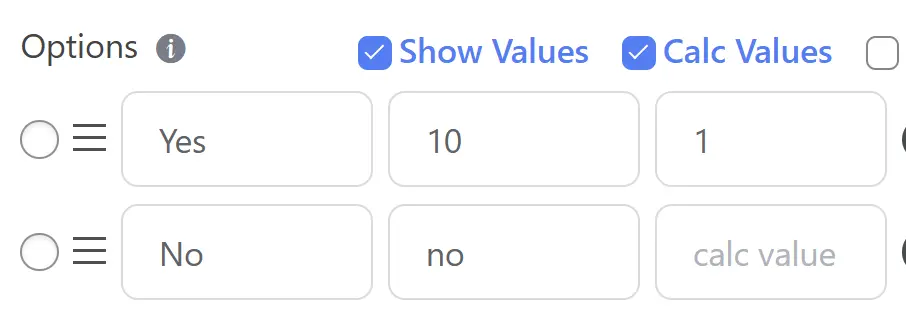

The Calc Value column appears because you likely have Numeric Calculations enabled for your form or that specific field. It allows you to separate the data you want to save from the data you want to calculate.
Here is the breakdown of why there are three columns:
- Label: This is the text the user sees on the front end of the form (e.g., "Yes").
- Show Values (Submission Value): This is the data stored in your database and sent in email notifications when the user selects that option. In your image, if a user selects "Yes," the system saves the number 10.
- Calc Value (Calculation Value): This is a hidden numerical value used exclusively for mathematical formulas inside the form. In your image, if a user selects "Yes," the form will use the number 1 in any equation (e.g.,
Target_Field * 5).
Why use Calc Values?
This is extremely useful for two main scenarios:
-
Pricing & Checkout: You might want the Label to say "Premium Package" and the Submission Value to say "premium_pkg" (for your CRM), but the Calc Value needs to be 99 so the form can calculate the total price.
-
Quizzes & Scoring: You might want to assign points to specific answers. For example:
- Label: "Strongly Agree"
- Value: "strongly_agree" (Recorded answer)
- Calc Value: "5" (Points added to the total score)
If you do not need to perform math based on this specific field, you can simply leave the "Calc Values" checkbox unchecked in the Options header.

Nishat Shahriyar excellent feature and explanation. Thank you. Are you planning an interface update. The plugin is great but looks a bit outdated compared to the new kids on the block like sureforms
Nishat Shahriyar when I use ai to create a form, I manage to affect values to the 'values' column, but not to the 'calc values'.
I use this prompt with chatgpt pro: The numbers in parentheses next to the option label are the hidden scoring values to be used for calculations.
Any suggestion to have ai fill the 'calc values' field?
Thanks
PS: by the way, the ai form generation is awesome!
Christophe Pasquier numeric calculation are still not available in the ai form builder. We plan to upgrade the AI form builder with smart validation and numeric calculation.
Nishat Shahriyar ok. It would be fantastic if for each option we could create as many columns as we want. See how wsforms does it https://wsform.com/knowledgebase/using-field-with-delimiter-and-column-parameters/
Any chance this could be brought to fluent forms?
Christophe Pasquier Okay, I will look into it.😃
Nishat Shahriyar Cool! Let me give you my current use case, which would be easy to manage with wsforms, but not so much with fforms unless I missed the obvious.
For a relationship readiness quiz:
- 20 radio button questions with 3 options each.
- at the end of the quiz, the quiz taker will receive a capacity percentage in 5 areas: openness, authenticity, etc.
- in wsforms, I would add 5 option columns for each question for each capacity and give a point value from 0 to 5 each
- Then I would create 5 hidden calculated fields that would sum up each columns for every questions
- in fforms, I would set complex conditional logic that would be prone to mistakes
How would you handle this in fforms?
Thanks for taking the time to evaluate the possibility of bringing this spreadsheet-like feature to fforms.