

Very Basic for a CRM (Must haves)
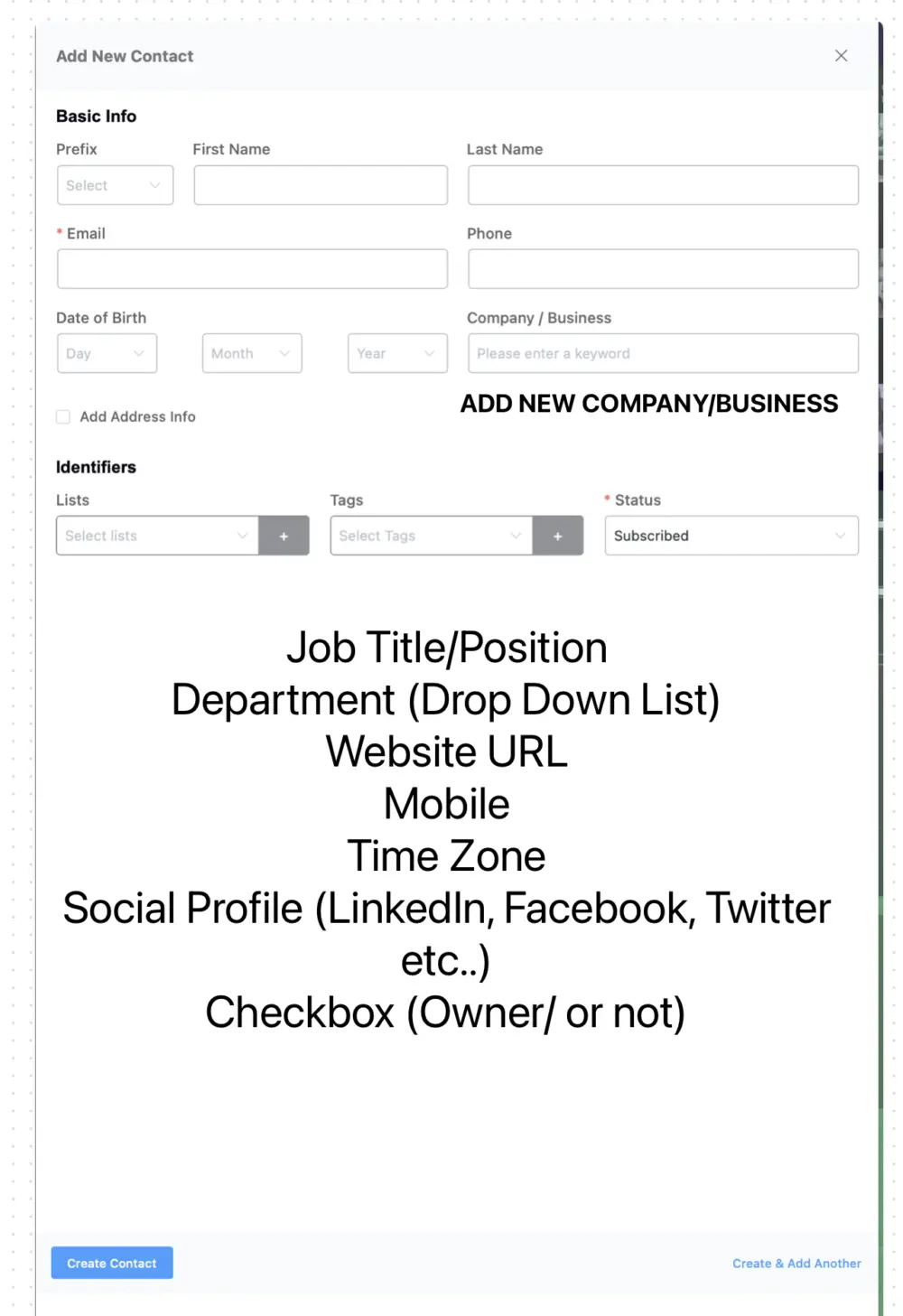
I understand that we have custom fields set up, but from a CRM perspective, the following should be pre-existing fields to ensure we capture all essential information:
1. Job Title/Position
2. Department (Dropdown List)
3. Website URL
4. Mobile
5. Time Zone
6. Social Profile (LinkedIn, Facebook, Twitter, etc.)
7. Checkbox (Owner/Not Owner)
Additionally, we should have the ability to create a company/business directly from the contact page. In the Company dropdown, if there is no existing company/business, we should have an option for Add New, which will trigger a pop-up to create a new company. This will help streamline the process of linking contacts to their respective companies more efficiently.

Most businesses don't need this info (and many do). and that's why we have added custom fields so anyone can add fields as they need.

@Jewel, you’re correct, but there are a couple of things:
1. How do I move custom fields to the correct position?
for example If I create filed called Mobile Phone how do I move it next to Phone field
2. By default, it picks the first contact of the company as the owner, which is not accurate in most cases. So add a checkbox owner will allow it to add it as owner otherwise it will be a simple contact associated with that particular business.