

Set User Subscription Status with Automation?
I can see how to unsubscribe users from lists using an automation, but what action actually changes their status?

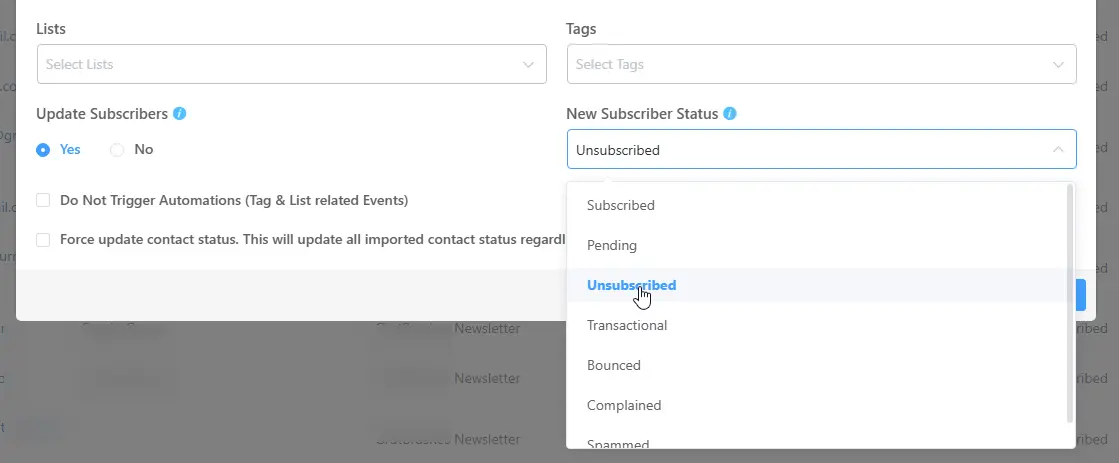
I don't think it's possible. I did it by importing a csv of all the emails I wanted to unsubscribe and choosing 'unsubscribed' from the "new subscriber status" dropdown.

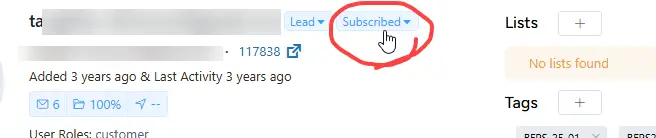
The user action that changes their status (circled) is when they click unsubscribe on a marketing email. There isn't an option to unsubscribe a user in an automation but you can remove them from any list(s) they belong to.
Or, to remove users in bulk from the database, use the advanced filter on the contacts list (using the same tag you're using in your automation) then select Delete User from the Bulk Action dropdown. Unless there is a solid reason, e.g. a course student who no longer wishes to receive marketing messages, it's good list hygiene to completely remove unwanted users. My personal view.
Thank you Jason Morrell that's all good advice and I had forgotten the option to do bulk actions based on a tag.
As for the list hygiene, I agree, but similar to your hypothetical, I have some users who get access to content via an FCRM tag which gets attached when they purchase a product in Fluent Cart, but they aren't necessarily subscribers.