


Set global color picker palette colors?
Is there a way to customize the global color picker palette colors?
Presently I have to have my web style guide open and manually copy and paste a style color for every object in the email template, which quickly becomes tedious.
With the new beta I see that I can choose "global colors" but I want to go further and change the color palette itself:
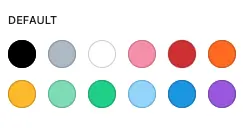
Ideally this should be set in the FCRM Settings section, but I'd even accept a fluentsnippet if someone could point me to how to access the FCRM palette!

Have you tried AI (Claude or ChatGPT, to write a CSS layout, and either use Fluent Snippets, or the customisation CSS area ?), you also need to be mindful of Light and Dark mode in doing this also. I had Claude read the dev docs also before I started.
Have a look at https://shuffles.com.au/sponsor-deals/
I just noticed some dark mode errors I have to fix, theres a bit of work, but can be done.