

FluentCRM 3.0 is here, Our Biggest update ever 🎉
After months of building, breaking things, rebuilding them, and finally shipping... FluentCRM 3.0 is live.
This isn't one of those releases where we add a few features and bump the version. We rebuilt the whole foundation on Vue 3, then layered on what you've been asking us for over the past two years. AI, SMS, a Gutenberg-native email builder, and a dashboard that finally feels as fast as your business needs it to.
If you've been waiting for the right moment to push your CRM further, this is it.
Why we rebuilt the foundation
We've been at this for five years now. Around 80,000 businesses run on FluentCRM today, and at that scale you eventually face a real choice. Keep patching the old foundation, or rebuild it properly for the next five years.
We picked the harder one. Vue 3, cleaner architecture, more room to grow.
You'll feel it the moment you open the new dashboard. About 50% more responsive. Bulk sending up to 10X faster. Same WordPress you trust, just much faster at almost everything.
The big stuff
AI that actually saves time. 25 MCP tools that connect FluentCRM to ChatGPT, Claude, Grok, and whatever LLM you already use. AI email writing right inside the editor. AI contact summaries so you stop scrolling through activity logs trying to understand a single contact. We didn't add AI for the buzzword. We added it where it removes real friction from your day.
SMS marketing is finally native. Campaigns, automation workflows, and two-way conversations, all inside FluentCRM. Twilio and Amazon SNS are supported on day one. WhatsApp is up next.
A Gutenberg email builder. Same WordPress blocks you already know. Reusable patterns so you build a layout once and use it across campaigns. FluentCart and WooCommerce product grids are built in.
A dashboard you'll want to open. Modern reports, global search, frontend portal access, proper dark mode, and real mobile responsiveness.
For FluentCart users, abandoned cart recovery is now native. Email and SMS in one workflow, no third-party glue.
Try these four things today
If you've got 15 minutes, here's where I'd start:
- Update the plugin. (Maybe you can try on staging first).
- Open the new dashboard. Just look at it for a second. You'll see what I mean.
- Try AI Email Writing on your next campaign. Connect your LLM, prompt it, send it.
- Set up one SMS automation. Even something simple like a "thanks for subscribing" text. Feel it work end-to-end inside FluentCRM.
- Enjoy the speed.
Thank you for getting us here. Please let us know your feedback about these massive upgrades.
Check out all the goodies: https://fluentcrm.com/fluentcrm-3-0/
Full Release Note: https://fluentcrm.com/blog/fluentcrm-3-0-release/
I will post more in the next few days about all the new features. Cheers!

Congratulations! The beta was beautiful and fast. I can't wait to start using this in production. Excellent work.

Thank you very much for all the GDPR compliance improvements you added!

So awesome guys !!! FluentCRM was the first product I bought from you and I love it since then ! I'm so glad it keeps getting better and better !
Thank you Team for the hard work !

amazing!
exist some know issue ?

Congratulations Shahjahan Jewel FluentCRM 3.0 is amazing

Just updated to 3.0 and nothing works. I was excited about the drop, updated and now I get a flash of the dashboard and then nothing. Doesn't display, none of the links work. I'm on a headless minimal wordpress install.
Just wanted everyone to know. Do a backup first. I didn't, should have but didn't. I thought "what could go wrong". Famous last words. Hey at least it didn't crash the site.

David Arrington We have released FluentCRM 3.0.2 (free version) to fix that issue for some servers.
Shahjahan Jewel I'm already on FluentCRM 3.0.2 free 3.0.0 pro and the issue persists. I will try to reinstall 3.0.2 as they were updated together, but pls expedite my support ticket so we can get this solved.
Reinstalling didn't make a difference. Still stuck at a blank dashboard.
David Arrington If you do a hard refresh that it should work. Only one know conflict we have that is Divi Flash. They should strip JS modules for some reason. Check if you have that plugin installed.
Shahjahan Jewel Don't have divi. Cleared all caches, including the server cache, hard refreshed and no change. Need some help on this one.
David Arrington maybe some edge cases. Would you please open a support ticket.
Shahjahan Jewel already done. thanks.

The dashboard is not showing me....I have installed - https://prnt.sc/3cYmrXIXtVYp
Debo Ogunrinde We have released FluentCRM 3.0.2 (free version) to fix that issue for some servers.
Shahjahan Jewel That resolved it...Thanks to you and the team! Awesome work...

Where is demo for 3.0 Pro?
Lucie Tosakova You don't get a demo for the Pro (Paid)...the demo is the Free version at wordpress.org.
Debo Ogunrinde And why do you think I’m writing this? LOL

Lucie Tosakova Yeah, I'd love to have a play with it on a demo site somewhere to see all the bells and whistles before I update my own site.

Awesome!

Thank you so much for all the amazing work 🙏🙏
Can you please rearrange a bit the columns to be in the following order?
- First column: Contact
- Second column: Prefix
- Third column: First Name
- Forth column: Last Name


Barnabas Chris Thanks for reporting. You can select which columns to keep. The Contacts column already includes first and last name.
Masiur Rahman Siddiki Thank you for the reply. It's helpful to have Prefix, First Name, Last Name columns side by side, so you can easily correct contact details that were not entered correctly by the user.
It's a small thing but helpful. Also, The contact column has the Gravatar image and I prefer that column to be always first. 🙏

LETS GOOOO
Some dark mode text improvement needed for the automations:
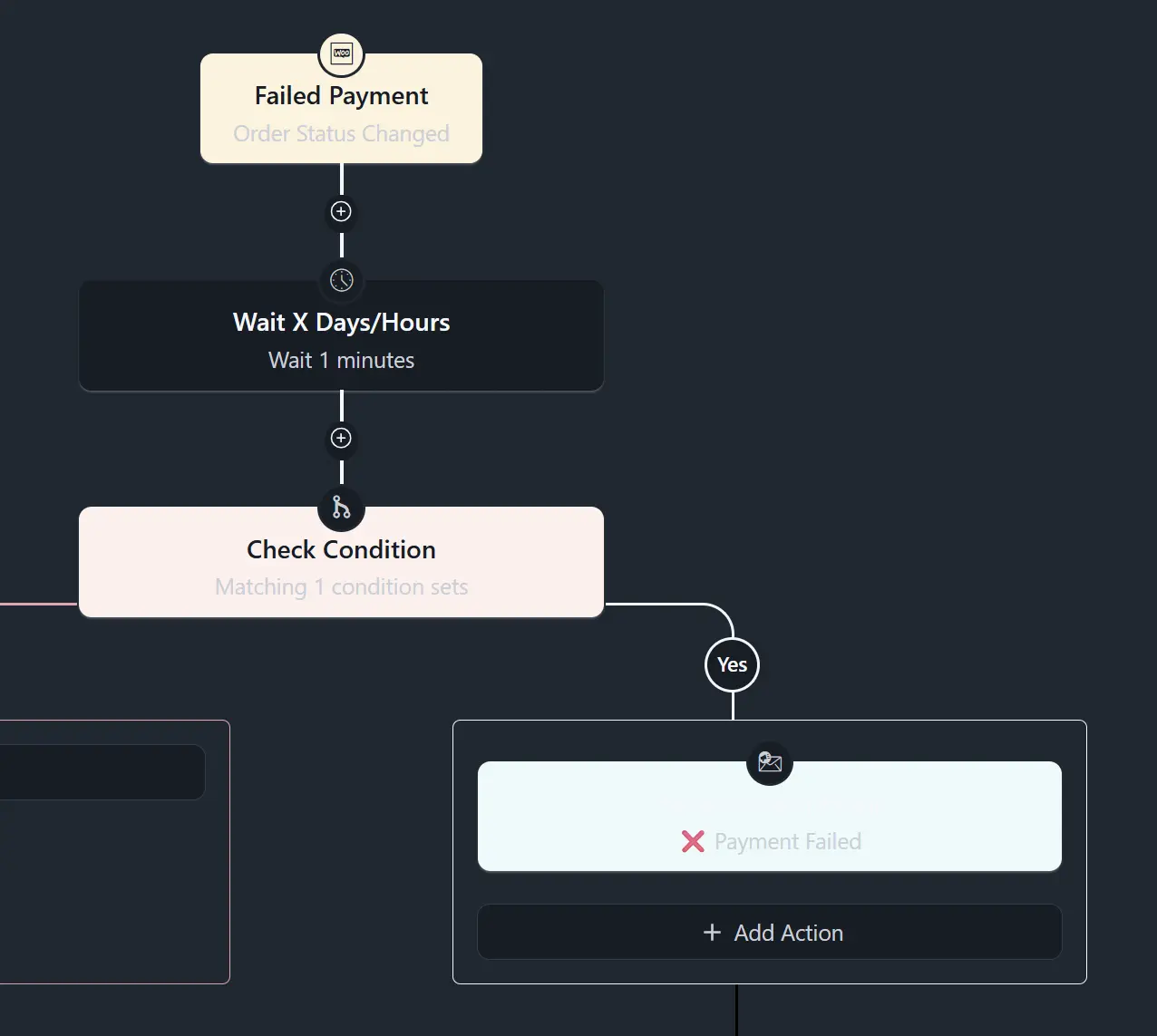
Barnabas Chris Yes. Thanks for reporting. Will work on it.
Shahjahan Jewel Thank you! I've seen already some dark theme improvements since RC-2 😉

Congratulations !

I hope the embedded video isn't a preview of fluent player because I clicked play and it just spins, even reloading the page it just spins lol.
Bob works for me bro - refresh / clear cache?
Liam McDonald Seems to be working now. It was strange it was hanging and hanging, refreshing did nothing. Came back now to view this comment and plays immediately.
Bob I have disabled FluentPlayer for now. Will do more testing and also I think I need to installed the latest version.
If anyone is interested, here's a post on my take about the new FluentCRM 3.0 while still in beta. There's a YouTube video embedded if you like to watch rather than read.

Incredible work! The frontend UI and reporting are such an improvement, you're going to make us look like rockstars to our clients.
Trying out the AI integrations...
- MCP worked flawlessly in our test environment. I was showing it off to my partner and she was absolutely shocked at how well it works. So was Claude, actually. It only had good things to say about your JSON returns.
- Relating to AI Summary, it shows up as null in the MCP response. It's definitely worth getting into the flow.
- Again, relating to AI Summary, it would be EXTREMELY helpful to have a contact review prompt input similar to the one for writing to help guide which fields to use and how to enrich the contact. For the time being, we'll continue to use our contact enrichment plugin: https://github.com/WeMakeGood/fluentcrm-contact-enrichment
Fantastic work all around!
I just demoed creating and sending a targeted campaign from Claude Cowork (didn't touch FluentCRM directly) to our team and they lost their minds. I think you might have something here.

Thank you so much for your diligent work! I downloaded the beta and in the beta I could add smart links directly in the email builder. Is that function removed in 3.0?
I am using the visual builder.
Jonas Höglund I still see smart links in the Gutenberg builder.
William Beem good for you - I'm just allergic to anything guthenberg. I like the visual builder but it has some drawbacks and if that option is not in the vsual builder maybe I have to take an allergy pil and start using GB instead 😜
Jonas Höglund I wasn't sure, since they're all visual builders to me. Looks like you spotted a bug.
William Beem I get what you mean, the visual builder is just more visual but has always lacked a lot of features. I come from MailPoet and the one thing they did better was their visual builder that is the best I've seen, intuitive and bugfree.

Would be great to get a lifetime deal now on the new Fluent CRM Shahjahan Jewel !
The quick search on the admin bar does not work right once you start typing more than 1 word


OMG !
AI MODE ! 🫶

Before I start using the new SMS feature heavily ;) I just wanted to check something.
Do Smart Codes / Merge Tags work in SMS campaigns and automations the same way they do in emails?
For example:
{{contact.first_name}}
And custom fields like:
{{contact.custom.your_field_name}}
Personalization is really important for my SMS campaigns, so I just want to make sure both first names and custom fields are fully supported in outgoing SMS messages.
Thanks!

Yes, SMS messages do parse smartcodes for primary fields. Fields like {{contact.first_name}}, {{contact.last_name}}, {{contact.full_name}}, {{contact.email}}, {{contact.phone}}, plus {{crm.business_name}} and {{crm.business_address}}, should work. we plan to add support for more smartcodes soon.
Shiam Chowdhury let’s support that in today’s update.
Miranda Rosengren After latest release SMS messages will parse custom fields like {{contact.custom.your_field_name}} and more smartcodes.

Looking awesome 😁

Shahjahan Jewel Congrats on the new version, but I tested it in staging (like all the previous 3.0 beta versions before it) and was very disappointed to see that that a bug I reported since the very first beta, and have confirmed in every single beta since, is still present in 3.0 release: 3.0 breaks compatibility with 2.x campaigns. When you duplicate a 2.x campaign, 3.0 breaks some blocks. Some are recoverable, others are not. Until this is fixed, we can't upgrade to 3.0, because it means we wouldn't be able to duplicate existing campaign without risking having to re-create some or all the content. Madness that you decided to ship it in this state. Please see ticket #154432 for more details. Anyone considering upgrading, make sure you check that 3.0 doesn't break your campaigns when you duplicate them in 3.0. Unless you never need to duplicate a campaign, it's a huge issue.
Screenplay Unlimited We looked into that issue. The problem is that Gutenberg now handles blocks differently, and for some very old blocks can't be recovered. Please note, you can always click recover if you find any broken blocks.
Shahjahan Jewel As reported many times, recover works with a few blocks, but doesn't work with others. So no, you can't "always" recover broken blocks. In the example I provided, four blocks are broken, only one (a H1 title) can be recovered. The other three (H2, paragraphs) are lost. I don't understand how such a basic compatibility issue can be ignored despite so many reports. 3.0 breaks compatibility with 2.x campaigns, and you don't seem to think it's an issue? By the way, they are not very old blocks, they are H1, H2 and text (paragraph) blocks used in our April newsletter. And before that, in our January newsletter. Of this year. It's not like we're trying to duplicate ancient archives, or use esoteric blocks... If you duplicate these recent campaigns with 2.x, there is zero issue and no broken block.
Shahjahan Jewel I tried 3.0.5 free + 3.0.3 pro, initially it looked like the compatibility with 2.x campaigns had improved. When I duplicated my 2.0 test campaign (the one I sent you a .json of), the only corrupted block was the H1 header at the top, and it was recoverable. The HH2 header and the text paragraphs at the end were not corrupted. So after recovering the top H1 header, I saved the campaign and tried to duplicate it again (as that's what I do for each of our newsletter, I duplicate the last one). Then the three blocks at the end (H2 and text paragraphs) showed up as corrupted and were NOT recoverable, so the text was lost. Please can you fix this? This is not, as you said, "very old blocks". They are the most used Gutenberg blocks (H1, H2 and text paragraph). If you are expecting us to copy manually all our 2.x campaigns before moving to 3.x, please say so, but as far as I'm concerned FluentCRM upgrades are blocked (again) until this is solved. If compatibility with 2.x campaigns is broken for such basic things, it's a very bad sign.

Congrats - Shahjahan Jewel with SMS native now, does that mean some contacts can exist with mobile/cell number as the primary identifier, if no email exists for the contact record?
We talked about a couple of enhancements for FluentCRM 3.0 that didn’t make it into this release. Do you know if they are still planned for a future release?
- Removal of all unsafe-inline scripts from the frontend (e.g., email web-view)
- Custom unsubscription page (like the new custom subscription management page)
- Double opt-in for every list (GDPR requirement for unauthenticated visitors)
Once again, thanks for all great improvements in FluentCRM 3.0.
Ping Shahjahan Jewel .
Shahjahan Jewel I take that as a no, but you’re always more than welcome to reach out if you want more information about the suggested security-, privacy- and compliance improvements.

Shahjahan Jewel do you have any step by step documentation on how to set up twilio / connect with FluentCRM for sms campaigns?

Chet Norman hi, you can read the documentation here: https://docs.fluentcrm.com/configure-sms-module

Wow... This update is huge

Hi Shahjahan Jewel ,
Congrats on the major update! But after installing it, my clients cannot use it. Neither editor works as intended. I'm really disappointed as there are two major issues with the release:
- The revamped Gutenberg editor. It has no global theme colour control. It doesn't inherit anything from an FSE-based website or a general classic Gutenberg-based website. For that point, it's effectively useless because there's no styling consistency. Expecting clients to manually add hex colours every time they need to add a button or an element just doesn't make any logical sense.
- The Visual Builder, which my clients have been using because it's worked flawlessly for years and was more feature-rich than the Gutenberg integration. Now you can't import templates when you select any of the pre-existing templates that clients have made. Nothing happens; it just silently fails. They can see them, edit them, but can't import them into new campaigns. Effectively, they can't use the FSE builder because there's no consistency with their website, and they can't use the Visual Builder because it can no longer import templates.
I have turned off any updates for FluentCRM until at least the second issue can be resolved. I would ideally love my clients to use the default Gutenberg editor; they are all FSE/Gutenberg users, but why not integrate the colours from theme.json? Seems like an obvious thing to do, as it's exactly the way in which WP/Gutenberg was designed to work natively.
Great to see the UI improvements, but the user experience of creating and editing campaigns needs work.
Hi Shahjahan Jewel,
I checked into the theme support issue, and this affects both classic and FSE-themed websites.
It does show theme support in the video, however from looking at the Gutenberg implementation, I can’t see actual theme support being wired into the editor. The implementation appears to be similar to the 2.x version, where it is essentially the vanilla Gutenberg editor running inside a wrapper/container.
Specifically, the editor color palette appears to be coming from FluentCRM/default presets, rather than from the active theme’s editor-color-palette support or FSE theme.json settings. I also noticed that the editor dequeues WordPress global styles, which means block theme styles are not being loaded into the editor iframe.
That makes the “WordPress-native” claim difficult to reconcile with the current behavior. Without even basic theme color support, the editor may as well be running on a completely different website or SaaS product, because visually it has no real connection to the current site’s design system.
So while there seems to be some theme-color handling during email rendering/output, the editor itself does not appear to expose theme colors or styles for either classic or FSE themes.
Can you confirm whether theme support is intended to work inside the containerised Gutenberg editor, or whether the current support is limited to rendering/output only?
Cheers!
Hi Shahjahan Jewel , the issues have persisted with the latest releases of 3.0.5 and Pro 3.0.3. I have raised support tickets for both #159323 and #159324. The Visual builder template builder issue is the current show stopper for updating any client websites, as they all use this feature for templating.

love it!

Shahjahan Jewel when will we get this for Fluentcart?
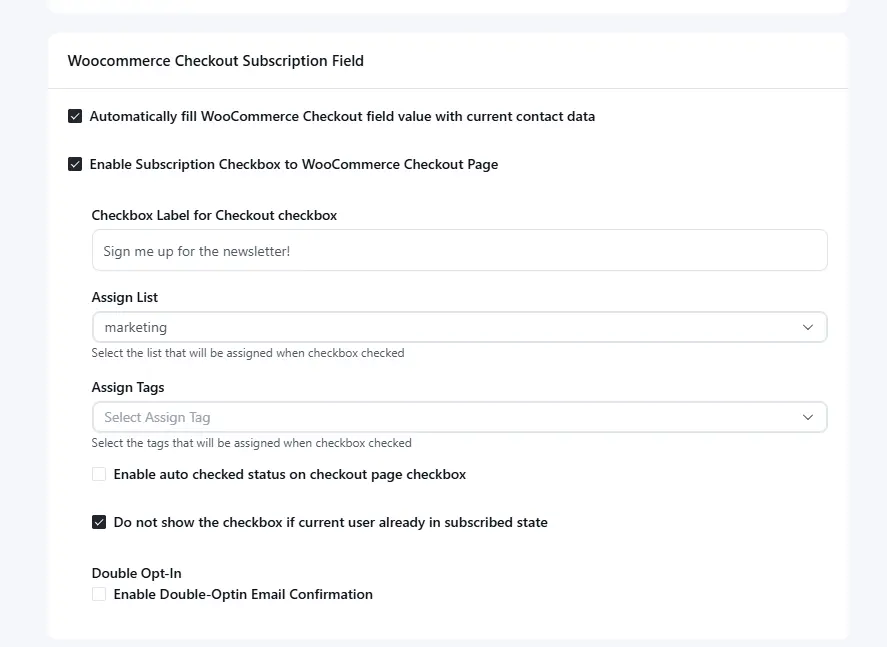
Natascha Vantuykom We will try to add that in the coming weeks.
Shahjahan Jewel great :-) thanks
Shahjahan Jewel will there be a 'create coupon' action for FluentCart aswell?
Masiur Rahman Siddiki when creating a new campaign title field is behind editor selection
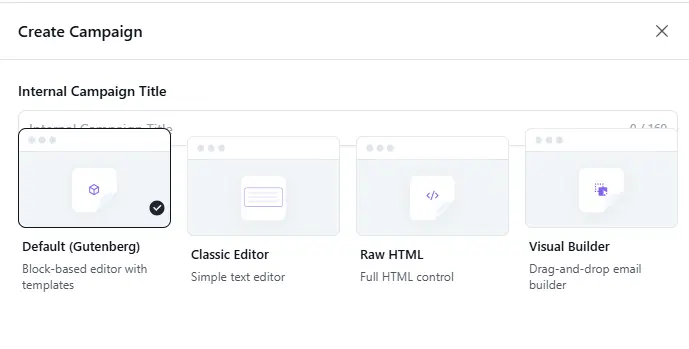
Natascha Vantuykom Thanks a lot for sharing. Update on the way( within today)
Masiur Rahman Siddiki 🤩thanks, keep up te good work!

Shahjahan Jewel The current Email Editor is buggy and not displaying the translated language. (For example, my translation language is Vietnamese, but it still displays in English.)
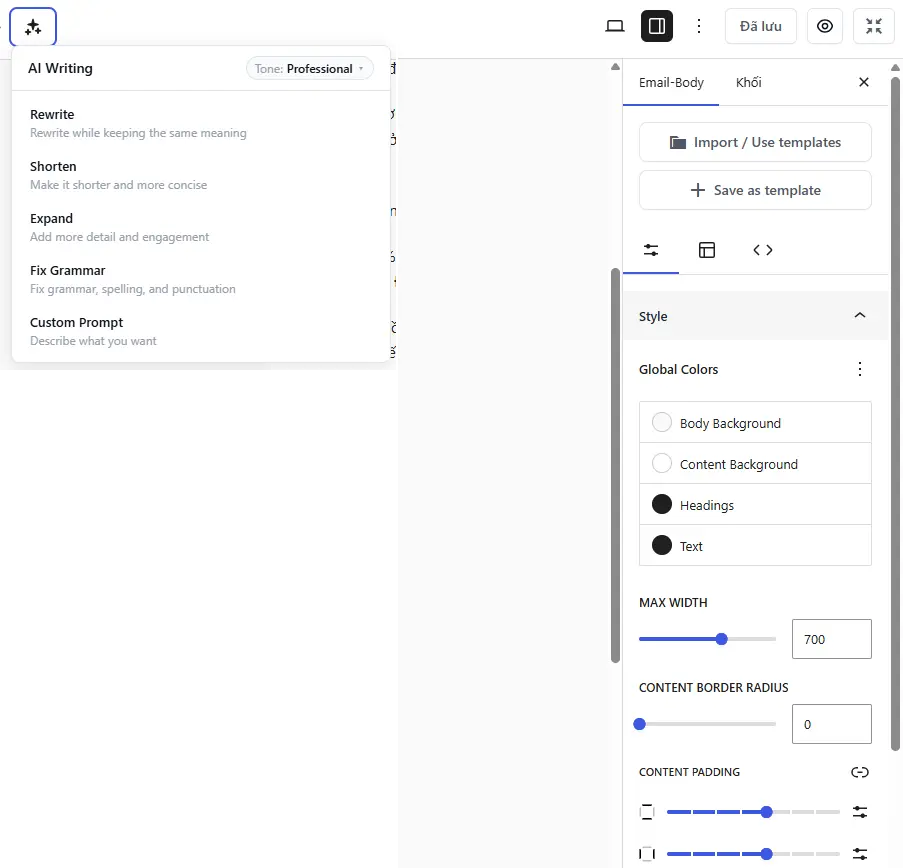
Hoang Hxn Yes, those strings need to be translated. I would not tag it as buggy.
Shahjahan Jewel I've already translated it, but it's not displaying in Vietnamese.

Happy to see this update, kudos to the team for this work. I'll spend my afternoon playing with the plugin.
For me everything in v3 is fast loading and steady except for the Gutenberg editor. When activated, it takes 5-8 seconds to load each time, spinning. Support is saying this is expected behavior? The screencast below shows what I am currently experiencing, I have deactivated other plugins but still no help. This definitely needs improvement. Creating emails in this environment now seems like work.
https://www.awesomescreenshot.com/video/52569113?key=bbff451680834d24d0ed3d2d1e1eb3dd
Shahjahan Jewel is this the new normal? Otherwise, please let me know how to resolve this...

I can't get Claude Desktop to connect to the MCP server. :(
Christian Frank should work. Please make sure you have Node / npx installed. Or ask your Claude to debug.
Shahjahan Jewel Updated, and it's working now. Thanks!
Shahjahan Jewel It was working fine, but now it's broken after the last update. 😭
Shahjahan Jewel It's working again. FWIW, there's a conflict with Flowmattic's MCP, and it won't work with a VPN from Claude Desktop.
Shahjahan Jewel It's working excellently now, after 3.0.5. Also, are there any plans for FluentCart MCP? I've seen a few devs out there, also for FluentComm, but I'd love to see a native MCP solution.

Please do something about this very quickly. I’m sending out hundreds to thousands of automated emails, and because of this error I’m losing money! I’m happy about new versions, but this is really unfair of you, as you have very negatively impacted my business. I’m asking for absolute urgency.
They look perfectly fine in the admin area, but only the first line is being sent. A huge bug, a huge disaster, a huge problem. I’m losing money right now!
PLEASE ANSWER for my ticket in support 159246

Man!
I installed it on a staging site and I LOVE what I see.
I connected it (MCP) with VS Code + Cline + Gemini/DeepSeek and my mind exploded when the IA gave me the small report I asked for.
Thanks, Shahjahan Jewel and team 🙏
P.S. I love the dark mode!!!
Jose Luis Duron My Claude Desktop just created 2 weekly newsletters, and organized a few leads I had straggling around. Also, I connected FluentCRM to our voip provider thru Flowmattic to send and receive text messages. This. is. AWESOME!

Jose Luis Duron just cant finde where in fluentcrm i can setup the mcp feature, cand you help me pls
Luis Minvielle Settings>AI Configuration>MCP for AI Agents

Shahjahan Jewel can we also have openrouter as an option for the 'AI Model Setup' in AI configuration?
And then be able to choose from numerous models...
Shahjahan Jewel I've added my AI API keys, and can see the summary creation of contacts option.
But, did I miss something...? Can the AI tools actually craft the message of a recurring email, and its subject, so it's unique based upon what blog posts may be included in the email?
I thought I saw mention of that somewhere, but can't spot it, and there's no docs yet about the AI features.
Thanks :)

Congrats on an amazing upgrade! Thank you very, very much for all the hard work you put in.

Hey I just logged in and can't find the FluentCRM app on my dashboard anymore. The plugin is active but when I try to install it again it says, "Installation failed: Destination folder already exists." help!
Julia Kraft Not sure what happened in your case. Can you create a support ticket so that we can take a look ?

Just having some time to look at and use this -- I was looking around in automations and I noticed that the in depth stats are gone! I can't find where to see the list of active contacts in an automation and how far they are in the automation anymore. Has that feature been removed?

Parm Saggu
Click in the Automations Overview on the icon (red arrow), and you see the active contacts.
Or
If you are in a contact, you see “overview | emails | notes”. Click on emails, and on the bottom you see the automations and their status.
Sebastian Got it thank you!

Cannot link buttons in new email builder with smart code. Guttenberg is trying to validate it.

What happened to the video on this post? 🤔