

Quick UI & UX Polish Suggestions for the Checkout Form (Borders & Floating Labels)
Hi team! FluentCart’s checkout design is clean and modern, but there are two subtle UI/UX details that could make the form completion experience much more polished:
1. Border Overlap on Grouped Fields (Visual Glitch)
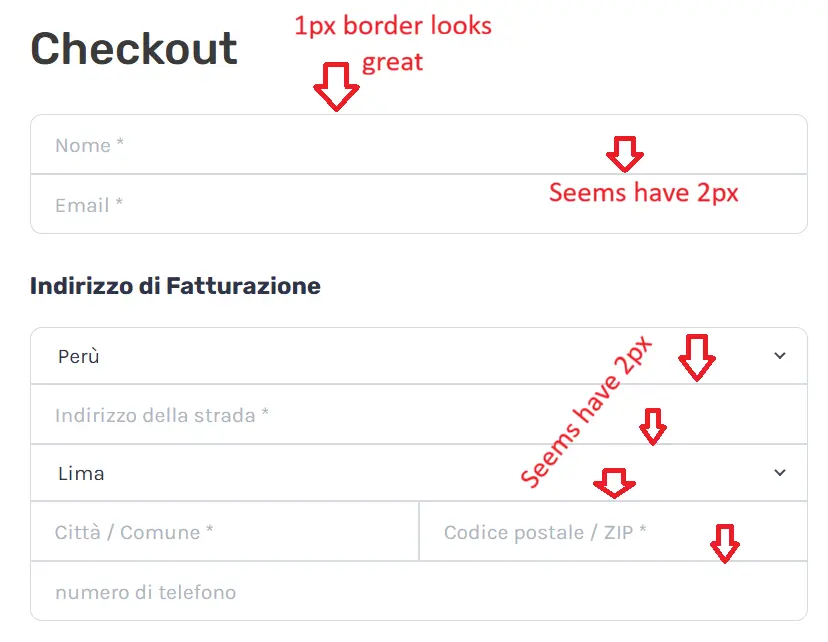
In the grouped input containers (like Billing Address and Contact info), the borders between adjacent inputs stack together. This creates an uneven 2px border seam at the intersections, while the exterior border remains 1px. A slight CSS tweak (e.g., using margin-top: -1px or collapsing sibling top/bottom borders) would ensure a crisp, consistent 1px stroke across the entire grid.
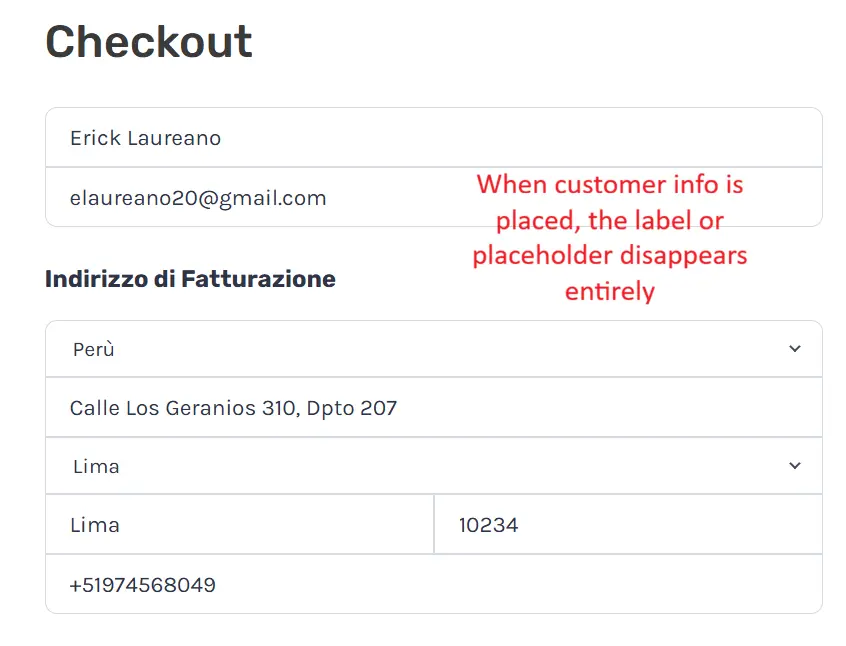
2. Floating Labels for Better Form Usability (UX) Right now, field labels rely solely on the HTML placeholder attribute. When a customer types or uses browser autofill, the placeholder disappears entirely. During final review before placing the order, there is no visible reference to tell which field is City, State, ZIP, or Address line without manually deleting the text.
Adopting Floating Labels (similar to Shopify’s checkout or Stripe Elements) or some other solutions—where the placeholder shrinks and docks to the top of the input once focused or populated—would eliminate guesswork and prevent checkout friction.
Attached are screenshots showing the difference between empty fields and filled fields. Hope this helps in the upcoming polish releases! 🚀

I agree. I actually thought about opening a ticket about this.
Forms that only use placeholders are very bad for accessibility and UX.
All fields should have labels displayed above them. I like how WooCommerce implemented the floating labels in the Block Checkout, including the transition when people click into a field. I would love to see something similar in FluentCart.

We got you covered , you will get this feature on today's release.

Nuhel Syed Awesome 👏
Hi, we’ve added a Field Labels setting to the checkout block in today’s release, so you can choose how field names appear to customers.
To change it, edit the page containing your checkout block, select the block, and open its settings in the editor sidebar. In Field Labels, you’ll find three options:
- Docked: Shows the field name beside the value.
- Floating: Shows the field name inside the field when it’s empty, then moves it above the value when the customer focuses on or fills in the field.
- Placeholder only: Uses placeholder text, which disappears as the customer enters a value.
Choose Floating and save or update the page to apply the change. The field name stays visible while the customer reviews their information, including when fields are autofilled.
Nuhel Syed Awesome! Thank you so much team for listening to community feedback and turning it around so quickly! The Floating option solves the field audit friction perfectly during checkout. Greatly appreciate the fast release! 💪