

How do I get rid of the sidebar on my single product page?
I switched from Astra to Divi theme, and now I wonder, is this even possible? My productpages give a sidebar and header and footer. What is the workaround here? Somebody? 😀.
I hope a feature will be added soon, just like in Gutenberg, so that I can place a button on my landing page that triggers a slide-in cart.
#divi
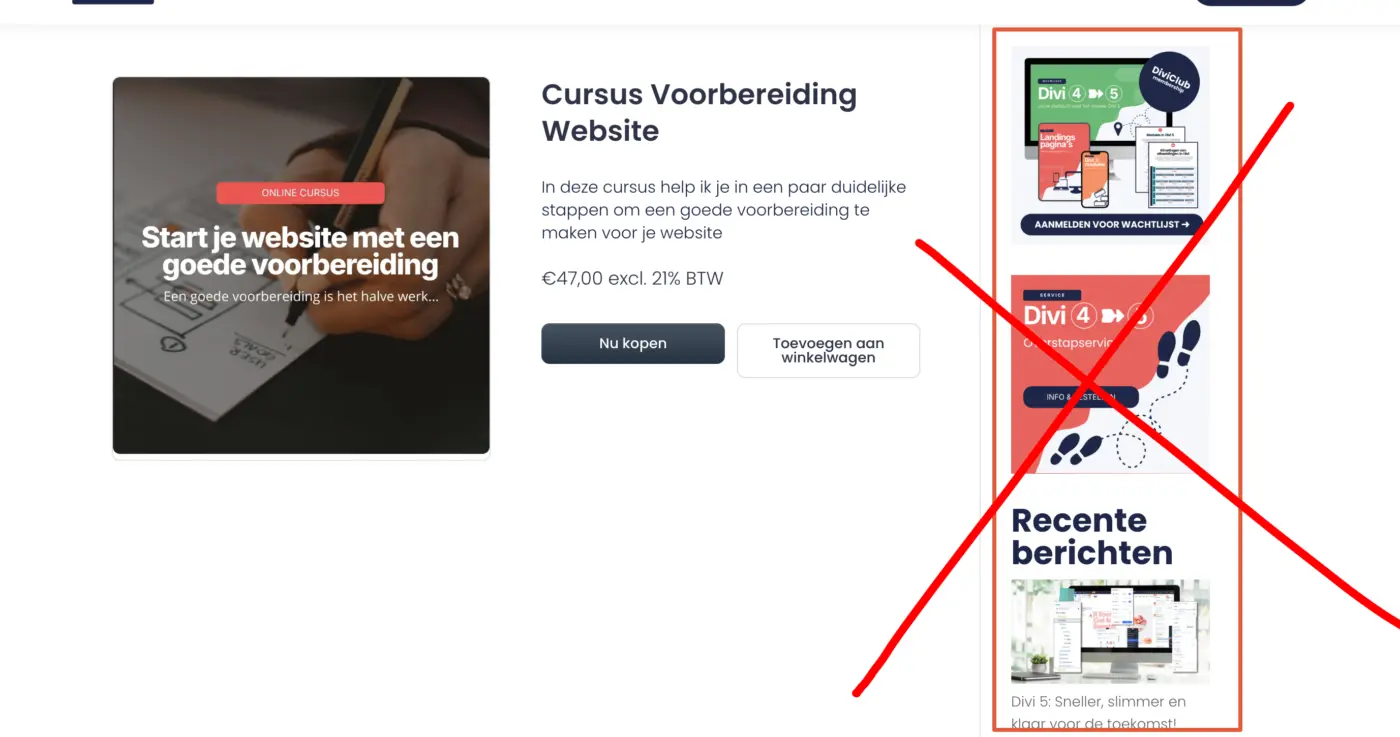

You can disable the sidebar for the fluent_products single template from Divi theme editor.

Thank you for asking this. I had been wondering this, too. I disabled Divi on Product pages (Theme Options > Builder), but that didn't do the trick. Did you find where to do this Monique Delissen?

Hello @victoria_1764519155. Couldn't find it either. I use Divi 5 for my website and not Divi 4. So I disabled the sidebar with CSS code:
.single-fluent-products #sidebar {
display: none !important;
}
And also decided to make my landingpages in Divi and link the 'buy buttons' direcly to the cart with the direct link in the products.
Monique Delissen Thank you for this! I asked Google for code to remove the line after removing the sidebar, so now my product pages are nice and clean. How are you liking Divi 5? Is it really faster than Divi 4? I haven't jumped to it yet.
Victoria Volk it's much faster! And a huge learning curve 😂
Monique Delissen That's great insight; I'll save that for another day then. 😂
Victoria Volk what was the code for removing the line?
Monique Delissen
/ Expand the content area to full width on static pages /
@media (min-width: 981px) {
body.page #left-area {
width: 100% !important;
padding-right: 0px !important;
float: none !important;
}