

Does anyone know how to fix the error "Your order can't be shipped to this address" in Fluent Cart?
My product is a digital subscription (paid membership community via Fluent Community) and I'm getting this error message.
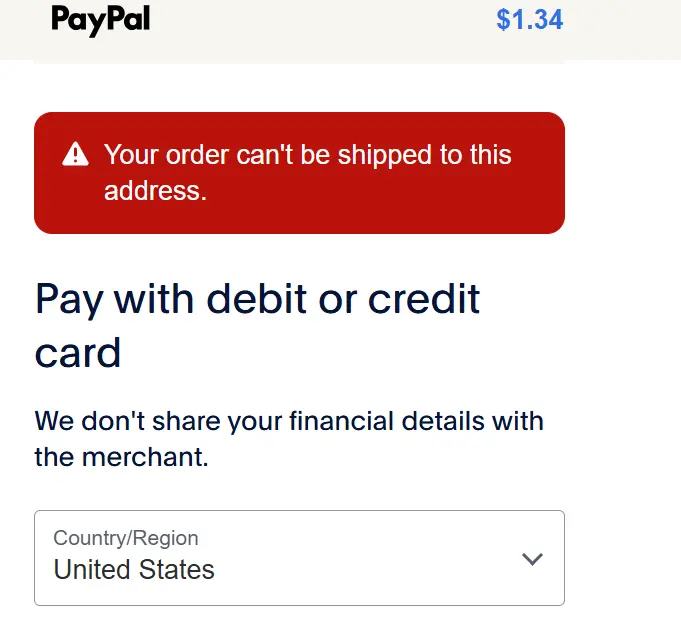

Looks like it's a error from PayPal. I will check from our codebase. We don't mark any item as require shipping from the API request.

I called PayPal and they said it’s not from there end. Apparently the “cannot ship to your address” is a common error. I haven’t been able to find a fix for it but it has something to do with the shipping and delivery settings in fluent cart. Here’s what I found online about this error in Shopify:

Up, I have the same issue, just opened a support ticket about it.
It looks like current implementation raises a 400 Errror (request is not well-formed) from a get from fluentcart to PayPal, but I ma not sure the issue is actually there.
I’ll let you know what I find out from my support ticket. They said they are looking into it. I sent them a video this morning.
Patricia Montagno They just answered me they fixed and it'll be available in the next update :-)
I was just about to send you the same message!
Also they said this CSS will fix the issue with not being able to click the “agree to terms and conditions” box:
.fct_checkout input[type="checkbox"]::before{
    border-color: unset !important;
}
Patricia Montagno This is an issue I mentioned to WPMN Support before. The thing is that the box is ticked, but their CSS makes it white on white, so you can't see it. Only if you set the border color or better still the back ground, can you see whether the box is checked or not.
Helmar Rudolph oh! Can you tell me how to change the background color? Is that even possible? Thank you!
Patricia Montagno
.fct_checkout input[type=checkbox]:checked {
background-color: #111 !important;
}
Thank you!!!