

🚨 Update on: FluentAuth 2.0.2 issue with missing Google Login on sites
Hey team,
I wanted to circle back with an update on the critical issue we previously reported where new websites using FluentAuth 2.0.2 had the “Login with Google” button completely missing on the FluentCommunity login page.
🔍 Root cause identified:
It turns out this was not caused directly by FluentAuth, but by the Members plugin (by MemberPress) interfering with how FluentCommunity renders its login page. Specifically, various hooks from Members were restricting or modifying page output, preventing the Google OAuth button from displaying.
💡 Special thanks to Ruman Ahmed from the Fluent support team for thoroughly investigating and quickly pinpointing the source of the problem — that was extremely helpful and saved a lot of time chasing the wrong leads.
✅ Resolution / workaround:
We resolved this by adding the following snippet to our functions.php. It disables all Members plugin hooks only on the FluentCommunity login endpoint, ensuring the Google login (and other social logins) render properly:
add_action('init', function() {
    if (isset($_GET['fcom_action']) && $_GET['fcom_action'] === 'auth') {
        global $wp_filter;
        foreach ($wp_filter as $tag => $hook) {
            if (!empty($hook->callbacks)) {
                foreach ($hook->callbacks as $priority => $functions) {
                    foreach ($functions as $id => $callback) {
                        if (is_array($callback['function']) && is_object($callback['function'][0])) {
                            $object = $callback['function'][0];
                            if (strpos(get_class($object), 'Members') !== false) {
                                remove_filter($tag, $callback['function'], $priority);
                                remove_action($tag, $callback['function'], $priority);
                            }
                        } elseif (is_string($callback['function']) && strpos($callback['function'], 'members_') !== false) {
                            remove_filter($tag, $callback['function'], $priority);
                            remove_action($tag, $callback['function'], $priority);
                        }
                    }
                }
            }
        }
    }
}, 0);
📌 Impact:
- This only affects sites where FluentAuth and Members were installed fresh.
🎉 Closing note:
Huge thanks again to Ruman Ahmed and the entire Fluent team for the rapid support and clear guidance.
Hopefully this post helps others in the community who might encounter the same scenario.
If anyone needs it, I can also provide a lightweight plugin version of this fix — just let me know!
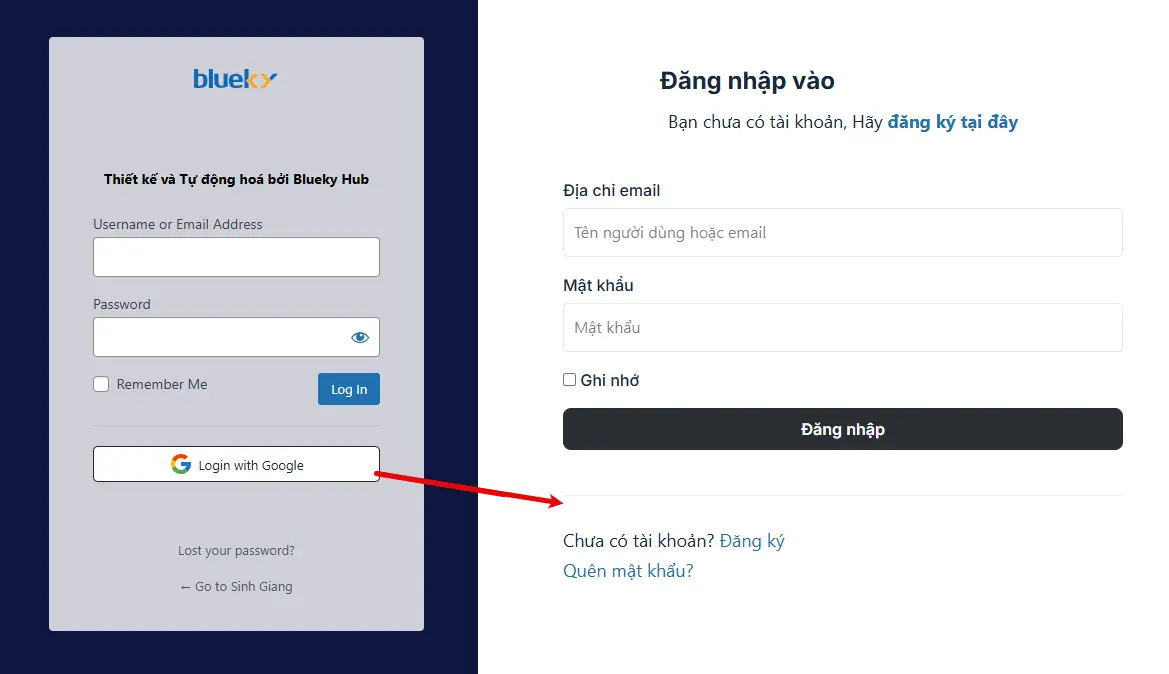


I've been having a headache all week looking for this problem. Because there is a site installed from version v1 when upgrading without errors. But I installed a new website from v2.0, it really can't log in with Google from the community login portal. Hope the Team will fix it soon.

not only, if an user is locked there's now way to manually unlock it

Tindaro Battaglia delete the hitory, it will auto unlock members.

Tindaro Battaglia You just need to do as Cuong Thach said 😏
Hoang Hxn o i see, but that's a workaround, not an option.
I said this solution some posts ago, but someone said it doesn't work
Tindaro Battaglia Yes, Maybe a smarter solution is needed Cuong Thach

Tindaro Battaglia Somehow my reply here seems to keep being deleted. I will try one more time. Deleting a log entry does not release the lock.
J V here we are
Tindaro Battaglia I have confidence it will be fixed. A lot has been fixed already. We just need to pray that it won't be as long as the last update before this one ;)
J V yep but that's a big problem, imagine a customer that is locked, sends an email to support and receives this answer : 🤷♂️
Tindaro Battaglia How would you like Flows to handle this situation?
Tindaro Battaglia I am not using it. I lock through a different plugin where I can unlock. I also don't use the password reset since it exposes wordpress login. You can also not use a captcha as login will be broken, so yeah some work needs to be done and until then don't use it or workaround.
J V 100% agree, any news on that Shahjahan Jewel ?
No news at all
Raiyan Marzan do you know how this problem should be fixed?

We have checked the issue. and make sure you have the Auth Shortcode is enabled. Otherwise it will not work.
Shahjahan Jewel I have enabled "Login or Signup Forms Shortcodes" but it doesn't work. Note: This only happens when installing FluentAuth 2.0.2 on a completely new site. This doesn't happen on an old site that already had a previous version of FluentAuth installed and upgraded to v2.0.2.
Shahjahan Jewel OT: is there a space to request features for Fluenthauth? it would be great to have a feature to select max number of simultaneous logins role based for registered users
Special thanks to Ruman Ahmed from the Fluent support team for thoroughly investigating and quickly pinpointing the source of the problem — that was extremely helpful and saved a lot of time chasing the wrong leads. 🙏

I do not have Members plugin on my site, but Google login does not appear on the community login or signup page. It is visible on the Wordpress login page.
What can I do to make it visible everywhere?