

“Security verification failed” — Login issues, kicked out, error messages
We have had these problems for weeks now with login issues. Has anybody had similar problems?
Yes, I have submitted a support ticket (and thank you, Team, we got some support suggestions), and I’ve tried to adjust settings in the different caching settings at both the host and at Cloudflare.
Yes, I can flush the cache also manually. But I can’t seem to permanently fix these login issues people seem to be having.
I’m using fluent community pro and I’m also using fluent auth—could fluent auth be part of the problem?
I have removed any custom login pages and I’m trying to make things as simple as possible.
The other hard part is that I can’t replicate the problems. People are having so I can’t test it very well.
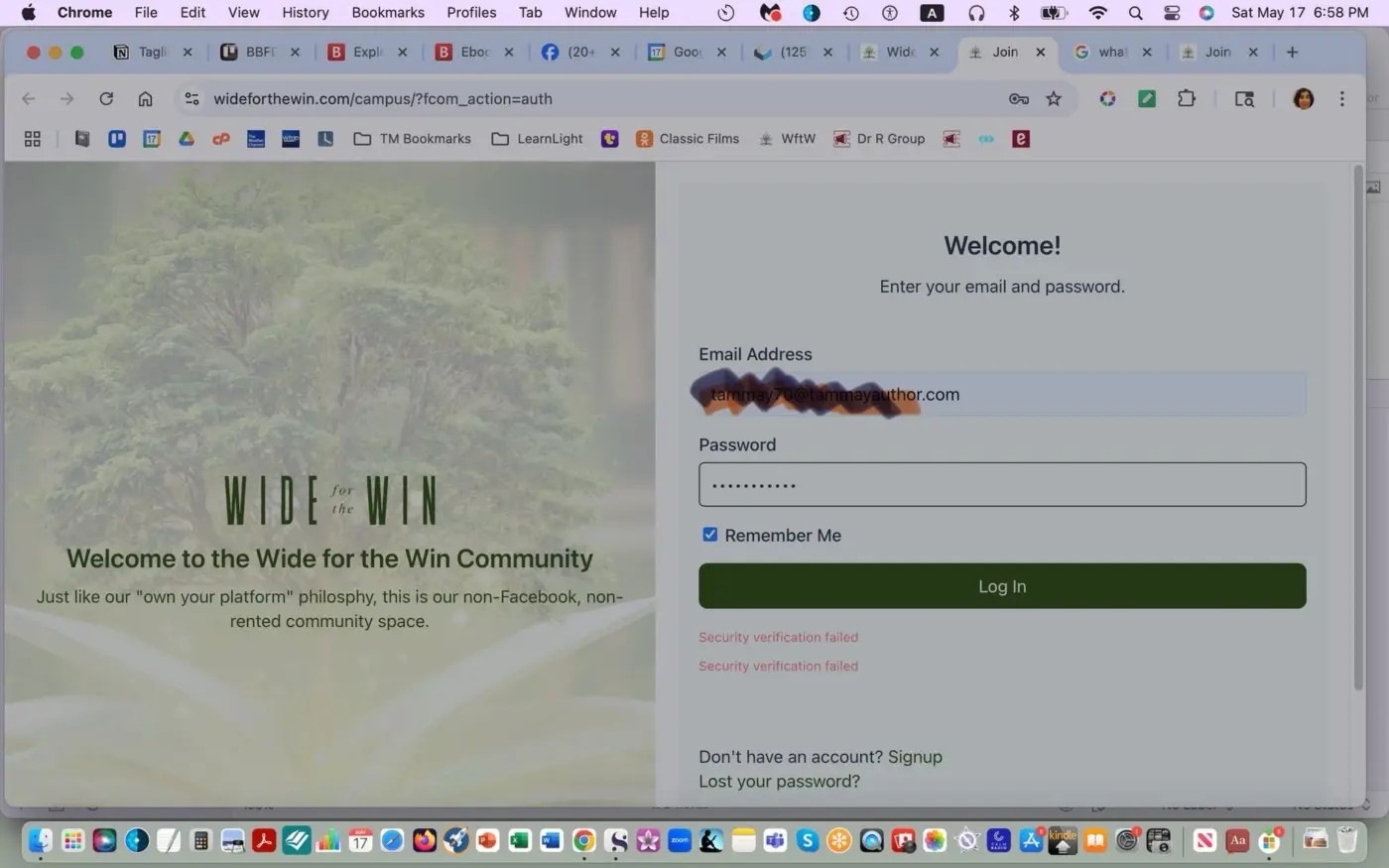
Here’s the message below from the user:
It was working just fine, and then suddenly yesterday, when I went to the site, it had kicked me out and was asking for my username and password. When I put those in, it gave me the following error message. I tried multiple times to do the change password option, changed the password, and then tried logging in again and same error message.
Thanks for any advice or suggestions!

Most probably it’s a plugin conflict. Do you have any other auth or security plugin installed?

Shahjahan Jewel Fluent Auth. Should I try turning that off?
Shahjahan Jewel i’m also using cloud flare and I have already tried turning off everything possible as far as caching.

Bradley Charbonneau My guess is that the problem is cloudflare turnstile. Just tried it and have the same issue. Shahjahan Jewel

J V Can I just completely turn things OFF at CloudFlare?
I'm mostly using CloudFlare for the (free) SSL for the domain.
Erin Wright I'm not sure what you mean. Turnstile doesn't just turn on.
J V I don't even know what "turnstile" is. ;-)
In a nutshell, if caching might be causing the problem, how can I turn it off at CloudFlare?
Shahjahan Jewel Should I just try to deactivate the Fluent Auth plugin? Could that be the problem?
What features will I miss if I don't use Fluent Auth?
Erin Wright If caching is the problem it will resolve itself with time. My answer was to TS and a guess based on my experience using Turnstile (captcha). I removed it and I'm fine logging in. I prefer to eventually be able to use it though.
J V I figured out what / where Turnstile is and I don't have it turned on or activated.
Erin Wright Well I guess you learned something, however I have no idea what your problem is, since you seem to be in somebody elses's post. ;)
J V Erin Wright & Bradley Charbonneau work together. ;-)
Erin Wright 🤣Ok, didn't know that. Anyway, my guess was wrong I guess. ;)
J V thank you so much for your comment. I’m willing to try anything at this point as our members are just having trouble logging in.
we have a ticket in to the helpdesk and they have been very helpful helping us. Try to figure this out. It could be something fluent auth plugin maybe I have misconfigured or something.
Bradley Charbonneau I am waiting for the plugin to get the update. Not using it at this point because of some issues I had. Instead I am at the moment using Theme My Login to have some options. Works fine, but not to pretty. Hope the next update will let me use Fluent Auth.
J V so, maybe this is a silly question, but do I have to use the fluent Auth plug-in?
If I just deactivate it, will my problems go away with login issues? What are the downsides of not using the plug-in at all?
Bradley Charbonneau You don't need it, but I cannot of course tell if it solves your problem.
For me the problem is that my WP backend gets exposed.
I wanted it for the magic link and for a prettier 'reset password', however they return links that show wp-admin link.
That is why I choose the other plugin.
Have you checked the settings in Akismet?
Bradley Charbonneau Also I just realized. I had issues when I was using caching from Cloudflare. Couldn't even login as admin. No more CF caching for me.
J V How do you turn off caching at Clouflare?
J V Also, Fluent Auth 2.0 is out, I’ll try the upgrade.
Bradley Charbonneau You have the option to pause it for testing purposes. Or completely remove the cache. You should be able to find the details from them.
I have FluentAuth installed now and I am happy with the progress as for me Magic Link was a big wish. I still found adding Captcha Turnstile causes login errors, so removed it again.
J V Thx. I’ll give it a shot.

I had a similar issue after installing Fluent Auth and I had to disable Loginizer and Wordfence, which both also secure login, but they are not compatible with Fluent Auth (which works fine on its own). If you have other login security plugins try disabling those.
Antonios Triantafyllakis thanks for the note.
I don’t have other security plug-ins running at all. I do have caching provided by the hosting and then caching provided by cloud flare. I’m trying to turn off as much as I can and yet I still can’t seem to get rid of these errors for the members.
If I turn off fluent auth, will that solve the problem?
Why do I actually need fluent anith anyway?

I would like to mention that before the background color covered all the content and now it appears as content inside a box.
I don't know if this design change was intentional or a mistake.
Please if someone can tell me how to do so that white margins do not appear in the forms of the portal 🙏.
Sombri Luna You commented on my post. You might want to create your own post so more people see it. ;-)
I just deactivated Fluent Auth ... I'll see if that helps with all of the error messages people are getting.
OK, that wasn't a good idea. After logging in (as a regular subscriber), I wasn't redirected the community but it just reloaded the login page again and again.
Ugh.
Reactivated Fluent Auth.
Here are all of our active plugins. Anything look like a conflict?
Admin Menu Editor
Akismet Anti-spam: Spam Protection
FCE Quick Fixes
Fluent Boards
Fluent Boards Pro
Fluent Forms
Fluent Forms PDF Generator
Fluent Forms Pro Add On Pack
Fluent Messaging
FluentAuth - Auth Security Plugin
FluentCommunity
FluentCommunity Pro
FluentCRM
FluentCRM Pro
FluentSMTP
Google Analytics for WordPress by MonsterInsights
Site Kit by Google

Within the past week my site as well went sour - massive critical errors. I have SiteLock which did a scan for malware and came back compromised. My plugins enabled are much like above. I currently have all my plugins enabled but the following...
Fluent Community, Fluent CRM, and Paymattic Pro
Whenever I enable just one of these I get a critical error.
Jamie Cochran I wish I could do a sad face emoji but ... ❤️
I think we also had a "compromised" site a while back and I think it was the Jetpack plugin that was giving us trouble.
We are just trying to help our members log in properly--and consistently.

Following

I sometimes have the same issue one thing that we did discover was that the varnish settings on cloudways were screwing us up we turned that off and it seemed to help we also had some conflicts with WordPress rocket caching as well as cloudflare it's definitely something to do with caching in my opinion
Joseph Babineau I have turned off any caching I can find and I think it helps.
"FCE Quick Fixes" turned out to be at least part of the problem. The WP Manage Ninja team turned off that plugin and that seems to have fixed the login issues.
Fingers crossed that it will work now!