


Recommended Hosting
I have a community the size of 300 members. I currently am using Hostinger VPS with the stats below but I don't like it. The Cyberpanel has so many issues and bugs. What hosting site is recommended for this type of setup.
CPU core: 4
Memory: 16 GB
Disk space: 200 GB
Bandwidth: 16 TB

Your current 4 CPU / 16 GB VPS is already well above WPManageNinja’s published baseline for FluentCommunity, so the main issue sounds more like CyberPanel and the server stack than a lack of resources.
WPMN own recommendation is to use a VPS or cloud server with PHP 8.1+, MySQL 8.0 or MariaDB 10.5+, Nginx, Redis object caching, server-side cron and NVMe storage. For an active community with lots of media, it’s also advisable offloading it to Cloudflare R2.
WPManageNinja runs this community on xCloud and recommends it.
You can use xCloud’s managed hosting or connect it to an external provider such as Hetzner, Vultr, DigitalOcean or AWS (ref)
I would migrate to a similar-sized xCloud setup first, then resize later based on actual concurrent users and CPU/database usage rather than total member count.

Jorge de los Reyes Except for the xCloud suggestion, agreed. Based upon extensive xCloud experience, and I have receipts.
hey Charlotte! Long time no see around here! 😄 It’s been a while since I last saw you in the community.
You’ve always brought really useful and thoughtful perspectives, so I’m sure this case is no different (which makes me genuinely curious about your experience!)
I’ve honestly lost count of how many hosting companies we’ve tried over the years. Way too many.
I’ve even been politely encouraged to leave once 🤣
We did have a few issues with xCloud in their early days, but since they significantly improved their support around a year ago, every actual technical problem I’ve had has been handled extremely well (and usually very quickly).
There are still a few things I’ve been waiting on for months… 🫣 but those are more commercial/product decisions than technical support issues.
From a business perspective, what matters most to me and our clients is performance, reliability, and what happens when something actually breaks. On those three points, my experience with xCloud has been consistently very good.
Of course, it’s not perfect (I don’t think any hosting company is, or should pretend to be). But after several years using it, I’m still very comfortable recommending xCloud.
I also think recommendations are interesting because sometimes you recommend a company for years, then one serious experience completely changes your view and you actively stop recommending them. I’ve had a few of those cases with Wordpress and hosting companies. Fortunately, xCloud hasn’t been one of them.
Don’t scare us like that without giving us some feedback 🤣
I’d genuinely be interested to hear what happened in your case. If those “receipts” are something you’re comfortable sharing publicly, I think they could be useful both for the community and as direct feedback for the xCloud/WPMN teams, since they’re around here too 😄
Jorge de los Reyes Well, I'm actually here quite a lot, but I'm glad to know you missed seeing me. 👋
Fair ask. I'm not going to write a full postmortem, but here's the short version.
I bought multiple tiers of the LTD and tested it hard from last fall through this summer, so well after the support improvements you mentioned. I built and burned down a lot of servers and sites, and moved everything except my main production site over. I'm not a coder, so I used it the way it's sold: pressing buttons, not dropping to the terminal.
You named reliability and what happens when something breaks as what matters most. Same for me, and that's where it fell down:
- Actions the interface reported didn't always happen, and when they failed there was usually no error or notice. You found out later.
- Neither the on-site nor the off-site backups it created were usable when I needed them. I ended up running a separate WP backup/migration setup alongside it, which defeats the purpose.
- Support didn't resolve it. I'm not posting the tickets publicly, since they're full of server and site details.
A panel's whole job is to run the commands behind the buttons and confirm they worked. If I have to verify every action by hand and keep independent backups anyway, it's adding work instead of removing it.
Not trying to scare anyone, and I don't doubt it's working for you. If you stay on it, verify everything and keep backups outside the platform. I've been through their support process and I'm done with it, so I've moved on. 💀
Charlotte I see 🙂↕️
I’m sorry you had that experience.
backups should never be kept only on the same platform; that’s an important reminder.
My own experience with xCloud has been different: across my sites and those of clients and colleagues, we use both the panel and the terminal extensively and haven’t run into major stability issues. The closest case I remember was a staging-site issue related to OPcache (that was solved in the same week to be fair).
That said, different setups can lead to very different experiences, so I appreciate the heads-up. I hope you’ve found a setup that’s more reliable for your needs.
Keep us updated! 😄
Jorge de los Reyes The off-site backups failed too; that's in my post. And a panel that needs the terminal to check its work is the problem I described, not a difference in setup. That's all I have to add on xCloud.
Charlotte Oh, sorry, I missed that you also mentioned off-site 😅
So I guess that’s an “X” for xCloud ❌ 🤣
As I said, keep us updated! We haven’t had any issues ourselves, but it’s always useful to know what’s working ( or not working) for others.
IMHO, any dependency is something worth keeping an eye on. And unless you want to run your own servers, hosting is going to remain one of those dependencies for a while.
Hopefully, feedback and competition keep pushing the whole market forward.
Especially in the VPS space: if prices keep going up, service quality should probably go up with them too 😅


Charlotte thank you for sharing your experience. How long ago was your experience that the off-site backups created by xCloud were not usable? Do you mind if I ask how did you discovered that they went wrong? Did it fail to restore or were there errors upon restoration? Thanks, in advance, for your time. I know this is in the past for you but this would be helpful for me to know.
Sheryl Coe "Do you mind if I ask how did you discovered that they went wrong? Did it fail to restore or were there errors upon restoration?" Yes to all. Sometimes one. Sometimes another. Almost all things appeared to function as expected. That was one of my issues: failure notices tell you what the needs are. Silent failures and false positives are more opaque problems - both in discovery and diagnosis.
I wish I had found more patterns in the failures - because honestly that's at least some structure and perhaps a path through the issues.

I understand this feeling, I recently moved from shared hosting to vps last month. Fluentcommunity cant work on low ram, I have upto 120 members, and 2-15 daily active members. Check inside your php version that is installed and increase the ram from 128mb to 512mb, do not increase the ram more than 1gig, or fluentcommunity will eat up all 16gig ram of your vps, also reduce your php service workers(fpm profile) from 100 to 20 each, if you don't, php workers will eat up everything in your core.
The difference between shared hosting and vps is that; on shared hosting, everything is already set up for you by the hosting company while vps you will set up everything yourself.
I am using aapanel, use aapanel instead of cyberpanel because aapanel comes with nginx/apache automatically.
You need to tackle this early or you will have ram and core issues soon, if at all you are not having the issues right now.
I am using contabo for hosting 8gig ram, 4 core, 100 ssd and dreamhost for domain/dns
Steps on how to fix your issues:
- fluent community requirements. https://dev.fluentcommunity.co/deployment/server-requirements
- backup your files, db, etc so you don't lose them.
- restart your vps, meaning you vps will become new, that is why backup is needed before wiping.
- use cmd or install putty, login your putty with your ip address, username and password given to your by hosting company.
- type this in your putty/cmd: "ssh root@your_vps_ip" example: (ssh [email protected]) and click enter
- install aapanel, paste this "URL=https://www.aapanel.com/script/install_panel_en.sh && if [ -f /usr/bin/curl ];then curl -ksSO $URL ;else wget --no-check-certificate -O install_panel_en.sh $URL;fi;bash install_panel_en.sh ipssl" and click enter.
- The installation takes about 2 to 5 minutes. Once finished, the terminal will display your unique aaPanel login URL, username, and password. Copy and save these details securely.
- Open your web browser and paste the generated login URL (or your VPS IP address with the default port
:8888). - Log in using the username and password provided in your terminal
- After successful login, ignore any fast/auto install software like, lamp(linux,apache,etc), lnmp(linux,nginx,etc).
- go to appstore by the left side menu, and install everything one after the other, so you can carefully configure them as you wish.
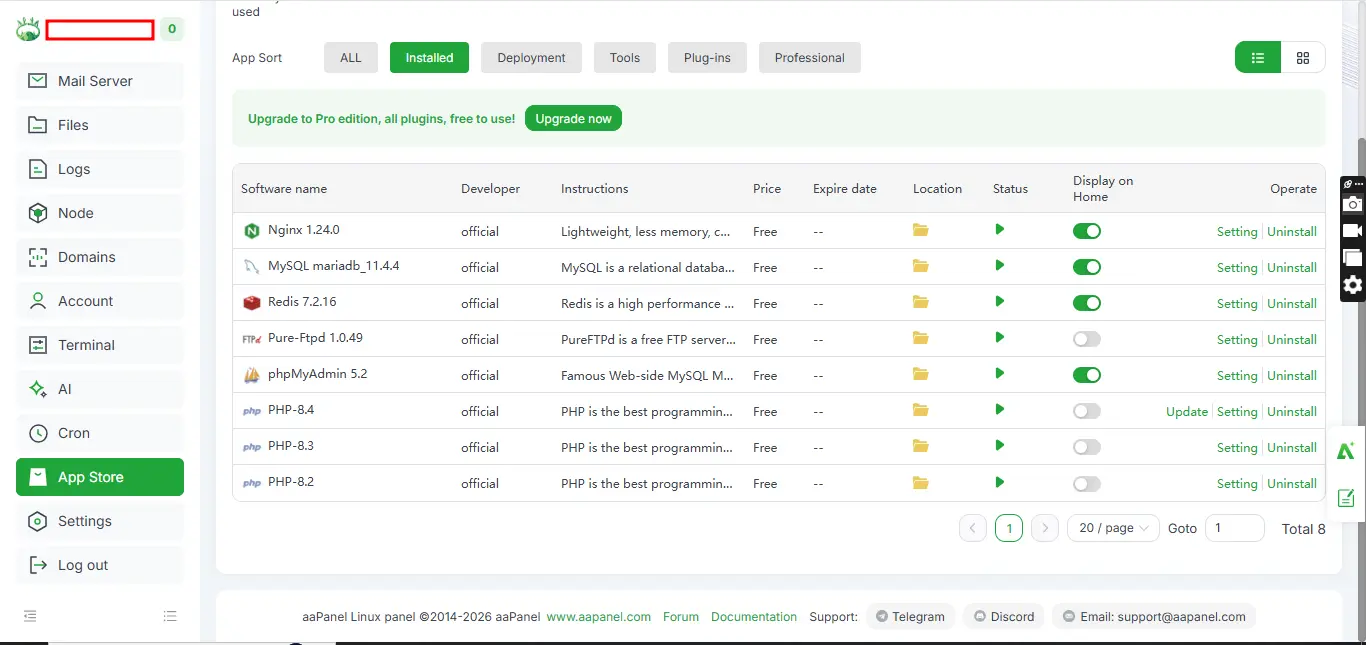
- install ngix, install mysql maria db, install phpmyadmin, install php version and finally redis.
- install the php version you want to use, either 8.2 or 8.3 or 8.4, i installed 3 different php versions because i have different websites using different versions, I am not only running a fluentcommunity site on my vps that's why, so for you, you can just install only one php version
- in the version click settings of that php version showing on appstore and set your ram from 128mb to 512mb or maximum of 1gig since you have 300 members for now, if your members grow from 300 to thousands, like 3000 or more increase your ram again to 2gig or 3gig, and increase php service workers(fpm profile) from 20 to 50 each. also max sizes
image 1:
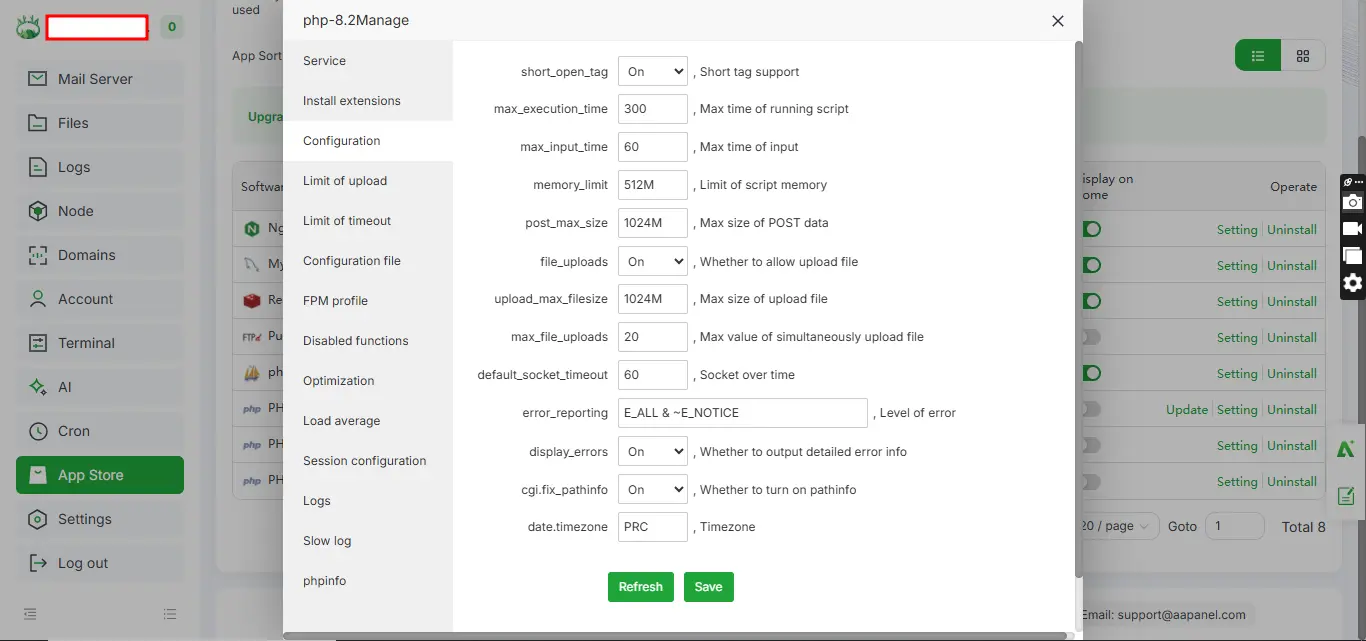
image 2:
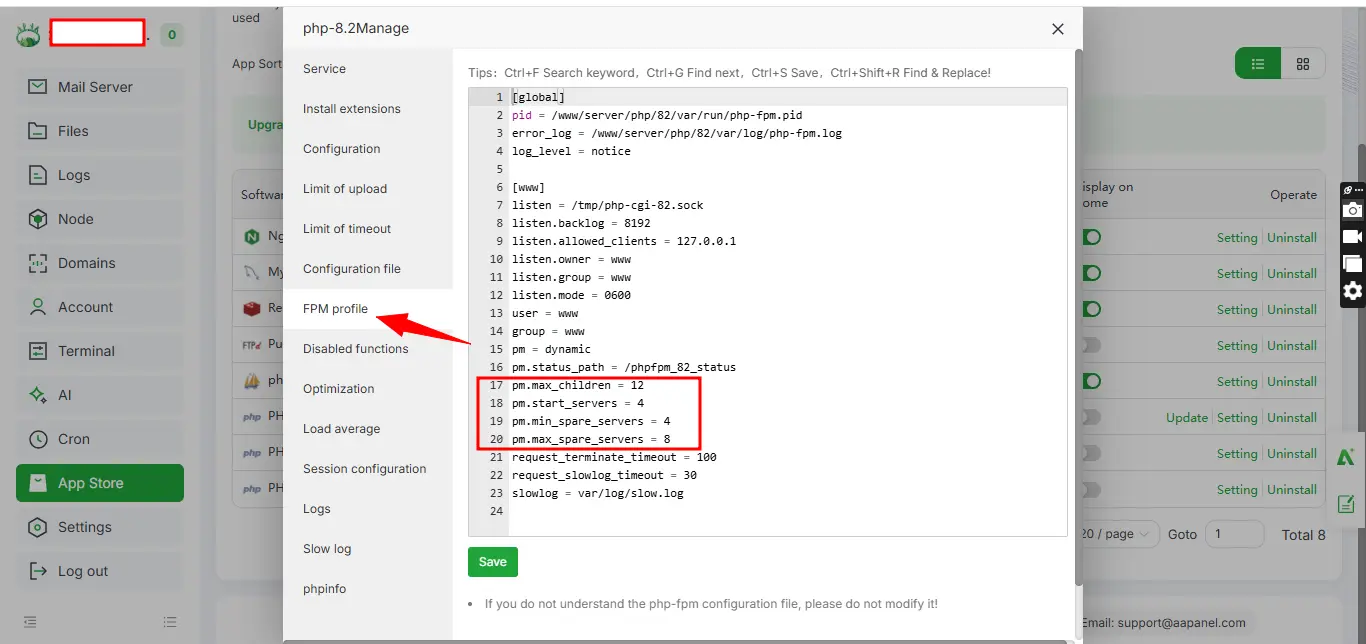
Note that if you don't partition your ram, they will be eaten up, partition like 512mb or 1gig to fluentcommunity since you have 300 members now. Nginx, redis, php versions, db, etc also eats rams and cores as well. to avoid future issues.
I hope this helps.
Sorry for my English, English is actually my 3rd language.

WiLson Eberechi nothing to add to your write up, just wanted to congratulate you on the growing community. Well done ☺️
Ross FCA Thank you

WiLson Eberechi What if you are on managed VPS and you can't change your panel?
Marek write to your hosting company to change it for you, they will.

I am pretty satisfied with Hetzner AX52 dedicated server.

I used it I used the same one for 4 years and a month ago I switched to NetCap hosting for a lower price and a more powerful server

I use o2switch and he performance are great. It's not expensive. https://www.o2switch.fr/

Hostinger offers many different panels. Try a different one!
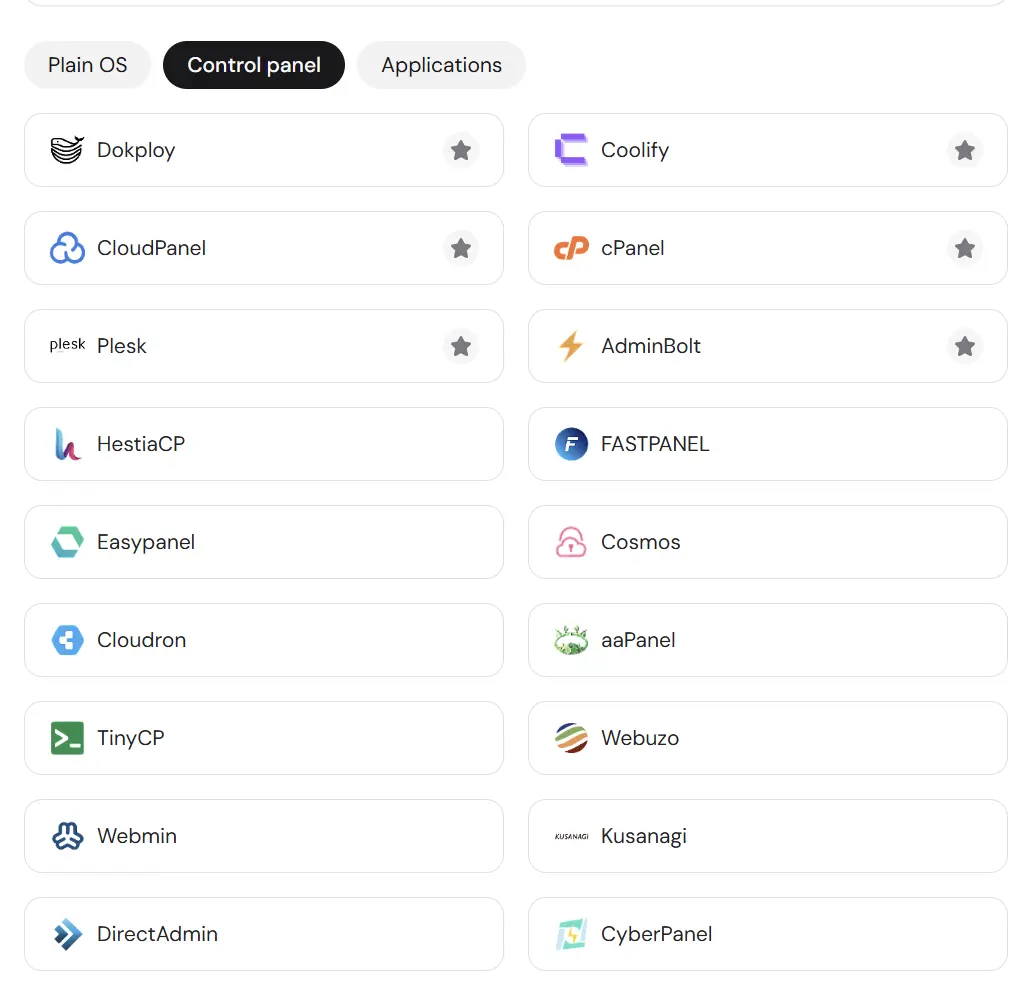

The server spec doesn't mean anything if you setup the website with limited details. Ensure the server can use as much RAM as needed, and that the number of NGINX workers (or the equivalent of the server you're running) is set up appropriately to the amount of RAM. Most panels install a basic website which settings are minimum for a basic blog...

Hostinger (cloud professionnal++)

What is your server desired location ? US, EU, elsewhere ?