

New Light Theme Design
Who wants the CSS code?
here it is!
.fcom_single_layout.fcom_max_layout.feeds.fcom_sticky_header { background: linear-gradient(180deg, #cad0ff 0%, #ffffff 70%);}.fhr_content_layout_header { background: unset !important; border-bottom: none !important;}.fcom_top_menu { border-bottom: none !important; background: #cad0ff;}#fluent_community_sidebar_menu { background: linear-gradient(180deg, #cad0ff 0%, #ffffff 70%);}.fcom_menu_link.fcom_dashboard.route_url.fcom_compt_link.router-link-exact-active { background: #fff;}
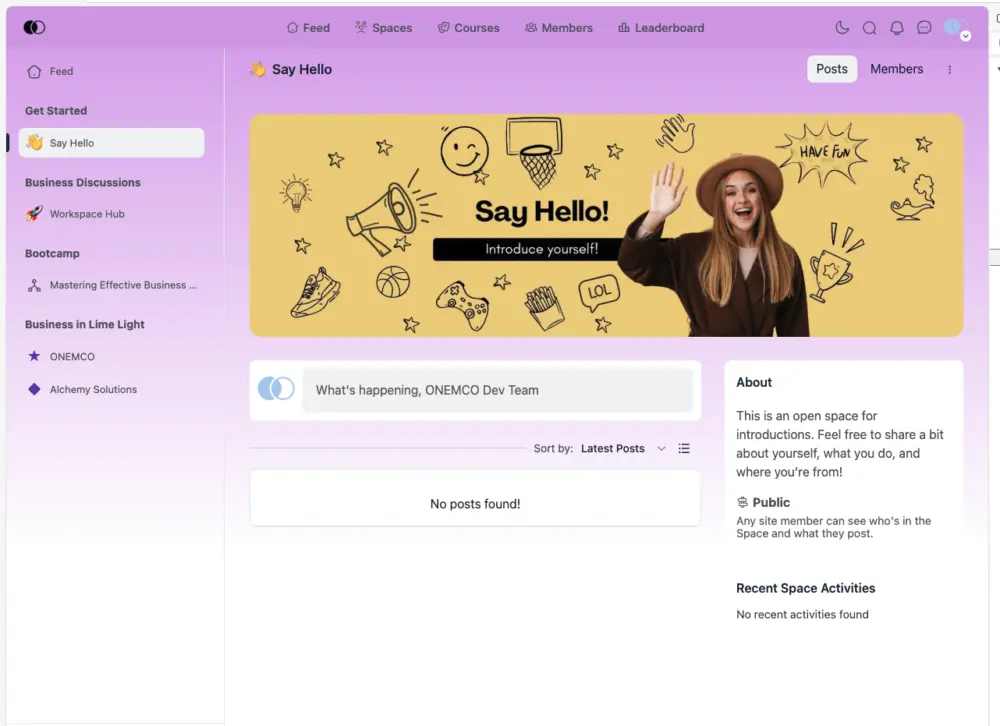

Well, it's quite pink 😆

Florian Daugalies, you tell me which colour you prefer my friend? And I shall make one that suits your need.
Manoj Sharma Nice to see you playing around with this wonderful plugin. But i personally don't like the color gradients. The default bright style fits our needs very well :)

I want it, I want it!
Our principal brand color is #960F0F 🤩
Linda Rando, cool !
Linda Rando, Change the main color to your liking -- here is the code... keep it a light color
.....
.fcom_single_layout.fcom_max_layout.feeds.fcom_sticky_header {
background: linear-gradient(180deg, #dd1a1a 0%, #ffffff 70%);
}
.fhr_content_layout_header {
background: unset !important;
border-bottom: none !important;
}
.fcom_top_menu {
border-bottom: none !important;
background: #dd1a1a;
}
#fluent_community_sidebar_menu {
background: linear-gradient(180deg, #dd1a1a 0%, #ffffff 70%);
}
.fcom_menu_link.fcom_dashboard.route_url.fcom_compt_link.router-link-exact-active {````background: #fff;````}
here is the CSS, change the primary colour to a light colour of your liking...
Enjoy
.fcom_single_layout.fcom_max_layout.feeds.fcom_sticky_header { background: linear-gradient(180deg, #cad0ff 0%, #ffffff 70%);}.fhr_content_layout_header { background: unset !important; border-bottom: none !important;}.fcom_top_menu { border-bottom: none !important; background: #cad0ff;}#fluent_community_sidebar_menu { background: linear-gradient(180deg, #cad0ff 0%, #ffffff 70%);}.fcom_menu_link.fcom_dashboard.route_url.fcom_compt_link.router-link-exact-active { background: #fff;}
Manoj Sharma, thank you ❤️❤️❤️

Where can i put this code?
domini immobilier Good question mate,
You can put this in this file for now:
wp-content/plugins/fluent-community/assets/theme-default-d8d9f2b1.css