


Issue with Menu Settings
Hello Communitiers!
I´m having an issue in one of my environments. I´m working with Support but just in case someone else had the experience and can share some light.
When I try to update the menu ( Menu Settings > Primary Menu Items ) - either reorganize the items or create a new one -I receive an error saying:
Unexpected error from server. Please check browser console.
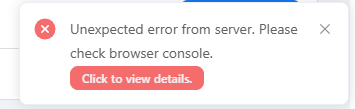
Once I click on 'Click to view details' I get the following message:

Environment Information:
-
Hoster: Hostinger
-
Wordpress Version: WordPress 6.8.1
-
Theme: AsapTheme
-
Enabled Plugins:
- FluentCommunity ( 1.7.5 )
- FluentCommunity Pro ( 1.7.5 )
- WooCommerce (9.9.4)
Support is being very diligent trying to help. They are recommending to reachout to Hostinger to turn off the CDN as looks like another user reported the same issue and that solved the issue. In my case, because it´s a shared account and I don't have access to the hPanel ) I tried to install the same component in another Wordpress ( tried 3 different ones ). The experience is not consistent. Some work with and withour CDN, other doesn´t work - doesn´t matter what I do ... simply doesn´t work.
Any ideas ??

Hi David Herraiz Diaz , have you got any good solution for this problem? I have the same error there. : /

Hi do you have any solution!! i have the same erreur plz help!, ounce i edit or delete menu setting i receive it. and no changes are made.
plzzzzzzz help
Angela Grolet Hi there, I use Hostinger and when I disabled the CDN, it works. So I can change the menu settings and enable the Hostinger's CDN again. Some CDN has more settings, but I'm sure that it's with the CDN, it filters the request cause of menu. I hope it helps!