

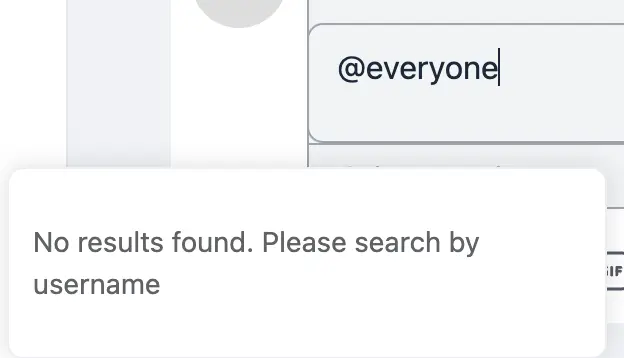
Is the @ everyone not enabled?
In some of the help text it indicates you could mention @ everyone but when you attempt to use it you see this Not found error:
Is this mention coming?
Great idea! Anyone with admin/moderation authority can use it.

This is working well here.
- Are you the administrator?
- Are there already more users registered in your community?
- Are you using the latest PRO version?

ELISA T FARIA yes, I'm administrator, there are a number of users in the community, and I'm using the latest PRO version.
In your example do you have anyone other than Marca added to the space?
Curtis Bingham "Marca" isn't a person. I translated the community to Brazilian Portuguese. "Marcar Todos" (I reviewed the translation, and the correct one is just "Marcar") means "Tag Everyone." In my example screenshot, I show that typing "everyone" correctly identifies the "Marcar Todos" or "Tag Everyone" function. In the current screenshot, I show that there's a confirmation message for the action.
ok, yesterday's update changed the help tip. It isn't quite perfect, but it does work.
It would be even more ideal if the help tip could be suppressed if it is a known @ everyone mention.

Anyone knows we I cant use the @ ? Its puts the text bold and big and dont writes the @ , I dont understand why :(
Sofia Carvalho first, only admins can use it, and apparently they can only use it in the original post but not in followup comments.
-
Curtis Bingham I think its not just that, its my pc or keyboard or I dont know that when i try to write @ it writes big and bold as you can see 😂