


Improve Group Sidebar UX – Move Admin Actions Out of Permanent View
The current group sidebar in FluentCommunity feels unnecessarily cluttered because administrative actions such as “Make admin,” “Leave group,” and “Delete group” are permanently visible.
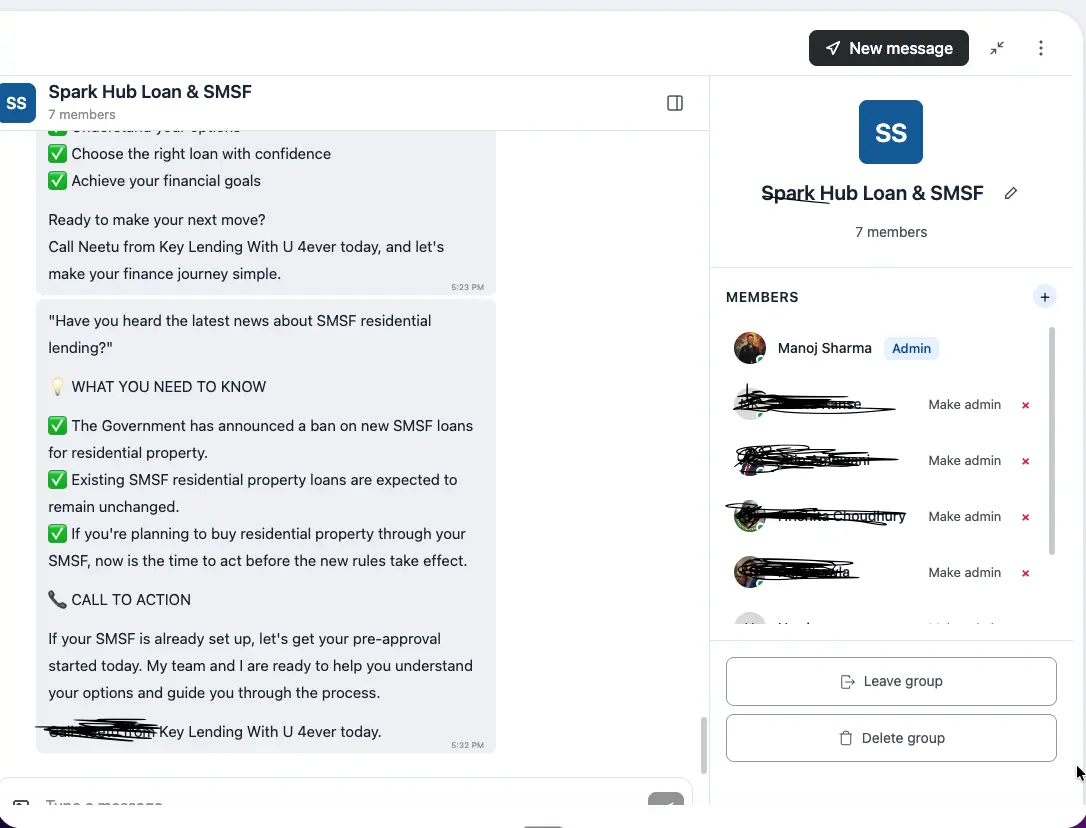
These are occasional actions, not things users need every time they open a group. Keeping them permanently displayed takes up valuable space and makes the interface feel more like an admin panel than a messaging/community experience.
It would be much cleaner to move these actions behind a three-dot menu, Group Settings, or Manage Group option.
For example, “Make admin” could be available from a menu when interacting with a specific member, while “Leave group” and “Delete group” could be placed under the group options/settings menu.
The main sidebar should focus on useful group information and the member list, while administrative and destructive actions should only appear when needed.
This would make the group experience cleaner, less cluttered, and more intuitive.

This is already implemented in our dev environment and will land in the upcoming release.
The per-member actions now sit in a three-dot menu on each member, so they only show when you interact with that member. We're also moving Leave/Delete group into a group options menu to keep the sidebar focused on group info and members.
As a bonus, that same menu introduces a new Block member option — so you can block someone directly from the group chat. 🎉
Appreciate the detailed feedback!