

Image bad rotation
Why do some images uploaded to the community automatically rotate? It looks really bad.
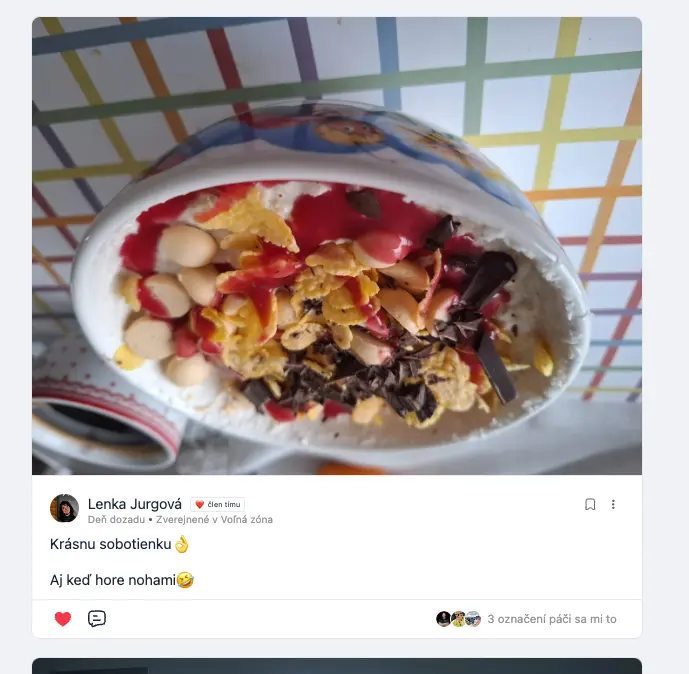

Are you uploading from iphone?

Shahjahan Jewel No. When I upload from Iphone, everything is ok.. This is from Android.

Shahjahan Jewel We've had some instances where user photos are upside down or sideways and I think they are uploading iPhone pics. I'll try to ask the users and see what I can find out.
Shahjahan Jewel This photo, which I post here my client share from Samsung galaxy A52

I had the same with a photo that I uploaded from my laptop
Just to let you know, we have fixed the issue on our dev branch.
Shahjahan Jewel so in next update it will be fixed?

Shahjahan Jewel is it possible for the team to release smaller but more frequent updates?
I’m still stuck with the broken integration between fluent CRM access tags, which has been a known issue for almost 4 weeks now.
You told me a week ago that it was fixed in the dev branch but that doesn’t really help me now or four weeks ago when it was first a problem.
When fluent community was still in beta, the updates were flying on and almost daily basis, and there were hot fixes as well.

Hi, this is still happening to me. I am uploading from iphone! This is extreamly important for me to get it fixed asap. Could you guys please guide me in the right direction on how to fix this?
Ron Dover The issue should be resolved. Are you using the latest version? If you still find the issue, please open a support ticket with the sample image so we can test it.
I noticed this only happens when uploading a HEIF image file. If I try to upload it directly from iCloud, I get an error: 'The file must be an image type.' However, if I upload the same image from the iPhone gallery, it works—but the image is always rotated to the left. Version 1.5.0
Shahjahan Jewel, uploading works correctly here, but on my FluentCommunity, all HEIC images rotate to the left. Has anyone else experienced this?
Ron Dover did you disable the image compression or have any extra plugin which is doing double rotating?
Shahjahan Jewel thank you, your suggestion pointed me in the right direction! The issue was indeed caused by a plugin: Instant WebP Converter. After disabling it, the double rotation problem was resolved. Appreciate the guidance!

+1