

😠I’m honestly stunned!
I’m really, really not happy!
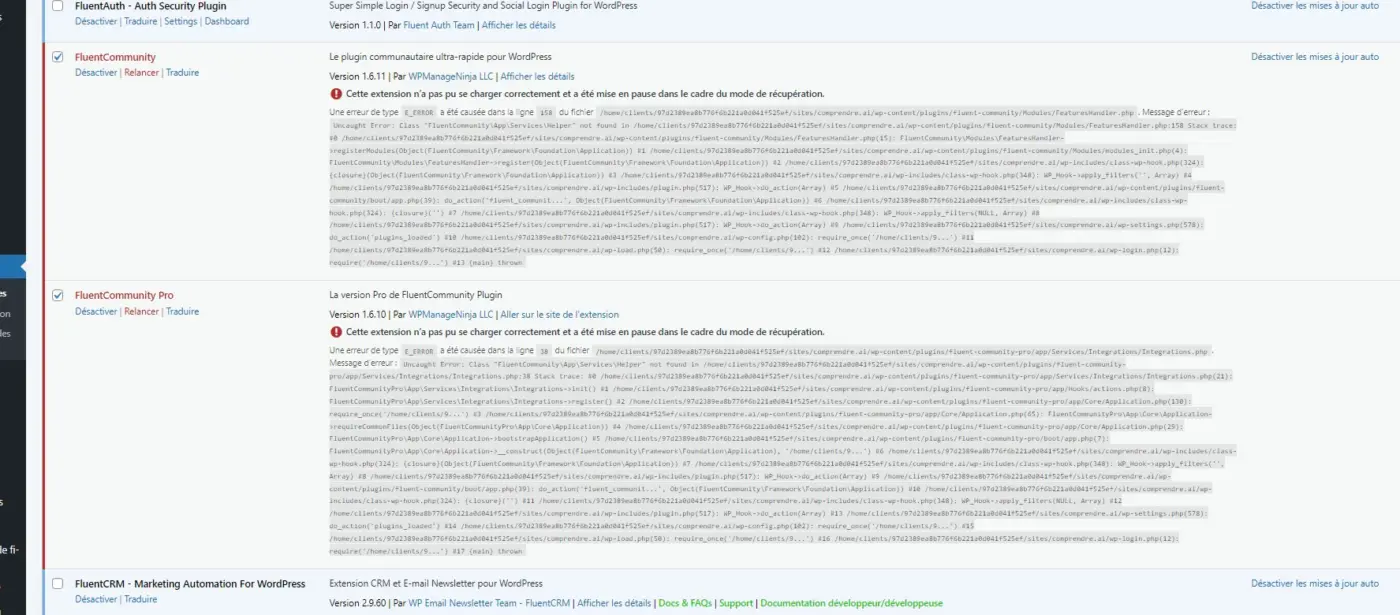
I’ve been using WordPress since 2004, and I’ve rarely had to give admin access to a plugin developer. But this is the first time in 20 years that I’ve ended up with a broken and inaccessible site after support intervention.
On top of that, due to the time difference between us, I woke up to find the site had been down for several hours—just when some people were supposed to access it this morning!
I’ve just switched the site to debug mode and enabled maintenance. Now I have to fix the issue caused by your support team. This is absolutely ridiculous.
Sorry, but there’s a serious issue with your procedures. Just a reminder of the basics: make a backup before making any changes, and restore it if something goes wrong. Isn’t that standard practice?
I have just removed your admin access.
😠I’m honestly stunned!

Shahjahan Jewel Please step in.

I truly understand your frustration — this situation is far from what we strive to deliver, and I’m very sorry for the inconvenience it has caused.
Our team developed a beta version of the plugin after thoroughly testing and confirming the fix in our local environments. Unfortunately, during the upload process via the WordPress directory, a network timeout occurred, which led to the issue affecting your site.
Our support agent informed you about the situation in the ticket as soon as it was identified. However, due to the time zone difference, you may have seen our message later. Additionally, since we didn’t have access to your cPanel or FTP, we were unable to take immediate corrective action ourselves.
I can see that our support agent has already shared the beta version containing the fix. To restore your site, we recommend deleting both the FluentCommunity Free and Pro plugins via your cPanel or FTP, and then installing the beta version we provided. This build includes the necessary fix for the recent issue and will be included in our upcoming official update.
Once again, I sincerely apologize for the disruption and appreciate your patience and understanding.
Thank you for your quick response.
I'm going to take some time to calm down before continuing the discussion with support.
I know breaking the site wasn't intentional, and that in coding, you often have to tinker around to find the comma causing the issue.
But doing so without planning for a rollback (restoring from a backup) is simply not acceptable. That’s the absolute basics.
Just to add another note: There has been no data loss or any of your existing work compromised. It's just had a fatal error when uploading the beta version of our support engineers were testing. Normally, customers provide access in the staging site for debugging site-specific issues.
D@vid Without FTP or file manager access, it's not possible to delete the plugin. Our team sent you message instantly to delete the plugin and reinstall. Again, truly sorry for the inconvenience. Let me know if there has anything more, I can hop-in and assist you.
Shahjahan Jewel
Are you seriously suggesting that I’m the one responsible for the issue just because it’s a production site that’s starting to be presented?
As for FTP access — when a support team needs it, they ask for it.
D@vid My tea is responsible for the issue. I am not saying you are responsible. Sorry if you understood that.
Shahjahan Jewel
Thanks

Shahjahan Jewel little tip - this plugin can come in really useful in these situations - https://wordpress.org/plugins/wp-file-manager/
Jonathan Gwyer
That's what they're already using.
Except that when you crash the site, the plugin becomes completely useless. That's why, as soon as you start messing with code files—especially alpha or beta versions—you need to do it via FTP.
It also avoids having to tell the client: “The site was working, we broke it, please fix it.”
The site stayed like that for 7 hours following the support team's 👇
Hi,
For information,
The “beta” solution provided by support did not solve the issue.
I still have ghost members, even after deleting them.
They only appear in FC, although they no longer exist in WP.
When I click on their username, it opens a… ghost profile page.
Thank you.

Is this not where a staging site comes in to test and debug etc? and once completely happy with staging one makes it live.