

I have implemented login through my primary web login page. i have configured a hyperlink menu item to go to the portal. when I click on the portal, it shows up...but with a login link showing. Once I click on the link, it reverts appropriately to the feeds page.
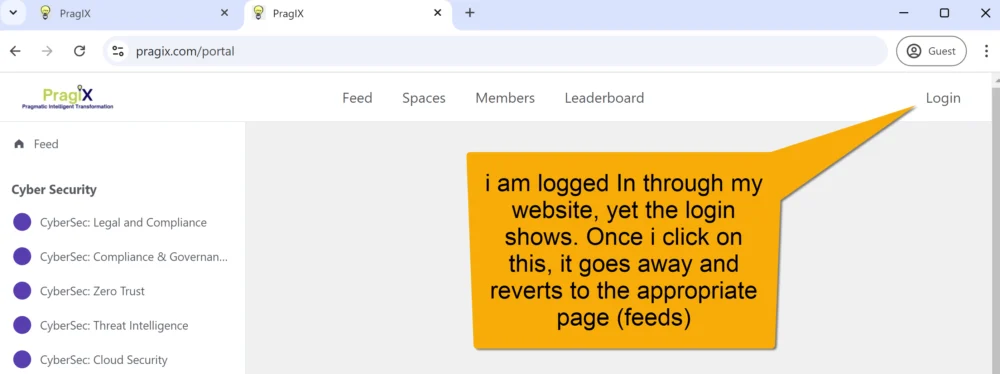

Bruce Hafner what is the source link when you mouse hover on the login link? Is it /portal or /portal/?fcom_action=auth
What is your Redirect URL for Public Users in the General Settings: /portal/admin/settings

https://pragix.com/portal/?fcom_action=auth&form=login
note...once you click on it...then you are on without a need to relogin. I can create a user so that you can see. Thanks Mat.
Bruce Hafner, it looks like you fix the problem right?

Most probably it was showing from browser caching.
I can confirm this is a bug (normal for a beta). It occurs when using a separate login form. The login menu item shows until you click it...then it sees that the user is logged in...and from that point, in the session, the login is gone. Until you logout. This was tested on a new VM and in a 'private' session of a browser. Again, we should expect that minor bugs will occur as this is in beta. Still, radically, love the product.
No...this login is not fixed. Again, I can do a desktop share if you want to see it. It is not that big of a deal (at the time) but it still exists. the good news is that deleted users are gone.
Bruce Hafner, I just sent you a Chat with error I am getting from your Public website when I go to any User Profie > Comments
<!DOCTYPE html> <html lang="en-US"> <head> <meta http-equiv="Content-Type" content="text/html; charset=UTF-8" /> <meta name="viewport" content="width=device-width"> <meta name='robots' content='max-image-preview:large, noindex, follow' /> <title>WordPress › Error</title> <style type="text/css"> html { background: #f1f1f1; } body { background: #fff; border: 1px solid #ccd0d4; color: #444; font-family: -apple-system, BlinkMacSystemFont, "Segoe UI", Roboto, Oxygen-Sans, Ubuntu, Cantarell, "Helvetica Neue", sans-serif; margin: 2em auto; padding: 1em 2em; max-width: 700px; -webkit-box-shadow: 0 1px 1px rgba(0, 0, 0, .04); box-shadow: 0 1px 1px rgba(0, 0, 0, .04); } h1 { border-bottom: 1px solid #dadada; clear: both; color: #666; font-size: 24px; margin: 30px 0 0 0; padding: 0; padding-bottom: 7px; } #error-page { margin-top: 50px; } #error-page p, #error-page .wp-die-message { font-size: 14px; line-height: 1.5; margin: 25px 0 20px; } #error-page code { font-family: Consolas, Monaco, monospace; } ul li { margin-bottom: 10px; font-size: 14px ; } a { color: #2271b1; } a:hover, a:active { color: #135e96; } a:focus { color: #043959; box-shadow: 0 0 0 2px #2271b1; outline: 2px solid transparent; } .button { background: #f3f5f6; border: 1px solid #016087; color: #016087; display: inline-block; text-decoration: none; font-size: 13px; line-height: 2; height: 28px; margin: 0; padding: 0 10px 1px; cursor: pointer; -webkit-border-radius: 3px; -webkit-appearance: none; border-radius: 3px; white-space: nowrap; -webkit-box-sizing: border-box; -moz-box-sizing: border-box; box-sizing: border-box; vertical-align: top; } .button.button-large { line-height: 2.30769231; min-height: 32px; padding: 0 12px; } .button:hover, .button:focus { background: #f1f1f1; } .button:focus { background: #f3f5f6; border-color: #007cba; -webkit-box-shadow: 0 0 0 1px #007cba; box-shadow: 0 0 0 1px #007cba; color: #016087; outline: 2px solid transparent; outline-offset: 0; } .button:active { background: #f3f5f6; border-color: #7e8993; -webkit-box-shadow: none; box-shadow: none; } </style> </head> <body id="error-page"> <div class="wp-die-message"><p>There has been a critical error on this website.</p><p><a href="https://wordpress.org/documentation/article/faq-troubleshooting/">Learn more about troubleshooting WordPress.</a></p></div></body> </html> Bruce Hafner, with deleted users it might be more compliated. If you removed your users from the DB there are related to users recored with userID so I would be careful with that operation.
Mat...the users were deleted from the wordpress admin page. Note there was a problem...and the new release fixed it...please....why i gods name would an app have anyone ever delete from the DB,,,,,ever...ever....ever. Again...the proble did exist. The problem obviously was found. And now with the new release the proble is fixed.....and I did not go to the DB to do this.
Bruce Hafner, it is still beta so sometimes there is a need to fix a table record in DB until there is a new fix. If someone can wait for the next release and fix thats ok. I just provided an alternate way so maybe it will be useful for someone. But I fully agree that bugs needs to be fixed from the app level not from DB etc.
ok...here is the fix....instead of hyperlinking to:
https://www.website.com/portal
you have to hyperlink to:
https://www.website.com/portal/?fcom_action=auth&form=login
now the mysterious login button goes away. The cors issue goes away...and the linking from your primary wordpress site to the portal works fine. This means that the portal needs to process that link and will not recognise going directly to the /portal. Once you know the trick it is ok..but odd