

How to "Upgrade User Level (Leaderboard)"
Hello
I can initiate "User Level (Leaderboard) Upgraded" the step on CRM Automation.
But why I can't "Upgrade User Level (Leaderboard)" when a Form is submit for example ?
Thx
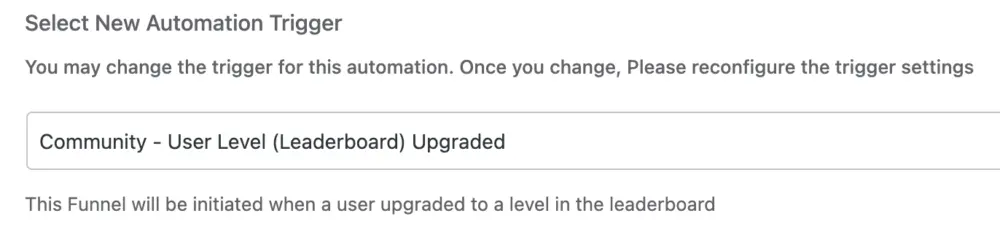

Laurent DRAPEAU I think you can only use the User Level as a trigger.
Example: a user will get x Likes and the Leaderboard for that user will change. Based on that action (level upgrade) you can do some action. So you can send the user congrats email.
This trigger User Level Upgrade is not working the other way around where you would like to upgrade the user level based on some condition - in other words you cannot cheat with Likes when using automation at this moment (you cannot increase the number of Likes - I hope this is what you are looking for).
This is how I understand the current state.
ps. User Level Downgrade trigger also could be implemented so when user delete all comments with Likes the Leaderboard Level is being downgraded and based in that you could have some automation - email notification to Admin about the downgrade activity + email to the user and give the user a retention coupon/deal etc.

Mat, Thx for your reply.
But Where can I find "User Level" trigger ?
My goal is to Upgrade a User after a sharing post on LinkedIn. For that I managed to create a fake form (FF) and redirect the user to LinkedIn shared link configurated.
Once the user clicks on submit I want to promote from New to Ambassador.
Laurent DRAPEAU I dont think this scenario is possible now because you want to chnage the User Leaderboard Level with the automation.
btw: it is really nice case scenario and I hope it will be possible to get it done - this is outside my current knowledge
Mat I'm not a dev... so i used ChatGPT to review the code of FF and FC, here is how I achieved it. I hope it's safe ;-)
// Add Badges After form submission.
add_action('fluentform/submission_inserted', function ($entryId, $formData, $form) {
  global $wpdb;

  // Vérifier si le formulaire soumis correspond à notre ID cible
  if($form->id != 5) { // Replace with your ID
    return;
 }

  // Récupérer l'utilisateur connecté
  $user_id = get_current_user_id();
  if (!$user_id) {
      return; // Aucun utilisateur connecté
  }

  // Rechercher la ligne correspondante dans la table xprofile
  $table_name = $wpdb->prefix . 'fcom_xprofile';
  $meta = $wpdb->get_var(
      $wpdb->prepare("SELECT meta FROM $table_name WHERE user_id = %d", $user_id)
  );

  // Désérialiser le contenu de la colonne meta
  $meta_data = maybe_unserialize($meta);
  if (!is_array($meta_data)) {
      $meta_data = [];
  }

  // Ajouter le badge si non existant
  $new_badge_slug = 'yourbadge_slug'; // Slug du badge à ajouter
  if (!isset($meta_data['badge_slug']) || $meta_data['badge_slug'] !== $new_badge_slug) {
      $meta_data['badge_slug'] = $new_badge_slug;

      // Sérialiser les données mises à jour
      $updated_meta = maybe_serialize($meta_data);

      // Mettre à jour la colonne meta pour l'utilisateur
      $wpdb->update(
          $table_name,
          ['meta' => $updated_meta],
          ['user_id' => $user_id],
          ['%s'], // Format des données mises à jour
          ['%d']  // Format de la condition WHERE
      );
  }
}, 20, 3);
And because it's not visible/easy to see what is the slug of Badge.
I added this to my functions.php too.
__
// Ajouter une page au menu d'administration
add_action('admin_menu', function () {
add_menu_page(
'Liste des Badges', // Titre de la page
'Badges FluentCommunity', // Titre du menu
'manage_options', // Capacité requise
'fluentcommunity-badges', // Slug de la page
'display_fluentcommunity_badges', // Fonction d'affichage
'dashicons-awards', // Icône du menu
20 // Position dans le menu
);
});
// Fonction pour afficher la liste des badges
function display_fluentcommunity_badges() {
global $wpdb;
// Nom de la table des métadonnées
$table_name = $wpdb->prefix . 'fcom_meta'; // Table des métadonnées
$meta_key = 'user_badges'; // Clé contenant les badges

// Récupérer la valeur de la clé `user_badges` dans la colonne `value`
$result = $wpdb->get_var(
    $wpdb->prepare("SELECT value FROM $table_name WHERE meta_key = %s", $meta_key)
);

if (empty($result)) {
    echo '<div class="notice notice-warning"><p>Aucun badge trouvé dans la base de données.</p></div>';
    return;
}

// Désérialiser les données
$badges = maybe_unserialize($result);

if (!is_array($badges)) {
    echo '<div class="notice notice-error"><p>Les données des badges sont corrompues ou dans un format inattendu.</p></div>';
    return;
}

// Afficher les badges sous forme de tableau
echo '<h1>Liste des Badges FluentCommunity</h1>';
echo '<table class="widefat fixed striped">';
echo '<thead><tr><th>Titre</th><th>Slug</th><th>Couleur</th><th>Icône (SVG)</th></tr></thead>';
echo '<tbody>';
foreach ($badges as $slug => $badge) {
    echo '<tr>';
    echo '<td>' . esc_html($badge['title'] ?? 'N/A') . '</td>';
    echo '<td>' . esc_html($slug) . '</td>';
    echo '<td>' . esc_html($badge['color'] ?? 'N/A') . '</td>';
    echo '<td>' . ($badge['config']['shape_svg'] ?? 'N/A') . '</td>';
    echo '</tr>';
}
echo '</tbody>';
echo '</table>';
}
__
cc Shahjahan Jewel I'm not sure if it's wanted but why metavalue is value and not metavalue like in wp ecosystem...
Mat Nota: As you can see I changed my mind and I used Badges instead of "Score User" so I can keep Leaderboard for Activity and Create a kind of Automation stuff with FF submissions to reward specific action.