

How can I fix this SERVER ERROR message
Hi. Can anyone tell me why I always get this message when I log into me Community?
Also, I've never been able to activate Fluent Play. How can I do it?
Thanks
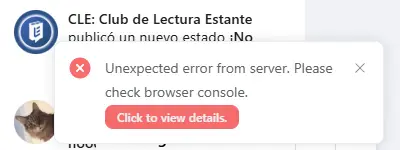

What are you seeing once you click be button?

Hi, Shahjahan, this
I consulted gemini and it said it was a conflict with Wordfence, so I Whitelisted this URL as it suggested, but I still get the same message :(
I got this issue too. It was incredibly complex to resolve. I don’t remember anything of it but I remember that what helped me was making a ticket on Support and someone explained what to do. It has to do with your server (in my case hostinger). I had to then contact support of Hostinger. I spent hours on it (sorry if that doesn’t seem encouraging. I am a noob). Just make a ticket. They will never help you on this community
Anne-Sophie W Thanks a lot, Anne! Is there any chance for you to send me a copy of your chat with support or screen shot of your request in hostinger. I use another hosting, but if you find that it would help a lot. Thanks!
Club de Lectura Estante CLE Max Davis This is the last part of my correspondance with Hostinger support - [email protected]
Name of the issue, identified by FluentSupport:
[ 403 Forbidden on JSON/REST API requests ]
Final answer from Hostinger. I believed everything wen't right after it:
[ At Hostinger, ModSecurity is enabled by default and, while the recommendation is to keep it enabled, there may be cases where you may require to disable ModSecurity; for example, to fix compatibility issues with some of your scripts, plugins or widgets.
To disable ModSecurity, open the .htaccess file of your website using the File Manager, or create oneif it doesn't exist.
Next, add the following lines:
<IfModule mod_security.c>
SecRuleRemoveById 400011
SecRuleRemoveById 400012
</IfModule>
After saving the changes, ModSecurity will be disabled for your website. ]
Sincerely hope that'll sort you out, because I won't be able to help more. The conversation itself was rendered complicated by the fact that my Hostinger account is set on outlook, which e-mail box I couldn't access for some reason. They initially wouldn't let me communicate with them through my main e-mail address for security reasons, so that made the e-mail exchange longer and more complex than it shoud have been.

AS W Wow, thank you so much for taking the time to share this in such detail — I know digging through old support tickets and pasting all of that isn't fun, especially after everything you went through with the whole Outlook email mess on top of it. Really generous of you to go to the trouble.
This gave me the exact lead I needed. I'm on a different host (Alfahosting, not Hostinger), so the specific rule IDs won't transfer directly, but the ModSecurity angle is genuinely new information for me — I'd already ruled out the regular WAF setting, but this points to a separate layer I hadn't considered. I've just sent it over to my host's support team to check.
Really appreciate you looping back to post the resolution instead of just letting the thread die once you were sorted — that's exactly the kind of thing that saves someone else (me!) hours of guessing. Thank you again 🙏
Max Davis Glad I could (potentially) come to your rescue. Please let me know if your own support team could help you! And thank you for being so grateful - although you don't have to be :) I think that helping one another of the main points of this community. I often feel bad for being so clueless and often asking for what seems obvious to most, or requesting new features as if I was never satisfied lol. So if I could be actually useful, it does make me happy.

Thanks for sharing this AS W I've been having the same issue too and thought I'd hop on and see if others were having this issue. I'm with Hostinger too so this is immensely useful.
Margaret Thomas I’m glad! Hopefully you can sort it out fast!
So the conflict with this error appears to be between the Fluent Player and Wordfence and so far disabling the player is the only thing that fixes it. Any other suggestions because now I can't upload audio and doesn't display video. But when I turn it back on it the messages resume popping up.
Margaret Thomas Support will help you. They are amazing!